# Implementing a Provider
To implement a **RadScheduler** provider, you create a class that inherits from **SchedulerProviderBase**.It must implement the **GetAppointments**, **Insert**, **Update**, **Delete**, **GetResourceTypes** and **GetResourcesByType** methods.
> note The provider is instantiated once per application domain and is shared across threads. **RadScheduler** ensures basic thread safety by encapsulating each provider in a wrapper that provides locks around each of its public methods.
This example shows how to create the XML-based provider that is already included in the Telerik.Web.UI assembly, along with **RadScheduler** itself. It is a lightweight and easy to deploy alternative to using a full-blown database. The provider uses an XML file to store information about each appointment. The XML file also contains information about the custom resources and some implementation-specific details such as the next appointment identity key. The XML file looks like this:
```XML
3
1
Meeting room 101
2
Meeting room 201
1
Alex
2
Bob
3
Charlie
1
Technical meeting
2007-03-30T06:00Z
2007-03-30T07:00Z
2
Lunch
2007-03-30T09:00Z
2007-03-30T10:00Z
```
1. The new provider class is called MyXmlSchedulerProvider, to distinguish it from the provider in the Telerik.Web.UI assembly that we are copying. It must be derived from SchedulerProviderBase. In order to implement it, we need to include a number of assemblies, including Telerik.Web.UI, System.Xml, System.IO, System.Configuration.Provider, System.Collections.Specialized, and System.Collections.Generic.
```C#
using System;
using System.Collections.Generic;
using System.Collections.Specialized;
using System.Configuration.Provider;
using System.IO;
using System.Xml;
using Telerik.Web.UI;
namespace MyNamespace
{
public class MyXmlSchedulerProvider : SchedulerProviderBase
{
}
}
```
```VB
Imports System
Imports System.Collections.Generic
Imports System.Collections.Specialized
Imports System.Configuration.Provider
Imports System.IO
Imports System.Xml
Imports Telerik.Web.UI
Namespace MyNamespace
Public Class MyXmlSchedulerProvider
Inherits SchedulerProviderBase
End Class
End Namespace
```
2. Add to the provider some private fields for holding basic information. These include an XmlDocument instance for manipulating the XML data file, a list of resources, and basic state and configuration information:
```C#
private const string DateFormatString = "yyyy-MM-ddTHH:mmZ";
private string _dataFileName;
private int _nextID;
private XmlDocument _doc;
private List _resources;
private bool _persistChanges;
private bool _documentLoaded;
```
```VB
Private Const DateFormatString As String = "yyyy-MM-ddTHH:mmZ"
Private _dataFileName As String
Private _nextID As Integer
Private _doc As XmlDocument
Private _resources As List(Of Resource)
Private _persistChanges As Boolean
Private _documentLoaded As Boolean
Private _resourceType As String
```
3. Before implementing the constructors, we need two helper functions for reading from the XML document.**ReadNextID**() looks up the next appointment ID.
**LoadResources**() loads the resource data from the XML document.
```C#
private int ReadNextID()
{
return int.Parse(_doc.SelectSingleNode("//Appointments/NextID").InnerText);
}
private void LoadResources()
{
_resources = new List();
foreach (XmlNode resourcesNode in _doc.SelectNodes("//Appointments/Resources"))
{
foreach (XmlNode resourceNode in resourcesNode.ChildNodes)
{
Resource resource = new Resource();
_resources.Add(resource);
resource.Type = resourceNode.Name;
foreach (XmlNode resourceData in resourceNode.ChildNodes)
{
switch (resourceData.Name)
{
case "Key":
resource.Key = resourceData.InnerText;
break;
case "Text":
resource.Text = resourceData.InnerText;
break;
}
}
}
}
}
```
```VB
Private Function ReadNextID() As Integer
Return Integer.Parse(_doc.SelectSingleNode("//Appointments/NextID").InnerText)
End Function
Private Sub LoadResources()
_resources = New List(Of Resource)()
For Each resourcesNode As XmlNode In _doc.SelectNodes("//Appointments/Resources")
For Each resourceNode As XmlNode In resourcesNode.ChildNodes
Dim resource As New Resource()
_resources.Add(resource)
resource.Type = resourceNode.Name
For Each resourceData As XmlNode In resourceNode.ChildNodes
Select Case resourceData.Name
Case "Key"
resource.Key = resourceData.InnerText
Exit Select
Case "Text"
resource.Text = resourceData.InnerText
Exit Select
End Select
Next
Next
Next
End Sub
```
4. The constructor initializes the global fields to save the XML document that it uses to manipulate its data, the first ID to use for an appointment,the persistChanges flag, and a boolean indicating that the XML document has been loaded. For added flexibility, the providerimplements two additional constructors that allow it to be configured at run-time. They allow using a XmlDocument instance or a file as a data store:
```C#
public XmlSchedulerProvider()
{
_doc = new XmlDocument();
_nextID = 1;
_persistChanges = false;
_documentLoaded = true;
}
public XmlSchedulerProvider(string dataFileName, bool persistChanges)
{
_dataFileName = dataFileName;
_doc = new XmlDocument();
_doc.Load(_dataFileName);
_nextID = ReadNextID();
LoadResources();
_persistChanges = persistChanges;
_documentLoaded = true;
}
public XmlSchedulerProvider(XmlDocument doc)
{
_doc = doc;
_nextID = ReadNextID();
LoadResources();
_persistChanges = false;
_documentLoaded = true;
}
```
```VB
Public Sub New()
_doc = New XmlDocument()
_nextID = 1
_persistChanges = False
_documentLoaded = True
End Sub
Public Sub New(ByVal dataFileName As String, ByVal persistChanges As Boolean)
_dataFileName = dataFileName
_doc = New XmlDocument()
_doc.Load(_dataFileName)
_nextID = ReadNextID()
LoadResources()
_persistChanges = persistChanges
_documentLoaded = True
End Sub
Public Sub New(ByVal doc As XmlDocument)
_doc = doc
_nextID = ReadNextID()
LoadResources()
_persistChanges = False >
_documentLoaded = True
End Sub
```
5. In order to support declarative configuration by a Web.config section, the provider overrides the **Initialize** method.After checking for valid parameters, **Initialize** calls its base implementation and uses the config collectionto read the configuration values. The "persistChanges" attribute defaults to "true" if not specified. The actual loading of the documentis deferred for performance reasons.
```C#
public override void Initialize(string name, NameValueCollection config)
{
if (config == null)
{
throw new ArgumentNullException("config");
}
if (string.IsNullOrEmpty(name))
{
name = "XmlSchedulerProvider";
}
base.Initialize(name, config);
_dataFileName = config["fileName"];
if (string.IsNullOrEmpty(_dataFileName))
{
throw new ProviderException("Missing XML data file name. Please specify it with the fileName property.");
}
string persistChanges = config["persistChanges"];
if (!string.IsNullOrEmpty(persistChanges))
{
if (!bool.TryParse(persistChanges, out _persistChanges))
{
throw new ProviderException("Invalid value for PersistChanges attribute. Use 'True' or 'False'.");
}
}
else
{
_persistChanges = true;
}
_documentLoaded = false;
}
```
```VB
Public Overloads Overrides Sub Initialize( ByVal name As String, ByVal config As NameValueCollection)
If config = Nothing Then
Throw New ArgumentNullException("config")
End If
If String.IsNullOrEmpty(name) Then
name = "XmlSchedulerProvider"
End If
MyBase.Initialize(name, config)
_dataFileName = config("fileName")
If String.IsNullOrEmpty(_dataFileName) Then
Throw New ProviderException("Missing XML data file name. Please specify it with the fileName property.")
End If
Dim persistChanges As String = config("persistChanges")
If Not String.IsNullOrEmpty(persistChanges) Then
If Not Boolean.TryParse(persistChanges, _persistChanges) Then
Throw New ProviderException("Invalid value for PersistChanges attribute. Use 'True' or 'False'.")
End If
Else
_persistChanges = True
End If
_documentLoaded = False
End Sub
```
6. A provider must implement the **GetAppointments**, **Insert**,**Update**, **Delete**, **GetResourceTypes**, and**GetResourcesByTypes** methods. However, before implementing these methods, we add some more helper functions. **SaveAppointmentResources** adds the resources for an appointment to the XML node for that appointment. **SaveAppointmentAttributes** adds any custom attributes for the appointment to its XML node.**CreateAppointmentNode** adds a node to the XML document that gets its data from an **Appointment** object.**LoadDataFile** checks whether the XML document needs to be loaded from the file, and if so, loads it and initializesthe \_nextID field. **SaveDataFile** saves the XML document to the associated file.**EnsureFilePath** calls **Page.MapPath** to resolve the XML file name.
```C#
private void SaveAppointmentResources(Appointment appointment, XmlNode appointmentNode)
{
if (appointment.Resources.Count == 0)
{
return;
}
XmlNode resourcesGroupNode = _doc.CreateNode(XmlNodeType.Element, "Resources", string.Empty);
appointmentNode.AppendChild(resourcesGroupNode);
foreach (Resource res in appointment.Resources)
{
XmlNode resourceNode = _doc.CreateNode(XmlNodeType.Element, res.Type, string.Empty);
resourcesGroupNode.AppendChild(resourceNode);
XmlAttribute keyAttribute = _doc.CreateAttribute("Key");
resourceNode.Attributes.Append(keyAttribute);
keyAttribute.InnerText = res.Key.ToString();
}
}
private void SaveAppointmentAttributes(Appointment appointment, XmlNode appointmentNode)
{
foreach (string attribute in appointment.Attributes.Keys)
{
if (appointment.Attributes[attribute] != string.Empty)
{
XmlNode attributeNode = _doc.CreateNode(XmlNodeType.Element, "Attribute", string.Empty);
appointmentNode.AppendChild(attributeNode);
XmlAttribute keyAttribute = _doc.CreateAttribute("Key");
attributeNode.Attributes.Append(keyAttribute);
keyAttribute.InnerText = attribute;
XmlAttribute valueAttribute = _doc.CreateAttribute("Value");
attributeNode.Attributes.Append(valueAttribute);
valueAttribute.InnerText = appointment.Attributes[attribute];
}
}
}
private XmlNode CreateAppointmentNode(Appointment appointment)
{
XmlNode appointmentNode = _doc.CreateNode(XmlNodeType.Element, "Appointment", string.Empty);
XmlNode appointmentID = _doc.CreateNode(XmlNodeType.Element, "ID", string.Empty);
appointmentID.InnerText = appointment.ID.ToString();
appointmentNode.AppendChild(appointmentID);
XmlNode appointmentSubject = _doc.CreateNode(XmlNodeType.Element, "Subject", string.Empty);
appointmentSubject.InnerText = appointment.Subject;
appointmentNode.AppendChild(appointmentSubject);
XmlNode appointmentStart = _doc.CreateNode(XmlNodeType.Element, "Start", string.Empty);
appointmentStart.InnerText = appointment.Start.ToUniversalTime().ToString(DateFormatString);
appointmentNode.AppendChild(appointmentStart);
XmlNode appointmentEnd = _doc.CreateNode(XmlNodeType.Element, "End", string.Empty);
appointmentEnd.InnerText = appointment.End.ToUniversalTime().ToString(DateFormatString);
appointmentNode.AppendChild(appointmentEnd);
if (!string.IsNullOrEmpty(appointment.RecurrenceRule))
{
XmlNode appointmentRecurrenceRule = _doc.CreateNode(XmlNodeType.Element, "RecurrenceRule", string.Empty);
appointmentNode.AppendChild(appointmentRecurrenceRule);
XmlNode recurrenceRuleCdata = _doc.CreateNode(XmlNodeType.CDATA, string.Empty, string.Empty);
appointmentRecurrenceRule.AppendChild(recurrenceRuleCdata);
recurrenceRuleCdata.InnerText = appointment.RecurrenceRule;
}
if (appointment.RecurrenceState == RecurrenceState.Exception)
{
XmlNode appointmentRecurrenceParentID = _doc.CreateNode(XmlNodeType.Element, "RecurrenceParentID", string.Empty);
appointmentRecurrenceParentID.InnerText = appointment.RecurrenceParentID.ToString();
appointmentNode.AppendChild(appointmentRecurrenceParentID);
}
SaveAppointmentResources(appointment, appointmentNode);
SaveAppointmentAttributes(appointment, appointmentNode);
return appointmentNode;
}
private void LoadDataFile()
{
if (string.IsNullOrEmpty(_dataFileName) || _documentLoaded)
{
return;
}
_doc.Load(_dataFileName);
_nextID = ReadNextID();
LoadResources();
_documentLoaded = true;
}
private void SaveDataFile()
{
if (_persistChanges && !string.IsNullOrEmpty(_dataFileName))
{
_doc.Save(_dataFileName);
}
}
private void EnsureFilePath(RadScheduler owner)
{
if ((owner.Page == null) || File.Exists(_dataFileName))
{
return;
}
_dataFileName = owner.Page.MapPath(_dataFileName);
}
```
```VB
Private Sub SaveAppointmentResources( ByVal appointment As Appointment, ByVal appointmentNode As XmlNode)
If appointment.Resources.Count = 0 Then
Return
End If
Dim resourcesGroupNode As XmlNode = _doc.CreateNode( XmlNodeType.Element, "Resources", String.Empty)
appointmentNode.AppendChild(resourcesGroupNode)
For Each res As Resource In appointment.Resources
Dim resourceNode As XmlNode = _doc.CreateNode(XmlNodeType.Element, res.Type, String.Empty)
resourcesGroupNode.AppendChild(resourceNode)
Dim keyAttribute As XmlAttribute = _doc.CreateAttribute("Key")
resourceNode.Attributes.Append(keyAttribute)
keyAttribute.InnerText = res.Key.ToString()
Next
End Sub
Private Sub SaveAppointmentAttributes( ByVal appointment As Appointment, ByVal appointmentNode As XmlNode)
For Each attribute As String In appointment.Attributes.Keys
If appointment.Attributes(attribute) <> String.Empty Then
Dim attributeNode As XmlNode = _doc.CreateNode(XmlNodeType.Element, "Attribute", String.Empty)
appointmentNode.AppendChild(attributeNode)
Dim keyAttribute As XmlAttribute = _doc.CreateAttribute("Key")
attributeNode.Attributes.Append(keyAttribute)
keyAttribute.InnerText = attribute
Dim valueAttribute As XmlAttribute = _doc.CreateAttribute("Value")
attributeNode.Attributes.Append(valueAttribute)
valueAttribute.InnerText = appointment.Attributes(attribute)
End If
Next
End Sub
Private Function CreateAppointmentNode( ByVal appointment As Appointment) As XmlNode
Dim appointmentNode As XmlNode = _doc.CreateNode(XmlNodeType.Element, "Appointment", String.Empty)
Dim appointmentID As XmlNode = _doc.CreateNode(XmlNodeType.Element, "ID", String.Empty)
appointmentID.InnerText = appointment.ID.ToString()
appointmentNode.AppendChild(appointmentID)
Dim appointmentSubject As XmlNode = _doc.CreateNode(XmlNodeType.Element, "Subject", String.Empty)
appointmentSubject.InnerText = appointment.Subject
appointmentNode.AppendChild(appointmentSubject)
Dim appointmentStart As XmlNode = _doc.CreateNode(XmlNodeType.Element, "Start", String.Empty)
appointmentStart.InnerText = appointment.Start.ToUniversalTime().ToString(DateFormatString)
appointmentNode.AppendChild(appointmentStart)
Dim appointmentEnd As XmlNode = _doc.CreateNode(XmlNodeType.Element, "End", String.Empty)
appointmentEnd.InnerText = appointment.[End].ToUniversalTime().ToString(DateFormatString)
appointmentNode.AppendChild(appointmentEnd)
If Not String.IsNullOrEmpty(appointment.RecurrenceRule) Then
Dim appointmentRecurrenceRule As XmlNode = _doc.CreateNode(XmlNodeType.Element, "RecurrenceRule", String.Empty)
appointmentNode.AppendChild(appointmentRecurrenceRule)
Dim recurrenceRuleCdata As XmlNode = _doc.CreateNode(XmlNodeType.CDATA, String.Empty, String.Empty)
appointmentRecurrenceRule.AppendChild(recurrenceRuleCdata)
recurrenceRuleCdata.InnerText = appointment.RecurrenceRule
End If
If appointment.RecurrenceState = RecurrenceState.Exception Then
Dim appointmentRecurrenceParentID As XmlNode = _doc.CreateNode(XmlNodeType.Element, "RecurrenceParentID", String.Empty)
appointmentRecurrenceParentID.InnerText = appointment.RecurrenceParentID.ToString()
appointmentNode.AppendChild(appointmentRecurrenceParentID)
End If
SaveAppointmentResources(appointment, appointmentNode)
SaveAppointmentAttributes(appointment, appointmentNode)
Return appointmentNode
End Function
Private Sub LoadDataFile()
If String.IsNullOrEmpty(_dataFileName) OrElse _documentLoaded Then
Return
End If
_doc.Load(_dataFileName)
_nextID = ReadNextID()
LoadResources()
_documentLoaded = True
End Sub
Private Sub SaveDataFile()
If _persistChanges AndAlso _
Not String.IsNullOrEmpty(_dataFileName) Then
_doc.Save(_dataFileName)
End If
End Sub
Private Sub EnsureFilePath(ByVal owner As RadScheduler)
If (owner.Page = Nothing) OrElse File.Exists(_dataFileName) Then
Return
End If
_dataFileName = owner.Page.MapPath(_dataFileName)
End Sub
```
7. The provider must implement **GetAppointments** to provide the scheduler with the appointment data currentlystored in the XML document. **GetAppointments** reads the appointment nodes from the XML file, and for each one,generates an **Appointment** object. These **Appointment** objects are added to a list ofappointments, which **GetAppointments** returns to the scheduler.
```C#
public override IEnumerable GetAppointments(RadScheduler owner)
{
EnsureFilePath(owner);
LoadDataFile();
List appointmentsList = new List();
foreach (XmlNode appointmentNode in _doc.SelectNodes("//Appointments/Appointment"))
{
Appointment appointment = new Appointment();
appointmentsList.Add(appointment);
foreach (XmlNode appointmentData in appointmentNode.ChildNodes)
{
switch (appointmentData.Name)
{
case "ID":
appointment.ID = int.Parse(appointmentData.InnerText);
break;
case "Subject":
appointment.Subject = appointmentData.InnerText;
break;
case "Start":
appointment.Start = DateTime.Parse(appointmentData.InnerText);
break;
case "End":
appointment.End = DateTime.Parse(appointmentData.InnerText);
break;
case "RecurrenceRule":
appointment.RecurrenceRule = appointmentData.InnerText;
appointment.RecurrenceState = RecurrenceState.Master;
break;
case "RecurrenceParentID":
appointment.RecurrenceParentID = int.Parse(appointmentData.InnerText);
appointment.RecurrenceState = RecurrenceState.Exception;
break;
case "Resources":
LoadAppointmentResources(owner, appointment, appointmentData);
break;
case "Attribute":
appointment.Attributes.Add(
appointmentData.Attributes[ "Key"].Value,
appointmentData.Attributes["Value"].Value);
break;
}
}
}
return appointmentsList;
}
```
```VB
Public Overloads Overrides Function GetAppointments(ByVal owner As RadScheduler) As IEnumerable(Of Appointment)
EnsureFilePath(owner)
LoadDataFile()
Dim appointmentsList As New List(Of Appointment)()
For Each appointmentNode As XmlNode In _doc.SelectNodes("//Appointments/Appointment")
Dim appointment As New Appointment()
appointmentsList.Add(appointment)
For Each appointmentData As XmlNode In appointmentNode.ChildNodes
Select Case appointmentData.Name
Case "ID"
appointment.ID = Integer.Parse(appointmentData.InnerText)
Exit Select
Case "Subject"
appointment.Subject = appointmentData.InnerText
Exit Select
Case "Start"
appointment.Start = DateTime.Parse(appointmentData.InnerText)
Exit Select
Case "End"
appointment.[End] = DateTime.Parse(appointmentData.InnerText)
Exit Select
Case "RecurrenceRule"
appointment.RecurrenceRule = appointmentData.InnerText
appointment.RecurrenceState = RecurrenceState.Master
Exit Select
Case "RecurrenceParentID"
appointment.RecurrenceParentID = Integer.Parse(appointmentData.InnerText)
appointment.RecurrenceState = RecurrenceState.Exception
Exit Select
Case "Resources"
LoadAppointmentResources(owner, appointment, appointmentData)
Exit Select
Case "Attribute"
appointment.Attributes.Add(appointmentData.Attributes("Key").Value, appointmentData.Attributes("Value").Value)
Exit Select
End Select
Next
Next
Return appointmentsList
End Function
```
8. The provider must implement an **Insert** method to add appointments to the XML document. **Insert** assigns an ID to the new appointment, using the \_nextID global field, and savesa new value for \_nextID in the XML document as well as the data for the new appointment:
```C#
public override void Insert(RadScheduler owner, Appointment appointmentToInsert)
{
appointmentToInsert.ID = _nextID;
XmlNode appointmentsNode = _doc.SelectSingleNode("//Appointments");
appointmentsNode.AppendChild(CreateAppointmentNode(appointmentToInsert));
_nextID++;
_doc.SelectSingleNode("//Appointments/NextID").InnerText = _nextID.ToString();
SaveDataFile();
}
```
```VB
Public Overloads Overrides Sub Insert( ByVal owner As RadScheduler, ByVal appointmentToInsert As Appointment)
appointmentToInsert.ID = _nextID
Dim appointmentsNode As XmlNode = _doc.SelectSingleNode("//Appointments")
appointmentsNode.AppendChild(CreateAppointmentNode(appointmentToInsert))
_nextID = _nextID + 1
_doc.SelectSingleNode("//Appointments/NextID").InnerText = _nextID.ToString()
SaveDataFile()
End Sub
```
9. The provider must implement the **Update** method to apply changes from the scheduler:
```C#
public override void Update(RadScheduler owner, Appointment appointmentToUpdate)
{
if (appointmentToUpdate.ID == null)
{
Insert(owner, appointmentToUpdate);
}
XmlNode appointmentNode = _doc.SelectSingleNode("//Appointments/Appointment[ID=" + appointmentToUpdate.ID + "]");
appointmentNode.ParentNode.ReplaceChild(CreateAppointmentNode(appointmentToUpdate), appointmentNode);
SaveDataFile();
}
```
```VB
Public Overloads Overrides Sub Update( ByVal owner As RadScheduler, ByVal appointmentToUpdate As Appointment)
If appointmentToUpdate.ID = Nothing Then
Insert(owner, appointmentToUpdate)
End If
Dim appointmentNode As XmlNode = _doc.SelectSingleNode("//Appointments/Appointment[ID=" + appointmentToUpdate.ID + "]")
appointmentNode.ParentNode.ReplaceChild(CreateAppointmentNode(appointmentToUpdate), appointmentNode)
SaveDataFile()
End Sub
```
10. The provider implements the **Delete** method to delete appointments from the XML document:
```C#
public override void Delete(RadScheduler owner, Appointment appointmentToDelete)
{
XmlNode appointmentNode = _doc.SelectSingleNode("//Appointments/Appointment[ID=" + appointmentToDelete.ID + "]");
appointmentNode.ParentNode.RemoveChild(appointmentNode);
SaveDataFile();
}
```
```VB
Public Overloads Overrides Sub Delete( ByVal owner As RadScheduler, ByVal appointmentToDelete As Appointment)
Dim appointmentNode As XmlNode = _doc.SelectSingleNode("//Appointments/Appointment[ID=" + appointmentToDelete.ID + "]")
appointmentNode.ParentNode.RemoveChild(appointmentNode)
SaveDataFile()
End Sub
```
11. The provider implements the **GetResourceTypes** method to tell the scheduler what custom resourcesare available. Note that is only needs to specify the names of the types:
```C#
public override IEnumerable GetResourceTypes(RadScheduler owner)
{
EnsureFilePath(owner);
LoadDataFile();
List resourceTypeNames = new List();
foreach (Resource res in _resources)
{
if (!resourceTypeNames.Contains(res.Type))
{
resourceTypeNames.Add(res.Type);
}
}
List resourceTypes = new List();
foreach (string resourceTypeName in resourceTypeNames)
{
resourceTypes.Add(new ResourceType(resourceTypeName));
}
return resourceTypes;
}
```
```VB
Public Overloads Overrides Function GetResourceTypes( ByVal owner As RadScheduler) As IEnumerable(Of ResourceType)
EnsureFilePath(owner)
LoadDataFile()
Dim resourceTypeNames As New List(Of String)()
For Each res As Resource In _resources
If Not resourceTypeNames.Contains(res.Type) Then
resourceTypeNames.Add(res.Type)
End If
Next
Dim resourceTypes As New List(Of ResourceType)()
For Each resourceTypeName As String In resourceTypeNames
resourceTypes.Add(New ResourceType(resourceTypeName))
Next
Return resourceTypes
End Function
```
12. The provider implements **GetResourcesByType** to supply the possible values for a specific resource type:
```C#
public override IEnumerable GetResourcesByType(RadScheduler owner, string resourceType)
{
EnsureFilePath(owner);
LoadDataFile();
return _resources.FindAll(delegate(Resource res)
{
return res.Type == resourceType;
});
}
```
```VB
Public Function Matches(ByVal res As Resource) As Boolean
Return res.Type = _resourceType
End Function
Public Overloads Overrides Function GetResourcesByType( ByVal owner As RadScheduler, ByVal resourceType As String) As IEnumerable(Of Resource)
EnsureFilePath(owner)
LoadDataFile()
_resourceType = resourceType
Return _resources.FindAll(AddressOf Matches)
End Function
```
In addition you can find a full sample project for **"Web Services with Custom Provider"** by adding a Scenario Template. Follow these steps to add the scenario:
1. Right-click on the Web site name in Solution Explorer window. Select "RadControls for ASP.NET AJAX". From the submenu choose"Add RadScheduler Scenario".
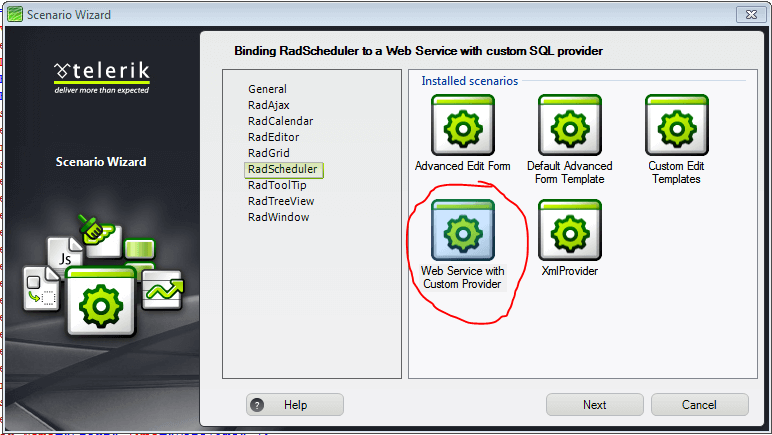
2. **Scenario Wizard** appears with different scenarios. Choose **"Web Service with Custom Provider"**:
3. Follow the wizard by pressing\*\*"Next"\*\* button and finally press **"Finish"**. A new .aspx page will be added to your project, depending on your choice in the Scenario Wizard. All necessary references will be added to your project.
4. Press **Ctrl+F5** and run the application.
## See Also
* [Using a Data Provider](https://www.telerik.com/products/aspnet-ajax/documentation/controls/scheduler/data-binding/providers/using-a-data-provider)
* [Implementing a Provider That Supports Multi-Valued Resources](https://www.telerik.com/products/aspnet-ajax/documentation/controls/scheduler/data-binding/providers/implementing-a-provider-that-supports-multi-valued-resources)