# Templates
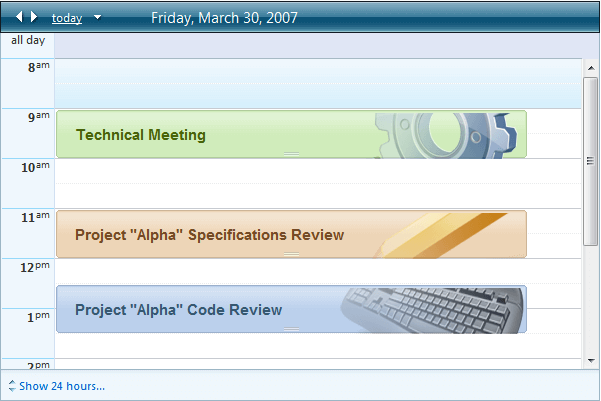
**RadScheduler** lets you change the appearance of appointments and of the in-line editor using templates. The **RadScheduler** templates are powerful enough to accommodate any content you want to embed, including HTML markup, ASP.NET server controls, and other third-party controls.
> caution When the advanced form is **modal** (AdvancedForm Modal="true"), it relies on a special CSS class to be displayed properly - **rsAdvancedEdit** . When using the advanced templates, you need to make sure that you wrap your content within a container which has this class. You can find an example [here](https://www.telerik.com/products/aspnet-ajax/documentation/controls/scheduler/how-to/use-custom-modal-advanced-template).
There are five types of templates that can be used with **RadScheduler**:
* **AppointmentTemplate** - determines how appointments are rendered within the scheduler's view.
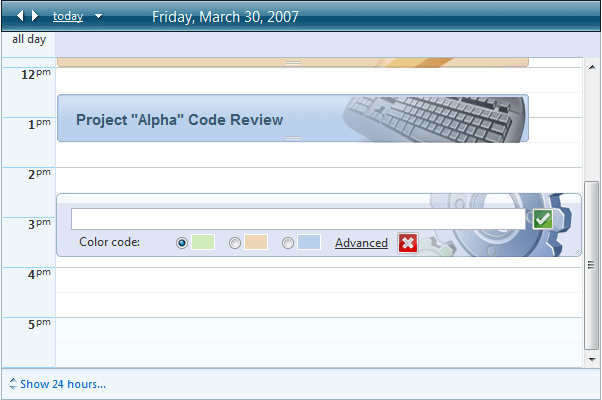
* **InlineInsertTemplate** - determines how the in-line editor appears for inserting a new appointment.
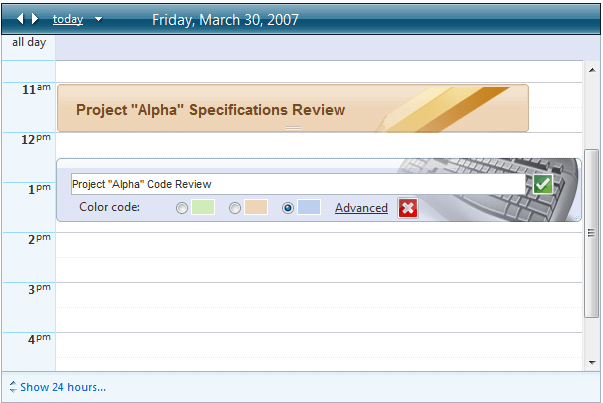
* **InlineEditTemplate** - determines how the in-line editor appears for editing an existing appointment.
* **AdvancedInsertTemplate** - determines how the advanced edit form appears for inserting a new appointment.
* **AdvancedEditTemplate** - determines how the advanced edit form appears for editing an existing appointment.
## AppointmentTemplate
```JavaScript
">
<%# Eval("Subject") %>
```
> note Using `` elements inside the AppointmentTemplate leads to incorrect rendering of the appointments in TimelineView.
## InlineInsertTemplate
```ASP.NET
```
This template is more complicated, including a text box for entering the appointment subject, insert and cancel buttons that call client-side functions to insert or cancel,a link button to bring up the edit form, and a radio button list with color codes. To initialize the radio button list, use the **FormCreated** event:
```C#
protected void RadScheduler1_FormCreated(object sender, SchedulerFormCreatedEventArgs e)
{
if (e.Container.Mode == SchedulerFormMode.Insert)
{
RadioButtonList list =
(RadioButtonList)e.Container.FindControl("AppointmentTypeRadioButtonList");
list.SelectedIndex = 0;
}
}
```
```VB
Protected Sub RadScheduler1_FormCreated(ByVal sender As Object, _
ByVal e As SchedulerFormCreatedEventArgs)
If e.Container.Mode = SchedulerFormMode.Insert Then
Dim list As RadioButtonList = _
DirectCast(e.Container.FindControl("AppointmentTypeRadioButtonList"), _
RadioButtonList)
list.SelectedIndex = 0
End If
End Sub
```
The result of the above code is shown below:
## InlineEditTemplate
```ASP.NET
```
The edit template is similar to the insert template, except that it does not need to initialize controls because they can get initial values from the bound fields:
## AdvancedInsertTemplate
```ASP.NET
```
**FormCreated**
```C#
protected void RadScheduler1_FormCreated(object sender, SchedulerFormCreatedEventArgs e)
{
RadScheduler scheduler = (RadScheduler)sender;
if (e.Container.Mode == SchedulerFormMode.Insert ||
e.Container.Mode == SchedulerFormMode.AdvancedInsert)
{
RadioButtonList list = (RadioButtonList)e.Container.FindControl("AppointmentTypeRadioButtonList");
list.SelectedIndex = 0;
}
if (e.Container.Mode == SchedulerFormMode.AdvancedInsert)
{
TextBox subjectBox = (TextBox)e.Container.FindControl("SubjectTextBox");
subjectBox.Text = e.Appointment.Subject;
RadDateInput startInput = (RadDateInput)e.Container.FindControl("StartInput");
startInput.DateFormat = scheduler.EditFormDateFormat + " " + scheduler.EditFormTimeFormat;
startInput.SelectedDate = RadScheduler1.DisplayToUtc(e.Appointment.Start);
RadDateInput endInput = (RadDateInput)e.Container.FindControl("EndInput");
endInput.DateFormat = scheduler.EditFormDateFormat + " " + scheduler.EditFormTimeFormat;
endInput.SelectedDate = RadScheduler1.DisplayToUtc(e.Appointment.End);
}
}
```
```VB
Protected Sub RadScheduler1_FormCreated(ByVal sender As Object, ByVal e As SchedulerFormCreatedEventArgs)
Dim scheduler As RadScheduler = CType(sender, RadScheduler)
If ((e.Container.Mode = SchedulerFormMode.Insert) _
OrElse (e.Container.Mode = SchedulerFormMode.AdvancedInsert)) Then
Dim list As RadioButtonList = CType(e.Container.FindControl("AppointmentTypeRadioButtonList"), RadioButtonList)
list.SelectedIndex = 0
End If
If ((e.Container.Mode = SchedulerFormMode.AdvancedInsert) _
OrElse (e.Container.Mode = SchedulerFormMode.AdvancedEdit)) Then
Dim subjectBox As TextBox = CType(e.Container.FindControl("SubjectTextBox"), TextBox)
subjectBox.Text = e.Appointment.Subject
Dim startInput As RadDateInput = CType(e.Container.FindControl("StartInput"), RadDateInput)
startInput.DateFormat = (scheduler.EditFormDateFormat + (" " + scheduler.EditFormTimeFormat))
startInput.SelectedDate = RadScheduler1.DisplayToUtc(e.Appointment.Start)
Dim endInput As RadDateInput = CType(e.Container.FindControl("EndInput"), RadDateInput)
endInput.DateFormat = (scheduler.EditFormDateFormat + (" " + scheduler.EditFormTimeFormat))
endInput.SelectedDate = RadScheduler1.DisplayToUtc(e.Appointment.End)
End If
End Sub
```
In addition, we need to add an **AppointmentCommand** event handler to create the recurrence rule if the Repeat CheckBox is checked:
```C#
protected void RadScheduler1_AppointmentCommand(object sender, AppointmentCommandEventArgs e)
{
if (e.CommandName == "Insert")
{
CheckBox repeatCheck = (CheckBox)e.Container.FindControl("RepeatCheckBox");
if (repeatCheck != null && repeatCheck.Checked)
{
RecurrenceRange range = new RecurrenceRange();
range.Start = RadScheduler1.DisplayToUtc(e.Container.Appointment.Start);
range.EventDuration = e.Container.Appointment.Duration;
range.MaxOccurrences = 10;
DailyRecurrenceRule rule = new DailyRecurrenceRule(1, range);
e.Container.Appointment.RecurrenceRule = rule.ToString();
}
}
}
```
```VB
Protected Sub RadScheduler1_AppointmentCommand(ByVal sender As Object, _
ByVal e As AppointmentCommandEventArgs) _
Handles RadScheduler1.AppointmentCommand
If e.CommandName = "Insert" Then
Dim repeatCheck As CheckBox = DirectCast(e.Container.FindControl("RepeatCheckBox"), CheckBox)
If repeatCheck <> Nothing AndAlso repeatCheck.Checked Then
Dim range As New RecurrenceRange()
range.Start = RadScheduler1.DisplayToUtc(e.Container.Appointment.Start)
range.EventDuration = e.Container.Appointment.Duration
range.MaxOccurrences = 10
Dim rule As New DailyRecurrenceRule(1, range)
e.Container.Appointment.RecurrenceRule = rule.ToString()
End If
End If
End Sub
```
The result of the above code is shown below: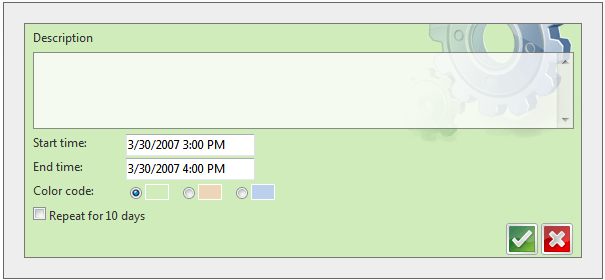
## AdvancedEditTemplate
```ASP.NET
```
**FormCreated**
```C#
protected void RadScheduler1_FormCreated(object sender, SchedulerFormCreatedEventArgs e)
{
if (e.Container.Mode == SchedulerFormMode.Insert ||
e.Container.Mode == SchedulerFormMode.AdvancedInsert)
{
RadioButtonList list =
(RadioButtonList)e.Container.FindControl("UsersRadioButtonList");
list.SelectedIndex = 0;
}
if (e.Container.Mode == SchedulerFormMode.AdvancedInsert ||
e.Container.Mode == SchedulerFormMode.AdvancedEdit)
{
TextBox subjectBox = (TextBox)e.Container.FindControl("SubjectTextBox");
subjectBox.Text = e.Appointment.Subject;
RadDateInput startInput = (RadDateInput)e.Container.FindControl("StartInput");
startInput.DateFormat = RadScheduler1.EditFormDateFormat + " " + RadScheduler1.EditFormTimeFormat;
startInput.SelectedDate = RadScheduler1.DisplayToUtc(e.Appointment.Start);
RadDateInput endInput = (RadDateInput)e.Container.FindControl("EndInput");
endInput.DateFormat = RadScheduler1.EditFormDateFormat + " " + RadScheduler1.EditFormTimeFormat;
endInput.SelectedDate = RadScheduler1.DisplayToUtc(e.Appointment.End);
}
}
```
```VB
Protected Sub RadScheduler1_FormCreated(ByVal sender As Object, _
ByVal e As SchedulerFormCreatedEventArgs) _
Handles RadScheduler1.FormCreated
If e.Container.Mode = SchedulerFormMode.Insert _
OrElse e.Container.Mode = SchedulerFormMode.AdvancedInsert Then
Dim list As RadioButtonList = _
DirectCast(e.Container.FindControl("UsersRadioButtonList"), RadioButtonList)
list.SelectedIndex = 0
End If
If e.Container.Mode = SchedulerFormMode.AdvancedInsert _
OrElse e.Container.Mode = SchedulerFormMode.AdvancedEdit Then
Dim subjectBox As TextBox = _
DirectCast(e.Container.FindControl("SubjectTextBox"), TextBox)
subjectBox.Text = e.Appointment.Subject
Dim startInput As RadDateInput = _
DirectCast(e.Container.FindControl("StartInput"), RadDateInput)
startInput.DateFormat = RadScheduler1.EditFormDateFormat + " " + _
RadScheduler1.EditFormTimeFormat
startInput.SelectedDate = _
RadScheduler1.DisplayToUtc(e.Appointment.Start)
Dim endInput As RadDateInput = _
DirectCast(e.Container.FindControl("EndInput"), RadDateInput)
endInput.DateFormat = RadScheduler1.EditFormDateFormat + " " + _
RadScheduler1.EditFormTimeFormat
endInput.SelectedDate = RadScheduler1.DisplayToUtc(e.Appointment.[End])
End If
End Sub
```
> note We do not need to make any changes to the **AppointmentCommand** event handler for handling the recurring event check box.The existing event handler that we added for the **AdvancedInsertTemplate** already handles the "Insert" command.
The result of the above code is shown below: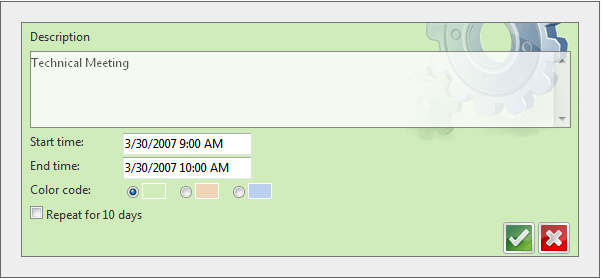
In addition you can find a full sample project for "Custom Edit Templates" by adding a Scenario Template. In this exampleproject you can also learn how to display appointments by resources. Follow these steps to add the scenario:
1. Right-click on the Web site name in Solution Explorer window. Select "RadControls for ASP.NET AJAX". From the submenu choose "Add RadScheduler Scenario".
2. **Scenario Wizard** appears with different scenarios. Choose **"Custom Edit Templates"**: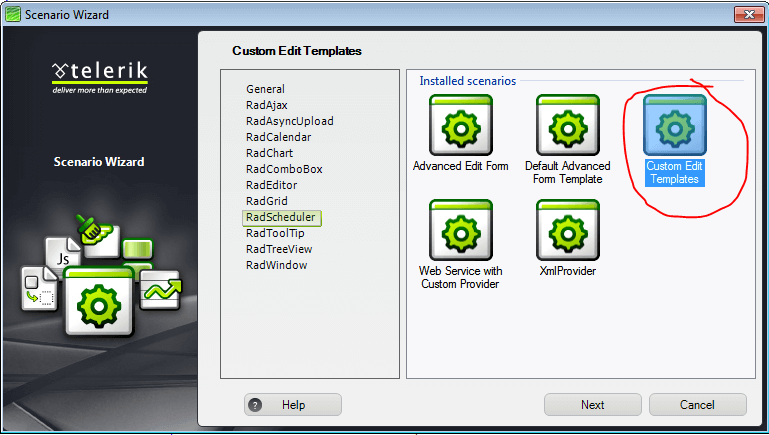
3. Follow the wizard by pressing\*\*"Next"\*\* button and finally press **"Finish"**. A new .aspx page will be added to your project, depending on your choice in the Scenario Wizard. All necessary references will be added toyour project.
4. Press **Ctrl+F5** and run the application.
## See Also
* [AppointmentCommand](https://www.telerik.com/products/aspnet-ajax/documentation/controls/scheduler/server-side-programming/server-events/appointmentcommand)
* [AppointmentCreated](https://www.telerik.com/products/aspnet-ajax/documentation/controls/scheduler/server-side-programming/server-events/appointmentcreated)
* [FormCreated](https://www.telerik.com/products/aspnet-ajax/documentation/controls/scheduler/server-side-programming/server-events/formcreated)
* [Replace the Edit Form](https://www.telerik.com/products/aspnet-ajax/documentation/controls/scheduler/how-to/replace-the-edit-form)