# Overview
This help article showcases how to configure the layout of the **RadRadioButtonList** control via the `Layout`, `Columns` and `Direction` properties.
* [Layout](https://www.telerik.com/products/aspnet-ajax/documentation/controls/radiobuttonlist/functionality/layout#layout)
* [Columns](https://www.telerik.com/products/aspnet-ajax/documentation/controls/radiobuttonlist/functionality/layout#columns)
* [Direction](https://www.telerik.com/products/aspnet-ajax/documentation/controls/radiobuttonlist/functionality/layout#direction)
## Layout
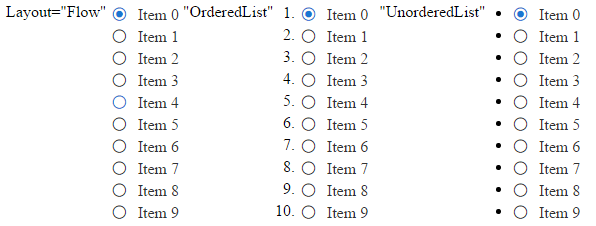
You can control whether the radio buttons will be rendered inside ul or li elements or without any elements. This behavior is controlled via the `Layout` property that takes `Flow` (default value), `OrderedList` and `UnorderedList` values.
You can see the output of **Example 1** that shows different layouts of the control in **Figure 1**.
> caption Example 1: Configure the Layout of RadRadioButtonList.
```ASP.NET
Layout="Flow"
"OrderedList"
"UnorderedList"
```
```C#
protected void Page_Init(object sender, EventArgs e)
{
for (int i = 0; i < 10; i++)
{
ButtonListItem rbli = new ButtonListItem() { Text = "Item " + i, Value = i.ToString() };
if (i == 0) { rbli.Selected = true; }
RadRadioButtonList1.Items.Add(rbli);
RadRadioButtonList2.Items.Add(rbli);
RadRadioButtonList3.Items.Add(rbli);
}
}
```
```VB
Protected Sub Page_Init(sender As Object, e As EventArgs)
For i As Integer = 0 To 9
Dim rbli As New ButtonListItem() With { _
Key .Text = "Item " & i, _
Key .Value = i.ToString() _
}
If i = 0 Then
rbli.Selected = True
End If
RadRadioButtonList1.Items.Add(rbli)
RadRadioButtonList2.Items.Add(rbli)
RadRadioButtonList3.Items.Add(rbli)
Next
End Sub
```
> caption Figure 1: Compare different layouts of RadRadioButtonList.
## Columns
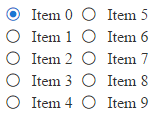
Radio buttons inside the **RadRadioButtonList** are rendered inside a single column by default. You can change this behavior using the `Columns` property. You can see a sample in **Example 2** and the output in **Figure 2**.
> caption Example 2: The code that shows how to display radio buttons in two columns.
```ASP.NET
```
```C#
protected void Page_Init(object sender, EventArgs e)
{
for (int i = 0; i < 10; i++)
{
ButtonListItem rbli = new ButtonListItem() { Text = "Item " + i, Value = i.ToString() };
if (i == 0) { rbli.Selected = true; }
RadRadioButtonList1.Items.Add(rbli);
}
}
```
```VB
Protected Sub Page_Init(sender As Object, e As EventArgs)
For i As Integer = 0 To 9
Dim rbli As New ButtonListItem() With { _
Key .Text = "Item " & i, _
Key .Value = i.ToString() _
}
If i = 0 Then
rbli.Selected = True
End If
RadRadioButtonList1.Items.Add(rbli)
Next
End Sub
```
> caption Figure 2: Display radio buttons in two columns.
## Direction
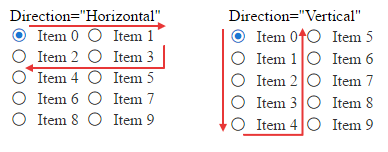
You can control the direction in which radio buttons are displayed within the groups via the `Direction` property (the output of **Example 3** is shown in **Figure 3**).
> caption Example 3: Configure horizontal and vertical direction for radio buttons.
```ASP.NET
Direction="Horizontal"
Direction="Vertical"
```
```C#
protected void Page_Init(object sender, EventArgs e)
{
for (int i = 0; i < 10; i++)
{
ButtonListItem rbli = new ButtonListItem() { Text = "Item " + i, Value = i.ToString() };
if (i == 0) { rbli.Selected = true; }
RadRadioButtonList1.Items.Add(rbli);
RadRadioButtonList2.Items.Add(rbli);
}
}
```
```VB
Protected Sub Page_Init(sender As Object, e As EventArgs)
For i As Integer = 0 To 9
Dim rbli As New ButtonListItem() With { _
Key .Text = "Item " & i, _
Key .Value = i.ToString() _
}
If i = 0 Then
rbli.Selected = True
End If
RadRadioButtonList1.Items.Add(rbli)
RadRadioButtonList2.Items.Add(rbli)
Next
End Sub
```
> caption Figure 3: Display radio buttons in different direction within the columns.
## See Also
* [Getting Started](https://www.telerik.com/products/aspnet-ajax/documentation/controls/radiobuttonlist/getting-started)
* [Server-Side API](https://www.telerik.com/products/aspnet-ajax/documentation/controls/radiobuttonlist/server-side-programming/properties-and-events)
* [Client-Side API](https://www.telerik.com/products/aspnet-ajax/documentation/controls/radiobuttonlist/client-side-programming/overview)