# ContentTemplate
This help article showcases how to add complex content (server-side controls and HTML elements) in **RadPushButton** instead of plain text (**Figure 1**). You can do this both in the markup, or in the code-behind:
* [Add Elements to RadPushButton in the Markup](https://www.telerik.com/products/aspnet-ajax/documentation/controls/pushbutton/functionality/contenttemplate#add-elements-to-radpushbutton-in-the-markup)
* [Add Elements to RadPushButton from the Code-behind](https://www.telerik.com/products/aspnet-ajax/documentation/controls/pushbutton/functionality/contenttemplate#add-elements-to-radpushbutton-from-the-code-behind)
## Add Elements to RadPushButton in the Markup
In order to add controls to the **RadPushButton** in the markup, you should place them directly in the composite **ContentTemplate** property (**Example 1**).
> caption Figure 1: RadPushButtons with ContentTemplate. The result from Examples 1-3.
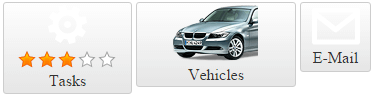
> caption Example 1: Adding controls to **ContentTemplate** of **RadPushButton** in the markup.
```ASP.NET

Tasks
```
## Add Elements to RadPushButton from the Code-behind
You can add controls to **RadPushButton** from the code-behind in two ways:
* Add elements to the **Controls** collection of **RadPushButton** (**Example 2**).
**Example 2**: Adding controls to the **Controls** collection of **RadPushButton** from the code-behind.
```ASP.NET
```
```C#
protected void Page_Init(object sender, EventArgs e)
{
Image buttonContentImage = new Image()
{
ID = "buttonContent",
AlternateText = "my car",
ImageUrl = "https://demos.telerik.com/aspnet-ajax/button/examples/contenttemplate/Images/car.png"
};
Label buttonContentLabel = new Label() { ID = "Label1", Text = "Vehicles" };
RadPushButton1.Controls.Add(buttonContentImage);
RadPushButton1.Controls.Add(buttonContentLabel);
}
```
```VB
Protected Sub Page_Init(sender As Object, e As EventArgs) Handles Me.Init
Dim buttonContentImage As New Image() With {
.ID = "buttonContent",
.AlternateText = "my car",
.ImageUrl = "https://demos.telerik.com/aspnet-ajax/button/examples/contenttemplate/Images/car.png"
}
Dim buttonContentLabel As New Label() With {
.ID = "Label1",
.Text = "Vehicles"
}
RadPushButton1.Controls.Add(buttonContentImage)
RadPushButton1.Controls.Add(buttonContentLabel)
End Sub
```
* Set the **ContentTemplate** property to an instance of a class that implements the **ITemplate** interface (**Example 3**).
**Example 3**: Adding controls to the **RadPushButton** by using the **ITemplate** class.
```ASP.NET
```
```C#
protected void Page_Init(object sender, EventArgs e)
{
RadPushButton1.ContentTemplate = new ButtonContentTemplate();
}
public class ButtonContentTemplate : ITemplate
{
void ITemplate.InstantiateIn(Control container)
{
System.Web.UI.WebControls.Image contentImage = new System.Web.UI.WebControls.Image();
contentImage.ID = "contentImage";
contentImage.ImageUrl = "https://demos.telerik.com/aspnet-ajax/button/examples/contenttemplate/Images/envelope.png";
contentImage.AlternateText = "envelope";
container.Controls.Add(contentImage);
Label contentLabel = new Label();
contentLabel.ID = "contentLabel";
contentLabel.Text = "E-Mail";
container.Controls.Add(contentLabel);
}
}
```
```VB
Protected Sub Page_Init(sender As Object, e As EventArgs)
RadPushButton1.ContentTemplate = New ButtonContentTemplate()
End Sub
Public Class ButtonContentTemplate
Implements ITemplate
Private Sub ITemplate_InstantiateIn(container As Control) Implements ITemplate.InstantiateIn
Dim contentImage As New System.Web.UI.WebControls.Image()
contentImage.ID = "contentImage"
contentImage.ImageUrl = "https://demos.telerik.com/aspnet-ajax/button/examples/contenttemplate/Images/envelope.png"
contentImage.AlternateText = "envelope"
container.Controls.Add(contentImage)
Dim contentLabel As New Label()
contentLabel.ID = "contentLabel"
contentLabel.Text = "E-Mail"
container.Controls.Add(contentLabel)
End Sub
End Class
```
## See Also
* [Image Button](https://www.telerik.com/products/aspnet-ajax/documentation/controls/imagebutton/overview)