# Custom Progress
**RadProgressArea** can be used to monitor the progress of any measurable process.
To monitor custom progress:
1. Register [ RadUploadHttpModule and RadUploadProgressHandler ](https://www.telerik.com/products/aspnet-ajax/documentation/controls/progressarea/webconfing-configuraton) in web.config.
2. Put a **RadProgressManager** control on the Web page.
3. Put a **RadProgressArea** control on the Web page.
* Set its **ProgressIndicators** property to include only those controls you want to use. In the **Page_Load** event handler, set the **Localization** property of the **RadProgressArea** object to change the labels so that they reflect your custom process.
4. In the code-behind, when the custom process executes, use the **RadProgressContext.Current** property to access the progress context.
* At each measurable step of the process, updates the fields of the progress context to indicate the values that **RadProgressArea** should display.
The following table lists the fields of the progress context that you can set:
> caption
| Name | Description |
| -------------------- | -------------------------------------------------------------------------------------------------------------------------------------- |
| PrimaryTotal | The maximum value of the primary progress indicators. By default, **RadProgressArea** d isplays the request size. |
| PrimaryValue | The current value of the primary progress indicators. By default, **RadProgressArea** displays the uploaded bytes count. |
| PrimaryPercent | The current value of the primary progress, expressed as a percentage of PrimaryTotal. |
| SecondaryTotal | The maximum value of the secondary progress indicators. By default, **RadProgressArea** displays the total number of files. |
| SecondaryValue | The current value of the secondary progress indicators. By default, **RadProgressArea** displays the number of files already uploaded. |
| SecondaryPercent | The current value of the secondary progress, expressed as a percentage of SecondaryTotal. |
| CurrentOperationText | The description of the current operation. By default, **RadProgressArea** displays the name of the currently uploading file. |
| TimeEstimated | The estimated time until the operation completes. |
| TimeElapsed | The time that has elapsed from the beginning of the operation. |
| Speed | The speed of the process. By default, RadProgressArea displays the upload speed. |
> note If you set some of these properties before upload begins, they are not used for file upload monitoring.
## Example
This example shows how to use **RadProgressArea** to display the progress of a custom process: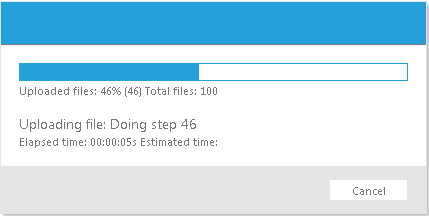
The **RadProgressManager** has **SuppressMissingHttpModuleError** set to "true", and the **RadProgressArea** hides the primary progress indicators and **Speed** indicator, as these all provide units to the value that reflect size:
```ASPNET
```
In the **Page_Load** event handler, the **Localization** property is set to reflect the new process:
```C#
protected void Page_Load(object sender, EventArgs e)
{
RadProgressArea1.Localization.UploadedFiles = "Completed Steps: ";
RadProgressArea1.Localization.CurrentFileName = "Step: ";
RadProgressArea1.Localization.TotalFiles = "Total Steps:";
}
```
```VB.NET
Protected Sub Page_Load(ByVal sender As Object, ByVal e As EventArgs) Handles Me.Load
RadProgressArea1.Localization.UploadedFiles = "Completed Steps: "
RadProgressArea1.Localization.CurrentFileName = "Step: "
RadProgressArea1.Localization.TotalFiles = "Total Steps:"
End Sub
```
The button's **Click** event handler performs the lengthy process, and at each measurablestep, updates the progress context:
> tip In addition to the **Dictionary** type, the **RadProgressContext** now offers strongly named properties:
> context\["CurrentOperationText"] = "Doing step " + i.ToString();
> is the same as
> context.CurrentOperationText = "Doing step " + i.ToString();
```C#
protected void Button1_Click(object sender, EventArgs e)
{
RadProgressContext context = RadProgressContext.Current;
context.SecondaryTotal = "100";
for (int i = 1; i < 100; i++)
{
context.SecondaryValue = i.ToString();
context.SecondaryPercent = i.ToString();
context.CurrentOperationText = "Doing step " + i.ToString();
if (!Response.IsClientConnected)
{
//Cancel button was clicked or the browser was closed, so stop processing
break;
}
// simulate a long time performing the current step
System.Threading.Thread.Sleep(100);
}
}
```
```VB.NET
Protected Sub Button1_Click(ByVal sender As Object, ByVal e As EventArgs) Handles Button1.Click
Dim context As RadProgressContext = RadProgressContext.Current
context.SecondaryTotal = "100"
Dim i As Integer = 1
While i < 100
context.SecondaryValue = i.ToString()
context.SecondaryPercent = i.ToString()
context.CurrentOperationText = "Doing step " + i.ToString()
If Not Response.IsClientConnected Then
'Cancel button was clicked or the browser was closed, so stop processing
Exit While
End If
' simulate a long time performing the current step
System.Threading.Thread.Sleep(100)
i = i + 1
End While
End Sub
```
For a live example that shows how to use custom progress monitoring in combination with a file upload, see [Monitoring Custom Progress](https://demos.telerik.com/aspnet-ajax/Upload/Examples/CustomProgress/DefaultCS.aspx).