# DataBinding Expressions
Sometimes, when you use Item or Content templates, you want the controls in the template to display information associated with the panel item properties. For example, consider a simple panel bar with a text box in the item templates of child items:
> note Please note that the approach that follows is valid for Content Templates as well.
```ASPNET
```
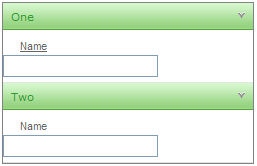
When you run the application, the panel items all show empty text boxes:
This is good as far as it goes, but perhaps you want to initialize the values of the text boxes. Note that the **Value** property of the panel items has a name all ready to assign.To override the **Text** property of the text box in the template, use a **DataBinder.Eval** statement:
```ASPNET
```
In the DataBinder.Eval statement, **Container** is the **RadPanelItem** and **"Value"** identifies the **Value** property of that item.
> note In this example, the first parameter to the DataBinder.Eval statement is **Container** , because the items are statically bound. If the panel bar was bound to a data source, then you must use **Container.DataItem** instead. e.g.<%#DataBinder.Eval(Container.DataItem, "TextField") %>
In addition to adding a DataBinder.Eval statement, you must also explicitly call the DataBind method for the items so that the template has access to the **Value** property:
```C#
protected void Page_Load(object sender, EventArgs e)
{
if (!IsPostBack)
{
for (int i = 0; i < RadPanelBar1.Items.Count; i++)
RadPanelBar1.Items[i].DataBind();
}
}
```
```VB.NET
Protected Sub Page_Load(ByVal sender As Object, ByVal e As EventArgs) Handles Me.Load
If Not IsPostBack Then
Dim i As Integer = 0
While i < RadPanelBar1.Items.Count
RadPanelBar1.Items(i).DataBind()
i = i + 1
End While
End If
End Sub
```
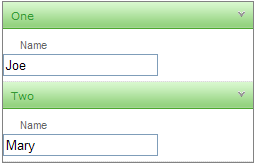
Now the value of the panel items appears in the text boxes:
## See Also
* [Data Binding Overview](https://www.telerik.com/products/aspnet-ajax/documentation/controls/panelbar/data-binding/overview)
* [Templates Overview](https://www.telerik.com/products/aspnet-ajax/documentation/controls/panelbar/templates/overview)