# Appearance

In this article, you will find information about the styling options and rendering of the WebForms OTPInput.

For a live example, visit the [Appearance Demo of the OTPInput](https://demos.telerik.com/aspnet-ajax/otpinput/appearance/defaultcs.aspx).

## Options

The WebForms OTPInput supports the following styling options:

* [`Size`](https://www.telerik.com/products/aspnet-ajax/documentation/controls/otpinput/appearance#size) - configures the overall size of the component.
* [`FillMode`](https://www.telerik.com/products/aspnet-ajax/documentation/controls/otpinput/appearance#fillmode) - configures how the color is applied to the component.
* [`Rounded`](https://www.telerik.com/products/aspnet-ajax/documentation/controls/otpinput/appearance#rounded) - configures the border radius of the component.

### Size

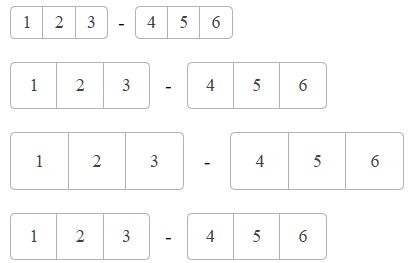
The `Size` option controls how big or small the items of the OTPInput look.
!["OTPInput Size"](https://www.telerik.com/products/aspnet-ajax/documentation/assets/fc4d4ac81ef6118fc360422dbc12d508/otpinput-size.png "OTPInput Size")

The following values are available for the [Size](https://www.telerik.com/products/aspnet-ajax/documentation/controls/otpinput/server-side-programming/enums#otpinputsize) option:

* `Small`
* `Medium` (Default)
* `Large`
* `None`

Example

```ASP.NET
<telerik:RadOTPInput ID="RadOTPInput1" runat="server" Size="Small" Separator="-">
    <ItemsCollection>
        <telerik:OTPInputItem GroupLength="3" />
        <telerik:OTPInputItem GroupLength="3" />
    </ItemsCollection>
</telerik:RadOTPInput>

<telerik:RadOTPInput ID="RadOTPInput2" runat="server" Size="Medium" Separator="-">
    <ItemsCollection>
        <telerik:OTPInputItem GroupLength="3" />
        <telerik:OTPInputItem GroupLength="3" />
    </ItemsCollection>
</telerik:RadOTPInput>

<telerik:RadOTPInput ID="RadOTPInput3" runat="server" Size="Large" Separator="-">
    <ItemsCollection>
        <telerik:OTPInputItem GroupLength="3" />
        <telerik:OTPInputItem GroupLength="3" />
    </ItemsCollection>
</telerik:RadOTPInput>

<telerik:RadOTPInput ID="RadOTPInput4" runat="server" Size="None" Separator="-">
    <ItemsCollection>
        <telerik:OTPInputItem GroupLength="3" />
        <telerik:OTPInputItem GroupLength="3" />
    </ItemsCollection>
</telerik:RadOTPInput>
```

### Rounded

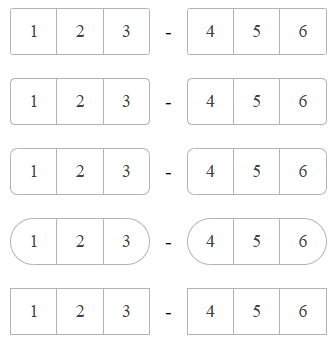
The `Rounded` option controls the border radius of the rendered `input` elements.
!["OTPInput Rounded"](https://www.telerik.com/products/aspnet-ajax/documentation/assets/b36deed335a078172fa1b30059235171/otpinput-rounded.png "OTPInput Rounded")

The following values are available for the [Rounded](https://www.telerik.com/products/aspnet-ajax/documentation/controls/otpinput/server-side-programming/enums#otpinputrounded) option:

* `Small`
* `Mediun` (Default)
* `Large`
* `Full`
* `None`

```ASP.NET
<telerik:RadOTPInput ID="RadOTPInput1" runat="server" Rounded="Small" Separator="-">
    <ItemsCollection>
        <telerik:OTPInputItem GroupLength="3" />
        <telerik:OTPInputItem GroupLength="3" />
    </ItemsCollection>
</telerik:RadOTPInput>

<telerik:RadOTPInput ID="RadOTPInput2" runat="server" Rounded="Medium" Separator="-">
    <ItemsCollection>
        <telerik:OTPInputItem GroupLength="3" />
        <telerik:OTPInputItem GroupLength="3" />
    </ItemsCollection>
</telerik:RadOTPInput>

<telerik:RadOTPInput ID="RadOTPInput3" runat="server" Rounded="Large" Separator="-">
    <ItemsCollection>
        <telerik:OTPInputItem GroupLength="3" />
        <telerik:OTPInputItem GroupLength="3" />
    </ItemsCollection>
</telerik:RadOTPInput>

<telerik:RadOTPInput ID="RadOTPInput4" runat="server" Rounded="Full" Separator="-">
    <ItemsCollection>
        <telerik:OTPInputItem GroupLength="3" />
        <telerik:OTPInputItem GroupLength="3" />
    </ItemsCollection>
</telerik:RadOTPInput>

<telerik:RadOTPInput ID="RadOTPInput5" runat="server" Rounded="None" Separator="-">
    <ItemsCollection>
        <telerik:OTPInputItem GroupLength="3" />
        <telerik:OTPInputItem GroupLength="3" />
    </ItemsCollection>
</telerik:RadOTPInput>
```

### FillMode

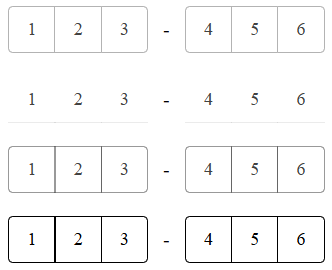
The `FillMode` option controls the way the color is applied to the rendered `input` elements.
!["OTPInput FillMode"](https://www.telerik.com/products/aspnet-ajax/documentation/assets/f88753309cd725d20f1f1eda39013e22/otpinput-fillmode.png "OTPInput FillMode")

The following values are available for the [FillMode](https://www.telerik.com/products/aspnet-ajax/documentation/controls/otpinput/server-side-programming/enums#otpinputfillmode) option:

* `Solid` (Default)
* `Flat`
* `Outline`
* `None`

```ASP.NET
<telerik:RadOTPInput ID="RadOTPInput1" runat="server" FillMode="Solid" Separator="-">
    <ItemsCollection>
        <telerik:OTPInputItem GroupLength="3" />
        <telerik:OTPInputItem GroupLength="3" />
    </ItemsCollection>
</telerik:RadOTPInput>

<telerik:RadOTPInput ID="RadOTPInput2" runat="server" FillMode="Flat" Separator="-">
    <ItemsCollection>
        <telerik:OTPInputItem GroupLength="3" />
        <telerik:OTPInputItem GroupLength="3" />
    </ItemsCollection>
</telerik:RadOTPInput>

<telerik:RadOTPInput ID="RadOTPInput3" runat="server" FillMode="Outline" Separator="-">
    <ItemsCollection>
        <telerik:OTPInputItem GroupLength="3" />
        <telerik:OTPInputItem GroupLength="3" />
    </ItemsCollection>
</telerik:RadOTPInput>

<telerik:RadOTPInput ID="RadOTPInput4" runat="server" FillMode="None" Separator="-">
    <ItemsCollection>
        <telerik:OTPInputItem GroupLength="3" />
        <telerik:OTPInputItem GroupLength="3" />
    </ItemsCollection>
</telerik:RadOTPInput>
```

### Type

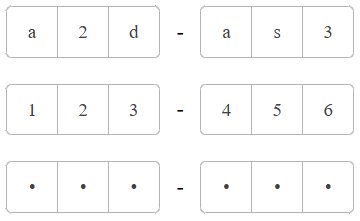
The `Type` option controls the type of the `input` elements.
!["OTPInput Type"](https://www.telerik.com/products/aspnet-ajax/documentation/assets/d9f6e42fb4e9f2de170721ecd5310fc9/otpinput-type.png "OTPInput Type")

The following values are available for the [Type](https://www.telerik.com/products/aspnet-ajax/documentation/controls/otpinput/server-side-programming/enums#otpinputtype) option:

* `Text` (Default)
* `Number`
* `Password`

```ASP.NET
<telerik:RadOTPInput ID="RadOTPInput1" runat="server" Type="Text" Separator="-">
    <ItemsCollection>
        <telerik:OTPInputItem GroupLength="3" />
        <telerik:OTPInputItem GroupLength="3" />
    </ItemsCollection>
</telerik:RadOTPInput>

<telerik:RadOTPInput ID="RadOTPInput2" runat="server" Type="Number" Separator="-">
    <ItemsCollection>
        <telerik:OTPInputItem GroupLength="3" />
        <telerik:OTPInputItem GroupLength="3" />
    </ItemsCollection>
</telerik:RadOTPInput>

<telerik:RadOTPInput ID="RadOTPInput3" runat="server" Type="Password" Separator="-">
    <ItemsCollection>
        <telerik:OTPInputItem GroupLength="3" />
        <telerik:OTPInputItem GroupLength="3" />
    </ItemsCollection>
</telerik:RadOTPInput>
```

## Next Steps

* [Separator](https://www.telerik.com/products/aspnet-ajax/documentation/controls/otpinput/separator)
* [Adaptiveness](https://www.telerik.com/products/aspnet-ajax/documentation/controls/otpinput/adaptiveness)
* [Accessibility](https://www.telerik.com/products/aspnet-ajax/documentation/controls/otpinput/accessibility-and-internationalization/overview)
* [Client-side Programming](https://www.telerik.com/products/aspnet-ajax/documentation/controls/otpinput/client-side-programming/overview)
* [Server-side Programming](https://www.telerik.com/products/aspnet-ajax/documentation/controls/otpinput/server-side-programming/overview)
