# Adding Images and Checkboxes to Items

You can easily add an image and/or a checkbox to the RadListBox item.

![Images check boxes](https://www.telerik.com/products/aspnet-ajax/documentation/assets/0d683cf7092aa29661cd84bf326caf13/listbox_images_checkboxes.png)

## Adding checkboxes to items

Set the **CheckBoxes** property of RadListBox to *True*. This will add a checkbox on the left of every list item.

* You can use the **Checked** property (True or False) of the list item to change its checked state.

* Use the **Checkable** property of the item if you need to hide the checkbox of that item.
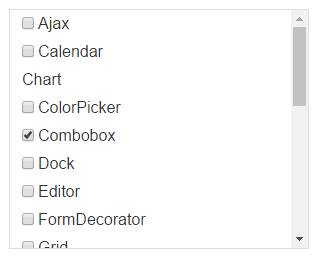
  ![Check boxes](https://www.telerik.com/products/aspnet-ajax/documentation/assets/ea36fad06cb84eb36c9841b9d27e74fa/listbox_checkboxes.png)

```ASPNET
<telerik:RadListBox ID="RadListBox1" runat="server" RenderMode="Lightweight" CheckBoxes="true">
    <Items>
        <telerik:RadListBoxItem Text="Ajax" />
        <telerik:RadListBoxItem Text="Calendar" />
        <telerik:RadListBoxItem Checkable="false" Text="Chart" />
        <telerik:RadListBoxItem Text="ColorPicker" />
        <telerik:RadListBoxItem Checked="true" Text="Combobox" />
        <telerik:RadListBoxItem Text="Dock" />
    </Items>
</telerik:RadListBox>
```

## Showing the CheckAll checkbox

From Q3 2013 you can use a **CheckAll** checkbox functionality in RadListBox. You can set the **ShowCheckAll** property of RadListBox to *True* and if the **CheckBoxes** is also set to true the **CheckAll** checkbox will be shown at the top of all other items of RadListBox. It allows checking or unchecking all the items with a single click.
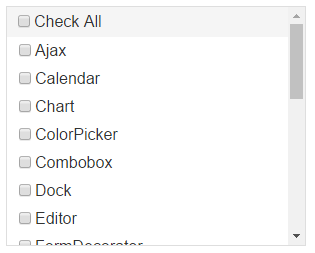
![Images check boxes](https://www.telerik.com/products/aspnet-ajax/documentation/assets/af51edf2ba9684b1aca4d4810f0e88e6/listbox_checkall.png)

```ASPNET
<telerik:RadListBox ID="RadListBox1" runat="server" RenderMode="Lightweight" CheckBoxes="true" ShowCheckAll="true">
    <Items>
        <telerik:RadListBoxItem Text="Ajax" />
        <telerik:RadListBoxItem Text="Calendar" />
        <telerik:RadListBoxItem Text="Chart" />
        <telerik:RadListBoxItem Text="ColorPicker" />
        <telerik:RadListBoxItem Text="Combobox" />
        <telerik:RadListBoxItem Text="Dock" />
    </Items>
</telerik:RadListBox>
```

## Adding images to items

Set the **ImageUrl** property of the list items to the path to the image. Leave the property blank to have the item with no image.
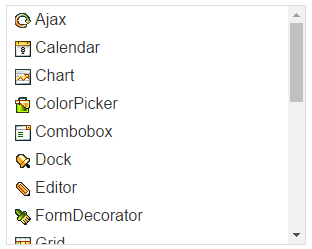
![Images check boxes](https://www.telerik.com/products/aspnet-ajax/documentation/assets/0c855b875316b5541f25ae4ecc277596/listbox_images.png)

```ASPNET
<telerik:RadListBox RenderMode="Lightweight" ID="RadListBox1" runat="server">
    <Items>
        <telerik:RadListBoxItem Text="Ajax" ImageUrl="images/Ajax.gif" />
        <telerik:RadListBoxItem Text="Calendar" ImageUrl="images/Calendar.gif" />
        <telerik:RadListBoxItem Text="Chart" ImageUrl="images/Chart.gif" />
        <telerik:RadListBoxItem Text="ColorPicker" ImageUrl="images/ColorPicker.gif" />
        <telerik:RadListBoxItem Text="Combobox" ImageUrl="images/Combobox.gif" />
        <telerik:RadListBoxItem Text="Dock" ImageUrl="images/Dock.gif" />
    </Items>
</telerik:RadListBox>
```

## See Also

* [Overview](https://www.telerik.com/products/aspnet-ajax/documentation/controls/listbox/radlistbox-items/overview)

* [Declaring the Items Inline](https://www.telerik.com/products/aspnet-ajax/documentation/controls/listbox/radlistbox-items/declaring-the-items-inline)

* [Loading Items from XML](https://www.telerik.com/products/aspnet-ajax/documentation/controls/listbox/radlistbox-items/loading-items-from-xml)

* [Working at Server-side](https://www.telerik.com/products/aspnet-ajax/documentation/controls/listbox/radlistbox-items/working-at-server-side)

* [Working at Client-side](https://www.telerik.com/products/aspnet-ajax/documentation/controls/listbox/radlistbox-items/working-at-client-side)

* [Checkboxes Demo](https://demos.telerik.com/aspnet-ajax/listbox/examples/functionality/checkboxes/defaultcs.aspx)

* [Text with Icons Demo](https://demos.telerik.com/aspnet-ajax/listbox/examples/functionality/textwithicons/defaultcs.aspx)
