# Custom Icons
This help article shows how to use custom icons (images or font icons) in **RadLinkButton**.
* [Image Icons](https://www.telerik.com/products/aspnet-ajax/documentation/controls/linkbutton/functionality/icons/custom-icons#image-icons)
* [Font Icons](https://www.telerik.com/products/aspnet-ajax/documentation/controls/linkbutton/functionality/icons/custom-icons#font-icons)
## Image Icons
To display an image icon on the button, you need to set the **Icon.Url** property to point to the URL of the desired image.
> caption Figure 1: RadLinkButton with custom icon set through the **Icon.Url** property.

> caption Example 1: Configure a **RadLinkButton** with an icon through the **Icon.Url** property.
```ASP.NET
```
### Hovered and Active States
**RadLinkButton** also provides an easy way to show different icon when the mouse is over the control, or the button is pressed (see **Figure 2** and **Example 2**). To do this, use the **HoveredCssClass** and **PressedCssClass** properties exposed by the **Icon** tag.
> caption Figure 2: A RadLinkButton can have different icons for its normal, hovered and active state.
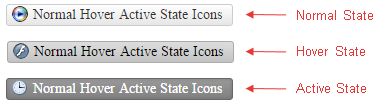
**Example 2:** Setup unique icons for the normal, hovered and active state of a **RadLinkButton**.
```ASP.NET
```
## Font Icons
You can use custom font icons in **RadLinkButton** as well. To do that, follow the steps below:
1. Load the stylesheet with the desired font icons on the page.
```CSS
```
2. Override the font-family of the button's icon element with the target one (see **Example 3**).
```CSS
button.RadButton .rbIcon:before {
font-family: myCustomFont;
}
```
3. Set the custom font icon class to the **Icon.CssClass** property.
```ASP.NET
```
You can find below an example with [Font Awesome Icons](https://github.com/FortAwesome/Font-Awesome).
> caption Figure 3: RadLinkButton with Font Awesome icon.

**Example 3:** Using FontAwesome font icons in RadLinkButton.
```CSS
```
```ASP.NET
```
You can also change the font-size and color of the font icon as described in the [Fine Tune](https://www.telerik.com/products/aspnet-ajax/documentation/controls/linkbutton/functionality/icons/fine-tune) help article.
Find out more information on how to use Font Awesome icons along with Telerik controls in the [4 Ways to Embed Font Awesome in Telerik UI for ASP.NET AJAX Controls](https://www.telerik.com/blogs/4-ways-embed-font-awesome-telerik-ui-for-asp-dotnet-ajax) blog post.
## See Also
* [PushButton - Custom Icons Demo](https://demos.telerik.com/aspnet-ajax/linkbutton/functionality/custom-icons/defaultcs.aspx)
* [Font Awesome Icons](https://github.com/FortAwesome/Font-Awesome)
* [PushButton - Embedded Icons Demo](https://demos.telerik.com/aspnet-ajax/linkbutton/functionality/embedded-icons/defaultcs.aspx)
* [Icons Overview](https://www.telerik.com/products/aspnet-ajax/documentation/controls/linkbutton/functionality/icons/embedded-icons)
* [Fine Tune Icons Position, Size and Color](https://www.telerik.com/products/aspnet-ajax/documentation/controls/linkbutton/functionality/icons/fine-tune)