# Multiline Labels
You can split labels and titles in the [ASP.NET AJAX Chart](https://www.telerik.com/products/aspnet-ajax/html-chart.aspx) into multiple lines by using the **"\n"** line feed character. This help article shows how to wrap labels and titles in a chart (**Figure 1**) with a small sample (**Example 1**). The multiline labels feature is available since **Q3 2014**. If you are using an older version of the suite, [this](https://feedback.telerik.com/Project/108/Feedback/Details/38633) page provides a workaround.
> note You can add line breaks in tooltips via the `
` tag because tooltips in **RadHtmlChart** are rendered with simple HTML.
> caption Figure 1: Wrapping text in chart labels and titles by using a line feed character ("\n").
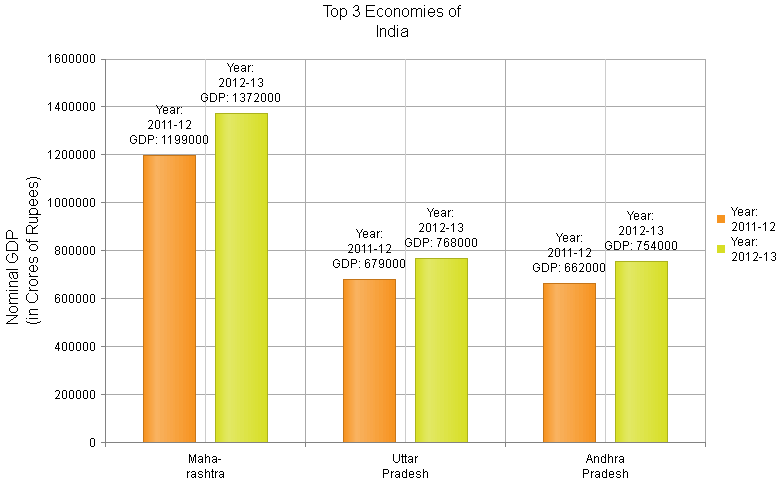
> caption Example 1: How to split labels, titles and tooltips in **RadHtmlChart** into several lines. This code creates the chart shown in **Figure 1**.
```ASP.NET
#=series.name#\n
GDP: #=value#
#=series.name#
GDP: #=value#
State: #=category#
#=series.name#\n
GDP: #=value#
#=series.name#
GDP: #=value#
State: #=category#
```
> note If you are setting these properties from the code-behind, you may need to escape the backslash as shown in **Example 2** below. You can read more about this in the [Handle Special Symbols](https://www.telerik.com/products/aspnet-ajax/documentation/controls/htmlchart/troubleshooting/handle-special-symbols) article. This does not apply to the `[axis].LabelsAppearance.DateFormats` whose format strings are escaped by the .NET `JavaScriptSerializer`. The main axis label format string, client templates, data and other strings (such as titles) require escaping.
>
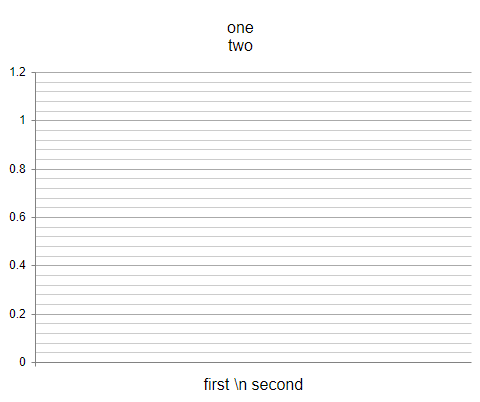
> As of R3 2018, escaping the back slash with more backslashes than necessary will result in the `\n` string being rendered instead of a new line. This is a feature that allows the `\n` string to be present in texts. **Example 2** below explains how this works.
> caption Example 2: How to escape new line characters from the code-behind. The result is shown in Figure 2.
```C#
//escape the new line character from the code-behind in C#
RadHtmlChart1.ChartTitle.Text = "one \\n two";
//as of R3 2018 this will not render a new line but a "\n" literal in the text
RadHtmlChart1.PlotArea.XAxis.TitleAppearance.Text = "first \\\\n second";
```
```VB
'in VB, the backslash is not a special symbol so it will not need additional escaping
RadHtmlChart1.ChartTitle.Text = "one \n two"
'as of R3 2018 this will not render a new line but a "\n" literal in the text
RadHtmlChart1.PlotArea.XAxis.TitleAppearance.Text = "first \\n second"
```
> caption Figure 2: The expected result of the escaping shown in Example 2, after R3 2018.
## See Also
* [RadHtmlChart Server-side API](https://www.telerik.com/products/aspnet-ajax/documentation/controls/htmlchart/server-side-programming/overview)
* [RadHtmlChart ClientTemplate for Series Labels and Tooltips](https://www.telerik.com/products/aspnet-ajax/documentation/controls/htmlchart/functionality/clienttemplate/overview)
* [Escaping Special Symbols Coming from the Server](https://www.telerik.com/products/aspnet-ajax/documentation/controls/htmlchart/troubleshooting/handle-special-symbols)