# Using Client Templates in Legend and Axes Labels
This article discusses the client templates for **Legend** items and **Axes** labels exposed in the [ASP.NET AJAX Chart](https://www.telerik.com/products/aspnet-ajax/html-chart.aspx).
The features listed here are available as of **R2 2016**.
You can quickly navigate through the sections in this article:
1. [Client Templates for Legend Items](https://www.telerik.com/products/aspnet-ajax/documentation/controls/htmlchart/functionality/clienttemplate/using-client-templates-legend-axes#client-templates-for-legend-items)
2. [Client Templates for Axes Labels](https://www.telerik.com/products/aspnet-ajax/documentation/controls/htmlchart/functionality/clienttemplate/using-client-templates-legend-axes#client-templates-for-axes-labels)
## Client Templates for Legend Items
The client template for the **Legend** items can be controlled by using the `ClientTemplate` property, exposed in the `LabelsAppearance` property (**Example 1**).
The values that can be resolved and used in the client templates are:
* `text` - the text the legend item.
* `series` - the data series.
* `value` - the point value. (only for donut and pie charts)
* `percentage` - the point value represented as a percentage value. Available only for donut, pie and 100% stacked charts.
More details are avilable in **Kendo** documentation—[legend.labels.template](https://docs.telerik.com/kendo-ui/api/javascript/dataviz/ui/chart#configuration-legend.labels.template).
> caption Figure 1: Result from the code in **Example 1**.
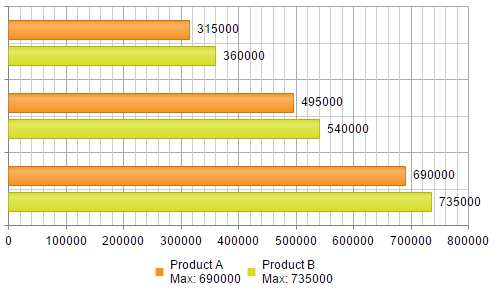
> caption Example 1: Using client templates for the **Legend** items.
```ASP.NET
```
## Client Templates for Axes Labels
The client template for the axes' labels can be controlled by using the `ClientTemplate` property, exposed in the `LabelsAppearance` property (**Example 2**).
The value that can be resolved and used in the client templates is:
* `value` - the text of the axis' label.
More details are available in the **Kendo** documentation—[valueAxis.labels.template](https://docs.telerik.com/kendo-ui/api/javascript/dataviz/ui/chart#configuration-valueAxis.labels.template).
> caption Figure 2: Result from the code in **Example 2**.
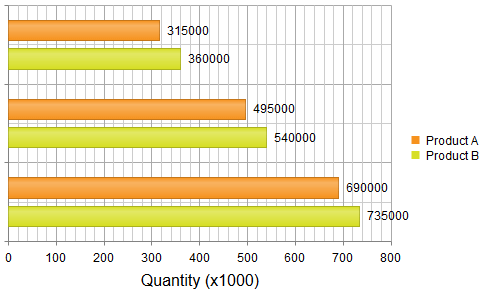
> caption Example 2: Using client templates for the **Legend** items.
```ASP.NET
#= value / 1000 #
```
## See Also
* [ClientTemplate Overview](https://www.telerik.com/products/aspnet-ajax/documentation/controls/htmlchart/functionality/clienttemplate/overview)
* [Display HTML and Execute JavaScript](https://www.telerik.com/products/aspnet-ajax/documentation/controls/htmlchart/functionality/clienttemplate/display-html-and-execute-javascript)
* [Kedno Chart API: legend.labels.template](https://docs.telerik.com/kendo-ui/api/javascript/dataviz/ui/chart#configuration-legend.labels.template)
* [Kedno Chart API: valueAxis.labels.template](https://docs.telerik.com/kendo-ui/api/javascript/dataviz/ui/chart#configuration-valueAxis.labels.template)
* [Format Numbers](https://www.telerik.com/products/aspnet-ajax/documentation/controls/htmlchart/appearance-and-styling/format-numbers)
* [Format Dates](https://www.telerik.com/products/aspnet-ajax/documentation/controls/htmlchart/appearance-and-styling/format-dates)
* [Demo: Client Templates for Series and Tooltips](https://demos.telerik.com/aspnet-ajax/htmlchart/examples/functionality/clienttemplates/defaultcs.aspx)