# Resizing Rows
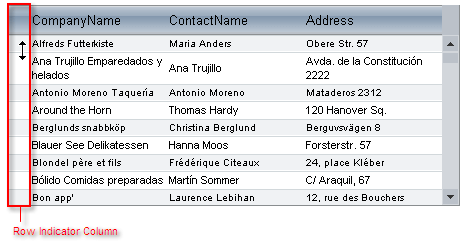
You can allow users to change the height of **RadGrid** rows by enabling row resizing. The grid displays a row indicator column that provides a resize handle unless you hide it.
## Enabling Row Resizing
Set **ClientSettings.Resizing.AllowRowResize** to `true` to enable row resizing. **RadGrid** automatically generates a **GridRowIndicatorColumn** that provides a resize handle. Users can resize rows by dragging any part of the bottom edge. To hide the indicator column, set **ClientSettings.Resizing.ShowRowIndicatorColumn** to `false`.
```ASP.NET
```
## See Also
* [OnRowResizing client-side event](https://www.telerik.com/products/aspnet-ajax/documentation/controls/grid/client-side-programming/events/onrowresizing)
* [OnRowResized client-side event](https://www.telerik.com/products/aspnet-ajax/documentation/controls/grid/client-side-programming/events/onrowresized)
* [GridRowIndicatorColumn](https://www.telerik.com/products/aspnet-ajax/documentation/controls/grid/columns/column-types#gridrowindicatorcolumn)