# Load-on-demand RadGrid in RadComboBox
The example below shows how to embed a **RadGrid** control in the template of a **RadComboBox**. This might be is a swift solution when you want to let users type a string sequence in the combobox input and load data (which matches the given pattern) in a table structure inside the combobox drop-down list. The integration between **RadGrid** and **RadComboBox** extends the built-in [multi-column combobox](https://demos.telerik.com/aspnet-ajax/Combobox/Examples/Functionality/MultiColumnCombo/DefaultCS.aspx) feature by feeding the combo with data loaded on demand. When you scroll to navigate through the loaded records, the table headers remain static at the top for a better user experience.
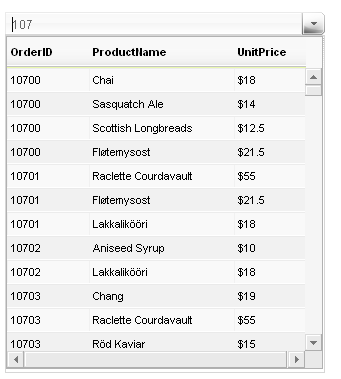
The ASPX file declares a combo box with an **ItemTemplate** that includes the **RadGrid** control. The **RadComboBox** has an **OnClientDropDownOpening** handler to generate an AJAX request (using a **RadAjaxManager** control on the same page) that binds the grid when the drop-down list opens. The **RadGrid** in the template has an **OnRowClick** event handler for setting the combo box text when the user clicks on a row:
```ASP.NET
 %>) ```
The grid's **OnRowClick** handler ("RowClicked") gets the values from the clicked row and assigns them as the text of the combo box. The combobox's **OnClientDropDownOpening** handler ("HandleOpen") gets a reference to the AJAX manager and initiates an AJAX request, passing in the string the user entered:
```JavaScript
function RowClicked(sender, args) {
var cellValues = args.getDataKeyValue("OrderID") + ", " + args.getDataKeyValue("ProductName") + ", $" + args.getDataKeyValue("UnitPrice");
var combo = $find("<%= RadComboBox1.ClientID %>");
setTimeout(function () { combo.set_text(cellValues); }, 50);
}
function HandleOpen(sender, args) {
var comboText = sender.get_text();
if (comboText.length > 2) {
setTimeout(function () { $find("<%= RadAjaxManager1.ClientID %>").ajaxRequest("LoadFilteredData," + comboText); }, 0);
}
else {
args.set_cancel(true);
}
}
```
In the code-behind, the **Page_Load** event handler adds an AJAX setting for the grid to the AJAX manager (now that the templated control is created). The **AjaxRequest** handler for the **RadAjaxManager** forces the grid to rebind. The **NeedDataSource** event handler of the grid binds it based on the string in the combobox:
```C#
protected void Page_Load(object sender, EventArgs e)
{
RadGrid grid = RadComboBox1.Items[0].FindControl("RadGrid1") as RadGrid;
RadAjaxManager1.AjaxSettings.AddAjaxSetting(RadAjaxManager1, grid, RadAjaxLoadingPanel1);
}
protected void RadAjaxManager1_AjaxRequest(object sender, AjaxRequestEventArgs e)
{
RadGrid grid = RadComboBox1.Items[0].FindControl("RadGrid1") as RadGrid;
if (e.Argument.IndexOf("LoadFilteredData") != -1)
{
grid.Rebind();
}
}
protected void RadGrid1_NeedDataSource(object source, GridNeedDataSourceEventArgs e)
{
RadGrid grid = source as RadGrid;
if (RadComboBox1.Text != "")
{
String[] vals = RadComboBox1.Text.Split(',');
if (vals.Length > 0)
{
RadComboBox1.Text = vals[0];
}
grid.DataSource = GetDataTable("SELECT [Order Details].OrderID, Products.ProductName, [Order Details].UnitPrice FROM Products, [Order Details] " + "WHERE [Order Details].OrderID LIKE '" + RadComboBox1.Text + "%'" + " AND Products.ProductID=[Order Details].ProductID");
}
else
{
DataTable dt = new DataTable();
dt.Columns.Add("OrderID");
dt.Columns.Add("ProductName");
dt.Columns.Add("UnitPrice");
grid.DataSource = dt;
}
}
public static string connectionString = ConfigurationManager.ConnectionStrings["NorthwindConnectionString"].ConnectionString;
public static DataTable GetDataTable(string query)
{
SqlConnection connection1 = new SqlConnection(connectionString);
SqlDataAdapter adapter1 = new SqlDataAdapter();
adapter1.SelectCommand = new SqlCommand(query, connection1);
DataTable table1 = new DataTable();
connection1.Open();
try
{
adapter1.Fill(table1);
}
finally
{
connection1.Close();
}
return table1;
}
```
```VB
Protected Sub Page_Load(ByVal sender As Object, ByVal e As EventArgs) Handles Me.Load
Dim grid As RadGrid = TryCast(RadComboBox1.Items(0).FindControl("RadGrid1"), RadGrid)
RadAjaxManager1.AjaxSettings.AddAjaxSetting(RadAjaxManager1, grid, RadAjaxLoadingPanel1)
End Sub
Protected Sub RadAjaxManager1_AjaxRequest(ByVal sender As Object, ByVal e As AjaxRequestEventArgs)
Dim grid As RadGrid = TryCast(RadComboBox1.Items(0).FindControl("RadGrid1"), RadGrid)
If e.Argument.IndexOf("LoadFilteredData") <> -1 Then
grid.Rebind()
End If
End Sub
Protected Sub RadGrid1_NeedDataSource(ByVal source As Object, ByVal e As GridNeedDataSourceEventArgs)
Dim grid As RadGrid = TryCast(source, RadGrid)
If RadComboBox1.Text <> "" Then
Dim vals As String() = RadComboBox1.Text.Split(","c)
If vals.Length > 0 Then
RadComboBox1.Text = vals(0)
End If
grid.DataSource = GetDataTable("SELECT [Order Details].OrderID, Products.ProductName, [Order Details].UnitPrice FROM Products, [Order Details] " + "WHERE [Order Details].OrderID LIKE '" + RadComboBox1.Text + "%'" + " AND Products.ProductID=[Order Details].ProductID")
Else
Dim dt As New DataTable()
dt.Columns.Add("OrderID")
dt.Columns.Add("ProductName")
dt.Columns.Add("UnitPrice")
grid.DataSource = dt
End If
End Sub
Public Shared connectionString As String = ConfigurationManager.ConnectionStrings("NorthwindConnectionString").ConnectionString
Public Shared Function GetDataTable(ByVal query As String) As DataTable
Dim connection1 As New SqlConnection(connectionString)
Dim adapter1 As New SqlDataAdapter()
adapter1.SelectCommand = New SqlCommand(query, connection1)
Dim table1 As New DataTable()
connection1.Open()
Try
adapter1.Fill(table1)
Finally
connection1.Close()
End Try
Return table1
End Function
```