# Server-side Selecting with a Select Button
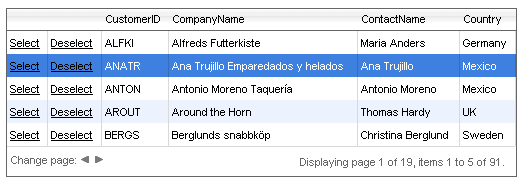
You can add **GridButtonColumn** columns to a grid to handle the selection and de-selection of grid rows. The **RadGrid** [Command API](https://www.telerik.com/products/aspnet-ajax/documentation/controls/grid/control-lifecycle/command-reference-) can automatically handle the select and de-select commands: you need only add the **GridButtonColumn** objects to the **Commands** collection and set their **CommandName** property:
```ASP.NET
```
You can access the selected rows using the **SelectedItems** collection of the **RadGrid** object. In addition, you can handle the **SelectedIndexChanged** server event of the grid to detect when a row's selection changes perform additional operations if needed.
For a live example showing server-side selection, see [Server-side row selection](https://demos.telerik.com/aspnet-ajax/Grid/Examples/Programming/SelectRowWithCheckBox/DefaultCS.aspx).
## See Also
* [Selecting overview](https://www.telerik.com/products/aspnet-ajax/documentation/controls/grid/functionality/selecting/overview)
* [Server-side selection with a checkbox](https://www.telerik.com/products/aspnet-ajax/documentation/controls/grid/functionality/selecting/selecting-rows/server-side-selecting-with-a-checkbox)