# Server-side Selecting with a CheckBox
You can use a template column to simulate the behavior of the **GridClientSelectColumn**, but handling the row selection server-side. Handling selection this way behaves like a grid with client-side selection, except that users cannot select rows by clicking on them.
To simulate the **GridClientSelectColumn** in a template column:
1. Create an **ItemTemplate** that contains a check box.
2. In the **OnCheckedChanged** event of the check box, set the parent row's **Selected** property to select or de-select the row.
3. If you are allowing multi-row selection, add a check box to the **HeaderItemTemplate**.
4. In the **OnCheckChanged** event of the header check box, set the **Selected** property of every row in the grid and the **Checked** property of the corresponding check boxes in the item templates.
> note The **Parent** property of the check box refers to the template. Therefore, to access the parent row, you must use the parent of the parent.
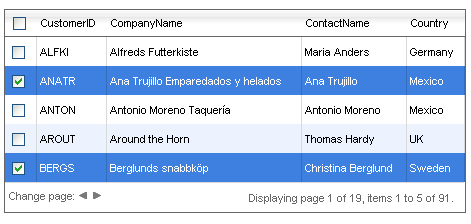
Note that in the grid declaration, you do not need to enable client-side selection:
```ASP.NET
```
In the code-behind, the **OnCheckedChanged** event handlers (**ToggleRowSelection** and **ToggleSelectedState**) handle the selection and de-selection of rows:
```C#
protected void ToggleRowSelection(object sender, EventArgs e)
{
((sender as CheckBox).NamingContainer as GridItem).Selected = (sender as CheckBox).Checked;
bool checkHeader = true;
foreach (GridDataItem dataItem in RadGrid1.MasterTableView.Items)
{
if (!(dataItem.FindControl("CheckBox1") as CheckBox).Checked)
{
checkHeader = false;
break;
}
}
GridHeaderItem headerItem = RadGrid1.MasterTableView.GetItems(GridItemType.Header)[0] as GridHeaderItem;
(headerItem.FindControl("headerChkbox") as CheckBox).Checked = checkHeader;
}
protected void ToggleSelectedState(object sender, EventArgs e)
{
CheckBox headerCheckBox = (sender as CheckBox);
foreach (GridDataItem dataItem in RadGrid1.MasterTableView.Items)
{
(dataItem.FindControl("CheckBox1") as CheckBox).Checked = headerCheckBox.Checked;
dataItem.Selected = headerCheckBox.Checked;
}
}
```
```VB
Protected Sub ToggleRowSelection(ByVal sender As Object, ByVal e As EventArgs)
TryCast(TryCast(sender, CheckBox).NamingContainer, GridItem).Selected = TryCast(sender, CheckBox).Checked
Dim checkHeader As Boolean = True
For Each dataItem As GridDataItem In RadGrid1.MasterTableView.Items
If Not TryCast(dataItem.FindControl("CheckBox1"), CheckBox).Checked Then
checkHeader = False
Exit For
End If
Next
Dim headerItem As GridHeaderItem = TryCast(RadGrid1.MasterTableView.GetItems(GridItemType.Header)(0), GridHeaderItem)
TryCast(headerItem.FindControl("headerChkbox"), CheckBox).Checked = checkHeader
End Sub
Protected Sub ToggleSelectedState(ByVal sender As Object, ByVal e As EventArgs)
Dim headerCheckBox As CheckBox = TryCast(sender, CheckBox)
For Each dataItem As GridDataItem In RadGrid1.MasterTableView.Items
TryCast(dataItem.FindControl("CheckBox1"), CheckBox).Checked = headerCheckBox.Checked
dataItem.Selected = headerCheckBox.Checked
Next
End Sub
```
For a live example showing server-side selection, see [Server-side row selection.](https://demos.telerik.com/aspnet-ajax/Grid/Examples/Programming/SelectRowWithCheckBox/DefaultCS.aspx)
## See Also
* [Selecting overview](https://www.telerik.com/products/aspnet-ajax/documentation/controls/grid/functionality/selecting/overview)
* [Selecting multiple rows on the server](https://www.telerik.com/products/aspnet-ajax/documentation/controls/grid/functionality/selecting/selecting-rows/server-side-selecting-multiple-rows)