# Edit Forms
To display the grid column editors in an auto-generated form when the grid switches into edit mode, set the table view's **EditMode** property to "EditForms" or "PopUp".
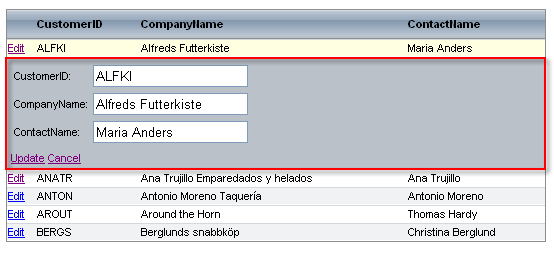
When **EditMode** is "EditForms", the edit form appears immediately below the item that is being edited:
```ASP.NET
```
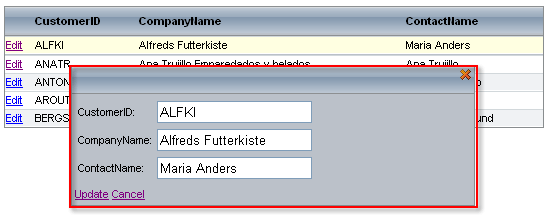
When **EditMode** is "PopUp", the edit form appears in a popup window above the grid:
```ASP.NET
```
To limit the number of characters the user can enter in the text box editor of the edit form, set the **MaxLength** property of the column.
## GridItem type for edit mode
When **EditMode** is "EditForms" or "PopUp", the grid row is of type **GridDataItem** in regular mode but not in edit mode. In event handlers such as the **ItemCreated** event (for example), you can cast the item to **GridEditableItem** (a base class of **GridDataItem**) when the item is in edit mode:
```C#
private void RadGrid1_ItemCreated(object sender, Telerik.Web.UI.GridItemEventArgs e)
{
if(e.Item is GridDataItem)
{
//the item is in regular mode
GridDataItem dataItem = e.Item as GridDataItem;
//do something here
}
else if (e.Item is GridEditableItem && e.Item.IsInEditMode)
{
//the item is in edit mode
GridEditableItem editedItem = e.Item as GridEditableItem;
//do something here
}
}
```
```VB
Private Sub RadGrid1_ItemCreated(ByVal sender As Object, ByVal e As Telerik.Web.UI.GridItemEventArgs) Handles RadGrid1.ItemCreated
If (TypeOf e.Item Is GridDataItem) Then
'the item is in regular mode
Dim dataItem As GridDataItem = CType(e.Item, GridDataItem)
'do something here
ElseIf (TypeOf e.Item Is GridEditableItem AndAlso e.Item.IsInEditMode) Then
'the item is in edit mode
Dim editedItem As GridEditableItem = CType(e.Item, GridEditableItem)
'do something here
End If
End Sub
```
When the item is edited, you can cast it to **GridEditFormItem** (a class that extends the **GridEditableItem** class) to reference the controls in it. The **GridEditFormItem** class has an **EditFormCell** property that provides access to the cell which wraps the controls inside the edit form.
You can also use the **ParentItem** property of **GridEditFormItem** to access the parent data item object from code inside an **UpdateCommand**, **InsertCommand**, or **ItemCommand** event handler:
```C#
if(e.Item is GridDataItem)
{
//find the edit form item
GridEditFormItem formItem = (e.Item as GridDataItem).EditFormItem as GridEditFormItem;
//get the cell which wraps the controls inside the edit form
TableCell cell = formItem.EditFormCell as TableCell;
}
if (e.Item is GridEditableItem)
{
//cast the item to GridEditFormItem
GridEditFormItem formItem = e.Item as GridEditFormItem;
//reference its parent data item
GridDataItem dataItem = formItem.ParentItem as GridDataItem;
}
```
```VB
If (TypeOf e.Item Is GridDataItem) Then
'find the edit form item
Dim formItem As GridEditFormItem = CType(CType(e.Item, GridDataItem).EditFormItem, GridEditFormItem)
'get the cell which wraps the controls inside the edit form
Dim cell As TableCell = CType(formItem.EditFormCell, TableCell)
End If
If (TypeOf e.Item Is GridEditableItem) Then
'cast the item to GridEditFormItem
Dim formItem As GridEditFormItem = CType(e.Item, GridEditFormItem)
'reference its parent data item
Dim dataItem As GridDataItem = CType(formItem.ParentItem, GridDataItem)
End If
```
Further information about how to reference controls inside grid rows and edit forms, see [Referencing controls in grid row/edit form](https://www.telerik.com/products/aspnet-ajax/documentation/controls/grid/how-to/common/referencing-controls-in-grid-row-edit-form).
## Using the EditItems collection
The grid's **EditItems** collection contains the items (rows) of the grid that are currently being edited. When using **InPlace** edit mode, these items contain the edit controls. When using **EditForms** or **PopUp** however, the items in the collection are the items in their initial (unedited) form. To access the edit form for an item in the list, use its **EditFormItem** property.
To support all edit modes in an application, check the table view's **EditMode** property when traversing the **EditItems** collection:
```C#
foreach (GridDataItem item in RadGrid1.EditItems)
{
GridEditableItem itemToEdit =
(item.OwnerTableView.EditMode == GridEditMode.InPlace)
? item : (GridEditableItem) item.EditFormItem;
//perform further operations
}
```
```VB
Dim item As GridDataItem
For Each item In RadGrid1.EditItems
Dim itemToEdit As GridEditableItem = _
(IIf item.OwnerTableView.EditMode = GridEditMode.InPlace Then _
CType(item, GridEditableItem) _
Else CType(item.EditFormItem, GridEditableItem))
'perform further operations
Next item
```
## See Also
* [In-place editing](https://www.telerik.com/products/aspnet-ajax/documentation/controls/grid/data-editing/edit-mode/in-place)
* [Custom edit forms](https://www.telerik.com/products/aspnet-ajax/documentation/controls/grid/data-editing/edit-mode/custom-edit-forms)