# Right-to-left support

## Configuring right-to-left rendering

To render grid content from right to left, set the **Dir** property for **MasterTableView** or nested **GridTableView** instances to **RTL**.

Here is an example:

```ASP.NET
      <telerik:RadGrid RenderMode="Lightweight" ID="RadGrid1" DataSourceID="SqlDataSource1" runat="server" Width="97%" AllowPaging="True" 
        PageSize="12" AllowSorting="True" ShowGroupPanel="True" AutoGenerateColumns="False"
        GridLines="none" AllowFilteringByColumn="true">
        <PagerStyle Mode="NextPrevNumericAndAdvanced"></PagerStyle>
        <MasterTableView Width="100%" Dir="RTL">
            <GroupByExpressions>
                <telerik:GridGroupByExpression>
                    <SelectFields>
                        <telerik:GridGroupByField FieldAlias="Received" FieldName="Received" FormatString="{0:D}"
                            HeaderValueSeparator=" from date: "></telerik:GridGroupByField>
                    </SelectFields>
                    <GroupByFields>
                        <telerik:GridGroupByField FieldName="Received" SortOrder="Descending"></telerik:GridGroupByField>
                    </GroupByFields>
                </telerik:GridGroupByExpression>
            </GroupByExpressions>
            <Columns>
                <telerik:GridBoundColumn SortExpression="Received" HeaderText="Received" HeaderButtonType="TextButton"
                    DataField="Received" DataFormatString="{0:d}">
                </telerik:GridBoundColumn>
                <telerik:GridBoundColumn SortExpression="From" HeaderText="From" HeaderButtonType="TextButton"
                    DataField="From">
                </telerik:GridBoundColumn>
                <telerik:GridBoundColumn SortExpression="FolderName" HeaderText="Folder name" HeaderButtonType="TextButton"
                    DataField="FolderName">
                </telerik:GridBoundColumn>
                <telerik:GridBoundColumn SortExpression="Size" HeaderText="Size" HeaderButtonType="TextButton"
                    DataField="Size">
                </telerik:GridBoundColumn>
            </Columns>
        </MasterTableView>
        <ClientSettings AllowDragToGroup="True">
            <Selecting AllowRowSelect="True"></Selecting>
        </ClientSettings>
    </telerik:RadGrid>
</div>
<br />
<asp:SqlDataSource ID="SqlDataSource1" ConnectionString="<%$ ConnectionStrings:TelerikConnectionString %>"
    ProviderName="System.Data.SqlClient"
    SelectCommand="SELECT * FROM Mails" runat="server">
</asp:SqlDataSource>
```

You can find the above grid in the following online examples:

[Right-to-left RadGrid demo in C#](https://demos.telerik.com/aspnet-ajax/Grid/Examples/Styles/RightToLeft/DefaultCS.aspx)

[Right-to-left RadGrid demo in VB.NET](https://demos.telerik.com/aspnet-ajax/Grid/Examples/Styles/RightToLeft/DefaultVB.aspx)

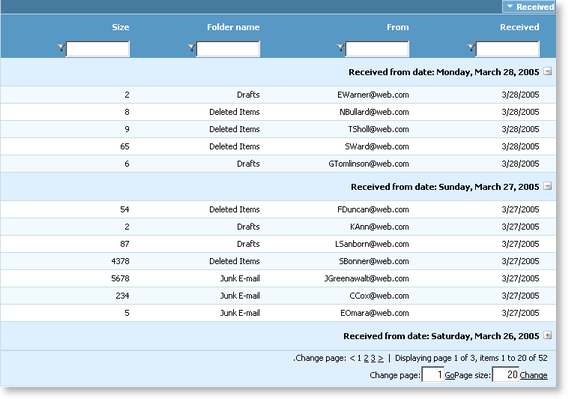
Here is an image of RadGrid in RTL mode.
![RadGrid rendered in right-to-left mode](https://www.telerik.com/products/aspnet-ajax/documentation/assets/7a9595f2d539645972a39449cf26f59b/rtlgrid_thumb.png)

All predefined grid skins (shipped with the grid installation) are optimized to work in RTL mode.

## See Also

* [RadGrid Skins](https://www.telerik.com/products/aspnet-ajax/documentation/controls/grid/appearance-and-styling/skins)
* [WAI-ARIA Support](https://www.telerik.com/products/aspnet-ajax/documentation/controls/grid/accessibility-and-internationalization/wai-aria-support)
