# Use Themes
RadEditor can be configured to use **ASP.NET 2.0 Themes** in the same manner as ordinary asp.net controls. A theme can be shared among multiple editors to make group configuration extremely easy. This ensures that configuration of all editors is done from a single location.To use themes with RadEditor:
1. From the Solution Explorer, right-click the project and select **Add | Add ASP.NET Folder | App_Themes** from the context menu.
2. Right-click the **App_Themes** folder and select **Add | New Item** from the context menu. Select the **Skin File** item type.
3. 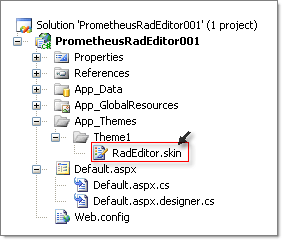
4. Open the skin file and add the RadEditor page directive and declaration. Set the RadEditor **SkinId** property to a unique name. In the example below, SkinId is declared as "SettingProperties".
```ASP.NET
<%@ register tagprefix="telerik" namespace="Telerik.Web.UI" assembly="Telerik.Web.UI" %>
Setting inline properties
```
5. In the ASPX/ASCX where the skin will be used, set the Theme in the page declaration. In the example below, the **Theme** is declared as "Theme1" to match the contents of App_Themes.
```ASP.NET
<%@ page language="C#" autoeventwireup="true" codebehind="Default.aspx.cs" theme="Theme1"
inherits="prometheusRadEditor001._Default" %>
```
6. In the RadEditor declaration, set the **SkinId** property to match the skin file created earlier. In the example below, SkinID is set to "SettingProperties" to match the **SkinId** declared in the skin file earlier.
```ASP.NET
```
> caution The controls form the Telerik® UI for ASP.NET AJAX suite in general and the editor control in specific, have both a **Skin** and **SkinID** Properties. **SkinID** refers to the general theming mechanism introduced in ASP.NET 2.0 and applies to standard ASP.NET controls, such as asp:Button. The **Skin** property refers to the Telerik® UI for ASP.NET AJAX **-** specific theming mechanism and allows you to set a number of CSS styles to a Telerik control at one time.
More information on how to use ASP.NET 2.x Themes is available in [MSDN](https://msdn2.microsoft.com/en-us/library/wcyt4fxb%28vs.80%29.aspx).