# Toolbars Overview

**RadEditor** Toolbars are containers that accommodate the buttons and dropdown lists of the various tools.	Developers can group buttons in a number of toolbars according to the specific purpose of the **RadEditor** implementation.	The figure below shows an editor with its full set of tools, distributed in five toolbars. You can configure a toolbar	with as few or as many tools as your application requires.
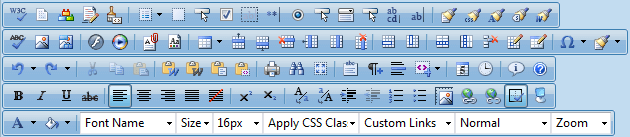
![RadEditor screenshot showing editor-fullsetoftoolsq12010.png](https://www.telerik.com/products/aspnet-ajax/documentation/assets/12ecda00d9c53ab728b0357165b88876/editor-fullsetoftoolsq12010.png)

You can learn how to add standard or custom tools to a toolbar in the following Help articles:

* [Adding Standard Buttons](https://www.telerik.com/products/aspnet-ajax/documentation/controls/editor/functionality/toolbars/buttons/add-standard-buttons)

* [Adding Your Own Buttons](https://www.telerik.com/products/aspnet-ajax/documentation/controls/editor/functionality/toolbars/buttons/add-your-own-buttons)

You can also configure the toolbar using an XML [ToolsFile](https://www.telerik.com/products/aspnet-ajax/documentation/controls/editor/functionality/toolbars/using-toolsfile.xml), which	defines:

* the number of toolbars and system [modules](https://www.telerik.com/products/aspnet-ajax/documentation/controls/editor/functionality/modules/overview)

* the collection of buttons in each toolbar and their order

* the specific options (if any) for the respective tools (i.e., Fonts collections, Colors collection, etc.)

* the [dockability](https://www.telerik.com/products/aspnet-ajax/documentation/controls/editor/functionality/toolbars/docking-zones) of each toolbar

* the default docking zone for each toolbar

You can group tools with similar logic in ToolStrips. You can find more information in the following	article: [How to create a ToolStrip](https://www.telerik.com/products/aspnet-ajax/documentation/controls/editor/functionality/toolbars/dropdowns/custom-toolstrip).

As of **Q2 2015**, new phone-optimized UI is introduced in **RadEditor**—[Phone Layout of RadEditor](https://www.telerik.com/products/aspnet-ajax/documentation/controls/editor/mobile-support/phone-layout/overview). You can find more details about the toolbar-related optimizations in the [Phone Layout Elements Structure](https://www.telerik.com/products/aspnet-ajax/documentation/controls/editor/mobile-support/phone-layout/elements-structure) article.

## RadEditor Toolset Reference

The lists below show the icon image, the name of the tool, a description of what the tool does, and the tag format used to declare that tool in the ToolsFile.xml file.

## General Buttons

| **Icon**                                                                                                                                                                                        | **Tool Name**                                                                                                                                                                     | **Description**                                                                                                                                                       | **ToolsFile Declaration**                                           |
| ----------------------------------------------------------------------------------------------------------------------------------------------------------------------------------------------- | --------------------------------------------------------------------------------------------------------------------------------------------------------------------------------- | --------------------------------------------------------------------------------------------------------------------------------------------------------------------- | ------------------------------------------------------------------- |
| ![RadEditor screenshot showing editor-converttoupper.gif](https://www.telerik.com/products/aspnet-ajax/documentation/assets/7a0bb2bd4b5ed8e430a37e9dbaa03cce/editor-converttoupper.gif)         | **ConvertToUpper**                                                                                                                                                                | Convert the text of the current selection to upper case, preserving the non-text elements such as	images and tables.                                                  | `<tool name="ConvertToUpper" />`                                    |
| ![RadEditor screenshot showing editor-converttolower.gif](https://www.telerik.com/products/aspnet-ajax/documentation/assets/eb7d42b15f34e91ac83d646a56c81b04/editor-converttolower.gif)         | **ConvertToLower**                                                                                                                                                                | Convert the text of the current selection to lower case, preserving the non-text	elements such as images and tables.                                                  | `<tool name="ConvertToLower" />`                                    |
| ![RadEditor screenshot showing editor-fontsize.gif](https://www.telerik.com/products/aspnet-ajax/documentation/assets/018b6beddc62b51d6826e048f08d18c6/editor-fontsize.gif)                     | **RealFontSize**                                                                                                                                                                  | Allows the user to apply to the current selection, the font size measured in pixels (px) or points (pt),	rather than a fixed-size 1 to 7 (as does the FontSize tool). | `<tool name="RealFontSize" shortcut="CTRL+SHIFT+P / CMD+SHIFT+P"/>` |
| ![RadEditor screenshot showing editor-togglescreenmode.gif](https://www.telerik.com/products/aspnet-ajax/documentation/assets/c9e7a09309f88fc1db6f454748f74d2a/editor-togglescreenmode.gif)     | **ToggleScreenMode**                                                                                                                                                              | Toggle Screen Mode - Switches Telerik **RadEditor** into full screen mode.                                                                                            | `<tool name="ToggleScreenMode" shortcut="F11 / CMD+F11"/>`          |
| ![RadEditor screenshot showing editor-toggleborders.gif](https://www.telerik.com/products/aspnet-ajax/documentation/assets/7fc699d6d308bcbf2bde2a82951ddc46/editor-toggleborders.gif)           | **ToggleTableBorder**                                                                                                                                                             | Show/Hide Border - Shows or hides borders around tables in the content area.                                                                                          | `<tool name="ToggleTableBorder" />`                                 |
| ![RadEditor screenshot showing editor-zoom1.gif](https://www.telerik.com/products/aspnet-ajax/documentation/assets/8ff58e3e0800f333cbda581605ded38f/editor-zoom1.gif)                           | **Zoom**                                                                                                                                                                          | Zoom - Changes the level of text magnification.                                                                                                                       | `<tool name="Zoom" />`                                              |
| ![RadEditor screenshot showing editor-modulemanager.gif](https://www.telerik.com/products/aspnet-ajax/documentation/assets/e418566bc9fa3253e5736bd182103d7e/editor-modulemanager.gif)           | **ModuleManager**                                                                                                                                                                 | Module Manager - Activates /Deactivates modules from a drop-down list of available modules.                                                                           | `<tool name="ModuleManager" />`                                     |
| ![RadEditor screenshot showing editor-toggledocking.gif](https://www.telerik.com/products/aspnet-ajax/documentation/assets/2440096b30d2995a3860b4501476ab0d/editor-toggledocking.gif)           | **ToggleDocking**                                                                                                                                                                 | Toggle Docking - Docks all floating toolbars to their respective docking areas.                                                                                       | `<tool name="ToggleDocking" />`                                     |
| ![RadEditor screenshot showing editor-findandreplace.gif](https://www.telerik.com/products/aspnet-ajax/documentation/assets/0457e56fac2bf281b8aec13258ff8f72/editor-findandreplace.gif)         | **FindAndReplace**                                                                                                                                                                | Find and Replace - Find (and replaces) text in the editor's content area.                                                                                             | `<tool name="FindAndReplace" shortcut="CTRL+F / CMD+F"/>`           |
| ![RadEditor screenshot showing editor-print.gif](https://www.telerik.com/products/aspnet-ajax/documentation/assets/17fd5171e608ce5e80a8f2daac61d0db/editor-print.gif)                           | **Print**                                                                                                                                                                         | Print - Prints the contents of the Telerik **RadEditor** or the whole web page.                                                                                       | `<tool name="Print" shortcut="CTRL+P / CMD+P"/>`                    |
| ![RadEditor screenshot showing editor-spellcheck.gif](https://www.telerik.com/products/aspnet-ajax/documentation/assets/8e9867c13f9a2dbd708da894d4f237bb/editor-spellcheck.gif)                 | **AjaxSpellCheck**                                                                                                                                                                | Spell - Launches the spell checker.                                                                                                                                   | `<tool name="AjaxSpellCheck"/>`                                     |
| ![RadEditor screenshot showing editor-cut.gif](https://www.telerik.com/products/aspnet-ajax/documentation/assets/a793326db219977a27e1e9488f40e9f4/editor-cut.gif)                               | **Cut**                                                                                                                                                                           | Cut - Cuts the selected content and copies it to the clipboard.                                                                                                       | `<tool name="Cut" shortcut="CTRL+X / CMD+X"/>`                      |
| ![RadEditor screenshot showing editor-copy.gif](https://www.telerik.com/products/aspnet-ajax/documentation/assets/762f07ee9f5252db49963e4904068111/editor-copy.gif)                             | **Copy**                                                                                                                                                                          | Copy - Copies the selected content to the clipboard.                                                                                                                  | `<tool name="Copy" shortcut="CTRL+C / CMD+X"/>`                     |
| ![RadEditor screenshot showing editor-paste.gif](https://www.telerik.com/products/aspnet-ajax/documentation/assets/b7f9d1651ed93da8a3d5c9dcdc7cd3c9/editor-paste.gif)                           | **Paste**                                                                                                                                                                         | Paste - Pastes the copied content from the clipboard into the editor.                                                                                                 | `<tool name="Paste" shortcut="CTRL+V / CMD+V"/>`                    |
| ![editor-paste-strip](https://www.telerik.com/products/aspnet-ajax/documentation/assets/f1db42601337f77307719d3977ddf840/editor-paste-strip.png)                                                | **PasteStrip**                                                                                                                                                                    | PasteStrip dropdown - Contains advanced paste options (Paste, PasteFromWord, PasteFromWordNoFontsNoSizes, PastePlainText, PasteAsHtml, PasteHtml)                     | `<tool name="PasteStrip" />`                                        |
| ![RadEditor screenshot showing editor-pastefromword.gif](https://www.telerik.com/products/aspnet-ajax/documentation/assets/f6a0dae4eab12a9a7787013c965c9627/editor-pastefromword.gif)           | **PasteFromWord**                                                                                                                                                                 | Paste from Word - Pastes content copied from Word and removes the web-unfriendly tags.                                                                                | `<tool name="PasteFromWord" />`                                     |
| ![RadEditor screenshot showing editor-pastefromword_full.gif](https://www.telerik.com/products/aspnet-ajax/documentation/assets/2d9e42415477ad08431b55acbe177180/editor-pastefromword_full.gif) | **PasteFromWordNoFontsNoSizes**                                                                                                                                                   | Paste from Word cleaning fonts and sizes - Cleans all Word-specific tags and removes font names and text sizes.                                                       | `<tool name="PasteFromWordNoFontsNoSizes" />`                       |
| ![RadEditor screenshot showing editor-pasteplaintext.gif](https://www.telerik.com/products/aspnet-ajax/documentation/assets/587622beda064928c90f8bc4b48a1840/editor-pasteplaintext.gif)         | **PastePlainText**                                                                                                                                                                | Paste Plain Text - Pastes plain text (no formatting) into the editor.                                                                                                 | `<tool name="PastePlainText" />`                                    |
| ![RadEditor screenshot showing editor-pastehtml.png](https://www.telerik.com/products/aspnet-ajax/documentation/assets/1c9d23b0af0eed6f00881488ffc73c5e/editor-pastehtml.png)                   | **PasteHtml**                                                                                                                                                                     | Paste HTML - Pastes HTML code in to the current selection and renders it. It is helpful when needed to enter predefined HTML code such as media embed source.         | `<tool name="PasteHtml" />`                                         |
| ![RadEditor screenshot showing editor-pasteashtml.gif](https://www.telerik.com/products/aspnet-ajax/documentation/assets/1f2bd16830698848e2370f1b7925d228/editor-pasteashtml.gif)               | **PasteAsHtml**                                                                                                                                                                   | Paste as HTML - Pastes HTML code in the content area and keeps all the HTML tags.                                                                                     | `<tool name="PasteAsHtml"/>`                                        |
| ![RadEditor screenshot showing editor-undo.gif](https://www.telerik.com/products/aspnet-ajax/documentation/assets/e7080da27e46bf43b0d90004344547e9/editor-undo.gif)                             | **Undo**                                                                                                                                                                          | Undo - Undoes the last action.                                                                                                                                        | `<tool name="Undo" shortcut="CTRL+Z / CMD+Z"/>`                     |
| ![RadEditor screenshot showing editor-redo.gif](https://www.telerik.com/products/aspnet-ajax/documentation/assets/928dcfacfaf3cd3b40896d71757c11a3/editor-redo.gif)                             | **Redo**                                                                                                                                                                          | Redo - Redoes/repeats the last action, which has been undone.                                                                                                         | `<tool name="Redo" shortcut="CTRL+Y / CMD+Y"/>`                     |
| ![RadEditor screenshot showing editor-formatstripper.gif](https://www.telerik.com/products/aspnet-ajax/documentation/assets/1156077dcc794b5227581a15e4ba4138/editor-formatstripper.gif)         | **FormatStripper**                                                                                                                                                                | Format Stripper - Removes custom or all formatting from selected text.                                                                                                | `<tool name="FormatStripper"/>`                                     |
| ![RadEditor screenshot showing editor-help.gif](https://www.telerik.com/products/aspnet-ajax/documentation/assets/cad2daf90ba8e93f32e9a4f158d6137d/editor-help.gif)                             | **Help**                                                                                                                                                                          | Quick Help - Launches the Quick Help you are currently viewing.                                                                                                       | `<tool name="Help" shortcut="F1"/>`                                 |
| ![RadEditor screenshot showing editor-aboutdialog.gif](https://www.telerik.com/products/aspnet-ajax/documentation/assets/6220ac2c1dafc4b9fde9c77681ed0720/editor-aboutdialog.gif)               | **AboutDialog**                                                                                                                                                                   | About Dialog - Shows the current version and credentials of Telerik **RadEditor** .                                                                                   | `<tool name="AboutDialog" />`                                       |
| ![RadEditor screenshot showing editor-xhtmlvalidator.png](https://www.telerik.com/products/aspnet-ajax/documentation/assets/0ba8ca82fd8e862b5bedb50af95487aa/editor-xhtmlvalidator.png)         | **XhtmlValidator**                                                                                                                                                                | XhtmlValidator - Uses the W3C XHTML Validator Page to perform validation of the current editor content.                                                               | `<tool name="XhtmlValidator" />`                                    |
| ![StyleBuilder](https://www.telerik.com/products/aspnet-ajax/documentation/assets/abbb3a7c591ae893bc68ec68859529c4/editor-stylebuilder.png)                                                     | **StyleBuilder**                                                                                                                                                                  | StyleBuilder - Provides options to define cascading style sheet (CSS) style attributes.                                                                               | `<tool name="StyleBuilder" />`                                      |
| ![RadEditor screenshot showing editor-toggle-toolzone.png](https://www.telerik.com/products/aspnet-ajax/documentation/assets/833273d2e69f93a826121c5b59a0bbec/editor-toggle-toolzone.png)       | **Toggle ToolZone** *(this button is [Phone-Layout-related](https://www.telerik.com/products/aspnet-ajax/documentation/controls/editor/mobile-support/phone-layout/overview))*    | Toggles the ToolZone in RadEditor with Phone Layout                                                                                                                   | `<tool name="MobileEdit" />`                                        |
| ![RadEditor screenshot showing editor-toggle-html-mode.png](https://www.telerik.com/products/aspnet-ajax/documentation/assets/54bd6995474447e42793ebe90286e2b5/editor-toggle-html-mode.png)     | **Toggle Edit Mode** *(this button is [Phone-Layout-related](https://www.telerik.com/products/aspnet-ajax/documentation/controls/editor/mobile-support/phone-layout/overview))*   | Switches between Design and HTML mode in RadEditor with Phone Layout.                                                                                                 | `<tool name="ToggleEditMode" />`                                    |
| ![RadEditor screenshot showing editor-toggle-screen-mode.png](https://www.telerik.com/products/aspnet-ajax/documentation/assets/14c7a342478aa4c70d1d6f19a3843628/editor-toggle-screen-mode.png) | **Toggle Screen Mode** *(this button is [Phone-Layout-related](https://www.telerik.com/products/aspnet-ajax/documentation/controls/editor/mobile-support/phone-layout/overview))* | Exits the full screen mode in RadEditor with Phone layout.                                                                                                            | `<tool name="ToggleScreenMode" />`                                  |

## Insert and Manage Links, Tables, Special Characters, Images and Media

| **Icon**                                                                                                                                                                                      | **Tool Name**           | **Description**                                                                                                                         | **ToolsFile Declaration**                                           |
| --------------------------------------------------------------------------------------------------------------------------------------------------------------------------------------------- | ----------------------- | --------------------------------------------------------------------------------------------------------------------------------------- | ------------------------------------------------------------------- |
| ![RadEditor screenshot showing editor-imagemanager.gif](https://www.telerik.com/products/aspnet-ajax/documentation/assets/3ab8d28fe4e2a2cdce5060c6b31f2bbe/editor-imagemanager.gif)           | **ImageManager**        | Image Manager - Inserts an image from a predefined image folder(s).                                                                     | `<tool name="ImageManager" shortcut="CTRL+G / CMD+G"/>`             |
| ![RadEditor screenshot showing editor-insertimage.png](https://www.telerik.com/products/aspnet-ajax/documentation/assets/3aa4f4948f7defda82aca23786269a84/editor-insertimage.png)             | **InsertImage**         | Insert Image - A lite version of the Set Image Properties (Properties...) dialog.                                                       | `<tool name="InsertImage"/>`                                        |
| ![RadEditor screenshot showing editor-imagemapdialog.gif](https://www.telerik.com/products/aspnet-ajax/documentation/assets/deb99a4d2baa61027b448f7d4b07dc22/editor-imagemapdialog.gif)       | **ImageMapDialog**      | Image Map - Allows users to define clickable areas within an image.                                                                     | `<tool name="ImageMapDialog"/>`                                     |
| ![RadEditor screenshot showing editor-absoluteposition.gif](https://www.telerik.com/products/aspnet-ajax/documentation/assets/8592f9b77ca5cc8ebbda88476e95bdc9/editor-absoluteposition.gif)   | **AbsolutePosition**    | Absolute Object Position - Sets an absolute position of an object (free move).                                                          | `<tool name="AbsolutePosition" />`                                  |
| ![RadEditor screenshot showing editor-inserttable.gif](https://www.telerik.com/products/aspnet-ajax/documentation/assets/98d86896224b3d1d80803a6778148eed/editor-inserttable.gif)             | **InsertTable**         | Insert Table - Inserts a table in the Telerik **RadEditor** .                                                                           | `<tool name="InsertTable" />`                                       |
| ![RadEditor screenshot showing editor-toggletableborder.gif](https://www.telerik.com/products/aspnet-ajax/documentation/assets/7fc699d6d308bcbf2bde2a82951ddc46/editor-toggletableborder.gif) | **ToggleTableBorder**   | Toggle Table Borders - Toggles borders of all tables within the editor.                                                                 | `<tool name="ToggleTableBorder" />`                                 |
| ![RadEditor screenshot showing editor-insertsnippet.gif](https://www.telerik.com/products/aspnet-ajax/documentation/assets/fda3d3ced9239b9a152d94e68b5e83cb/editor-insertsnippet.gif)         | **InsertSnippet**       | Insert Snippet - Inserts pre-defined code snippets.                                                                                     | `<tool name="InsertSnippet" />`                                     |
| ![RadEditor screenshot showing editor-insertformelement.gif](https://www.telerik.com/products/aspnet-ajax/documentation/assets/4635f3e0f8cd259751ff1613c1e790fd/editor-insertformelement.gif) | **InsertFormElement**   | Insert Form Element - Inserts a form element from a drop-down list with available elements.                                             | `<tool name="InsertFormElement" />`                                 |
| ![RadEditor screenshot showing editor-insertdate.gif](https://www.telerik.com/products/aspnet-ajax/documentation/assets/2b86ce97c6e2b7ca3b31fe724b8a4bf6/editor-insertdate.gif)               | **InsertDate**          | Insert Date - Inserts current date.                                                                                                     | `<tool name="InsertDate" />`                                        |
| ![RadEditor screenshot showing editor-inserttime.gif](https://www.telerik.com/products/aspnet-ajax/documentation/assets/0058e41dd49031fc9ca7905668695249/editor-inserttime.gif)               | **InsertTime**          | Insert Time - Inserts current time.                                                                                                     | `<tool name="InsertTime" />`                                        |
| ![editor-insertexternalvideo](https://www.telerik.com/products/aspnet-ajax/documentation/assets/fc95aceb9748a9535fbefcb9ab3c45f9/editor-insertexternalvideo.png)                              | **InsertExternalVideo** | Insert Video - Inserts YouTube or Vimeo video providing just the URL. Additional options for video	customization are available as well. | `<tool name="InsertExternalVideo" />`                               |
| ![RadEditor screenshot showing editor-flashmanager.gif](https://www.telerik.com/products/aspnet-ajax/documentation/assets/08ad4a3dab9198737c46720556f680b5/editor-flashmanager.gif)           | **FlashManager**        | Flash Manager - Inserts a Flash animation and lets you set its properties.                                                              | `<tool name="FlashManager" />`                                      |
| ![RadEditor screenshot showing editor-mediamanager.gif](https://www.telerik.com/products/aspnet-ajax/documentation/assets/502f333d853cea417099ab5070b1f147/editor-mediamanager.gif)           | **MediaManager**        | Windows Media Manager - Inserts a Windows media object (AVI, MPEG, WAV, etc.) and lets you set its properties.                          | `<tool name="MediaManager" />`                                      |
| ![RadEditor screenshot showing editor-documentmanager.gif](https://www.telerik.com/products/aspnet-ajax/documentation/assets/e6d3370dd804833106e544a9972d4aa7/editor-documentmanager.gif)     | **DocumentManager**     | Document Manager - Inserts a link to a document on the server (PDF, DOC, etc.)                                                          | `<tool name="DocumentManager" />`                                   |
| ![RadEditor screenshot showing editor-linkmanager.gif](https://www.telerik.com/products/aspnet-ajax/documentation/assets/a5411220b67e6c5ff3a0cbd9dd70cb09/editor-linkmanager.gif)             | **LinkManager**         | Hyperlink Manager - Makes the selected text or image a hyperlink.                                                                       | `<tool name="LinkManager" shortcut="CTRL+K / CMD+K"/>`              |
| ![RadEditor screenshot showing editor-insertlink.png](https://www.telerik.com/products/aspnet-ajax/documentation/assets/c8c64ec080ae1fb381c8d0da9d6c08d7/editor-insertlink.png)               | **InsertLink**          | Insert Link - A lite version of the **Hyperlink Manager** , which makes the selected text or image a hyperlink.                         | `<tool name="InsertLink" />`                                        |
| ![RadEditor screenshot showing editor-unlink.gif](https://www.telerik.com/products/aspnet-ajax/documentation/assets/211be0a0b74ce7343ca266ed0fd1b4c5/editor-unlink.gif)                       | **Unlink**              | Remove Hyperlink - Removes the hyperlink from the selected text or image.                                                               | `<tool name="Unlink" shortcut="CTRL+SHIFT+K / CMD+SHIFT+K"/>`       |
| ![RadEditor screenshot showing editor-symbols.gif](https://www.telerik.com/products/aspnet-ajax/documentation/assets/01df5a9763e01a4e1f366e5a70966e60/editor-symbols.gif)                     | **InsertSymbol**        | Insert Special Character - Inserts a special character (€, ®, ©, ±, etc.)                                                               | `<tool name="InsertSymbol" />`                                      |
| ![RadEditor screenshot showing editor-customlinks.gif](https://www.telerik.com/products/aspnet-ajax/documentation/assets/53ffb6223c6d0b298bc828e57f9cf760/editor-customlinks.gif)             | **InsertCustomLink**    | Insert Custom Link - Inserts an internal or external link from a predefined list.                                                       | `<tool name="InsertCustomLink" shortcut="CTRL+ALT+K / CMD+ALT+K"/>` |
| ![RadEditor screenshot showing editor-templatemanager.gif](https://www.telerik.com/products/aspnet-ajax/documentation/assets/e248d0adc9a7bd21582033cbe9773a94/editor-templatemanager.gif)     | **TemplateManager**     | Choose HTML Template - Applies an HTML template from a predefined list of templates.                                                    | `<tool name="TemplateManager" />`                                   |

## Create, Format, Edit: Paragraphs and Lines

| **Icon**                                                                                                                                                                                            | **Tool Name**            | **Description**                                                                                    | **ToolsFile Declaration**              |
| --------------------------------------------------------------------------------------------------------------------------------------------------------------------------------------------------- | ------------------------ | -------------------------------------------------------------------------------------------------- | -------------------------------------- |
| ![RadEditor screenshot showing editor-insertparagraph.gif](https://www.telerik.com/products/aspnet-ajax/documentation/assets/b092e1740b8e967957923d6a19d1ee7e/editor-insertparagraph.gif)           | **InsertParagraph**      | Insert New Paragraph - Inserts a new paragraph.                                                    | `<tool name="InsertParagraph" />`      |
| ![RadEditor screenshot showing editor-paragraph.gif](https://www.telerik.com/products/aspnet-ajax/documentation/assets/e1560484e62b30623323b8b37cf3ae9a/editor-paragraph.gif)                       | **FormatBlock**          | Paragraph Style dropdown button - Applies standard text styles to selected text.                   | `<tool name="FormatBlock"/>`           |
| ![RadEditor screenshot showing editor-indent.gif](https://www.telerik.com/products/aspnet-ajax/documentation/assets/807584e7f3328b2d62b26eeee637c9c7/editor-indent.gif)                             | **Indent**               | Indent - Indents paragraphs to the right.                                                          | `<tool name="Indent" />`               |
| ![RadEditor screenshot showing editor-outdent.gif](https://www.telerik.com/products/aspnet-ajax/documentation/assets/1ca306e9210f461fbe28c1b5a101d9f4/editor-outdent.gif)                           | **Outdent**              | Outdent - Indents paragraphs to the left.                                                          | `<tool name="Outdent" />`              |
| ![RadEditor screenshot showing editor-justifyleft.gif](https://www.telerik.com/products/aspnet-ajax/documentation/assets/41d2baf8476535010f78f0b7b6a836f0/editor-justifyleft.gif)                   | **JustifyLeft**          | Align Left - Aligns the selected paragraph to the left.                                            | `<tool name="JustifyLeft" />`          |
| ![RadEditor screenshot showing editor-justifycenter.gif](https://www.telerik.com/products/aspnet-ajax/documentation/assets/d026f2464921c13ab91da083d66c0b64/editor-justifycenter.gif)               | **JustifyCenter**        | Center - Aligns the selected paragraph to the center.                                              | `<tool name="JustifyCenter" />`        |
| ![RadEditor screenshot showing editor-justifyright.gif](https://www.telerik.com/products/aspnet-ajax/documentation/assets/ea900abcf610c389f004074dbaa9582b/editor-justifyright.gif)                 | **JustifyRight**         | Align Right - Aligns the selected paragraph to the right.                                          | `<tool name="JustifyRight" />`         |
| ![RadEditor screenshot showing editor-justifyfull.gif](https://www.telerik.com/products/aspnet-ajax/documentation/assets/d78987ddea057dec92f07f4b5a4a3544/editor-justifyfull.gif)                   | **JustifyFull**          | Justify - Justifies the selected paragraph.                                                        | `<tool name="JustifyFull" />`          |
| ![RadEditor screenshot showing editor-justifynone.gif](https://www.telerik.com/products/aspnet-ajax/documentation/assets/d74b98bd6f8c5bb8ef05c161a1041c22/editor-justifynone.gif)                   | **JustifyNone**          | Justify None - Removes the alignment.                                                              | `<tool name="JustifyNone" />`          |
| ![RadEditor screenshot showing editor-insertunorderedlist.gif](https://www.telerik.com/products/aspnet-ajax/documentation/assets/ea1fd1c4b0c59cf1d3a80e9cdf4f30bb/editor-insertunorderedlist.gif)   | **InsertUnorderedList**  | Bulleted List - Creates a bulleted list from the selection.                                        | `<tool name="InsertUnorderedList" />`  |
| ![RadEditor screenshot showing editor-insertorderedlist.gif](https://www.telerik.com/products/aspnet-ajax/documentation/assets/94a9069c29d8feeb3944cbac6ae128d3/editor-insertorderedlist.gif)       | **InsertOrderedList**    | Numbered List - Creates a numbered list from the selection.                                        | `<tool name="InsertOrderedList" />`    |
| ![RadEditor screenshot showing editor-inserthorizontalrule.gif](https://www.telerik.com/products/aspnet-ajax/documentation/assets/ef120ccaaf6fbfc8d5a21dafe807cc34/editor-inserthorizontalrule.gif) | **InsertHorizontalRule** | Insert Horizontal Line (e.g. Horizontal Ruler) - Inserts a horizontal line at the cursor position. | `<tool name="InsertHorizontalRule" />` |

## Create, Format, Edit: Text, Font and Lists


| **Icon**                                                                                                                                                                              | **Tool Name**       | **Description**                                                              | **ToolsFile Declaration**                                       |
| ------------------------------------------------------------------------------------------------------------------------------------------------------------------------------------- | ------------------- | ---------------------------------------------------------------------------- | --------------------------------------------------------------- |
| ![RadEditor screenshot showing editor-bold.gif](https://www.telerik.com/products/aspnet-ajax/documentation/assets/8ae05f87380fcf7b42770c373aac1e53/editor-bold.gif)                   | **Bold**            | Bold - Applies bold formatting to the selected text.                         | `<tool name="Bold" shortcut="CTRL+B / CMD+B"/>`                 |
| ![RadEditor screenshot showing editor-italic.gif](https://www.telerik.com/products/aspnet-ajax/documentation/assets/33e2043962b97e6a6c59fc8751610554/editor-italic.gif)               | **Italic**          | Italic - Applies italic formatting to the selected text.                     | `<tool name="Italic" shortcut="CTRL+I / CMD+I"/>`               |
| ![RadEditor screenshot showing editor-underline.gif](https://www.telerik.com/products/aspnet-ajax/documentation/assets/bf980fec73bf92701090bfeaefeaf0e5/editor-underline.gif)         | **Underline**       | Underline - Applies underline formatting to the selected text.               | `<tool name="Underline" shortcut="CTRL+U / CMD+U"/>`            |
| ![RadEditor screenshot showing editor-strikethrough.gif](https://www.telerik.com/products/aspnet-ajax/documentation/assets/44db5f633244d984cda6743f3e3ccf5b/editor-strikethrough.gif) | **StrikeThrough**   | Strikethrough - Applies strikethrough formatting to the selected text.       | `<tool name="StrikeThrough" />`                                 |
| ![RadEditor screenshot showing editor-superscript.gif](https://www.telerik.com/products/aspnet-ajax/documentation/assets/738027829ceda4b5bfeb5e6550e55961/editor-superscript.gif)     | **Superscript**     | Superscript - Makes the selected text superscript.                           | `<tool name="Superscript" />`                                   |
| ![RadEditor screenshot showing editor-subscript.gif](https://www.telerik.com/products/aspnet-ajax/documentation/assets/2497f554dc1616e66c2c0bc90f2280ba/editor-subscript.gif)         | **Subscript**       | Subscript - Makes the selected text subscript.                               | `<tool name="Subscript" />`                                     |
| ![RadEditor screenshot showing editor-fontname.gif](https://www.telerik.com/products/aspnet-ajax/documentation/assets/fbc78cb7f61feada9378de1b30ece324/editor-fontname.gif)           | **FontName**        | Font Select - Sets the font typeface.                                        | `<tool name="FontName" shortcut="CTRL+SHIFT+F / CMD+SHIFT+F"/>` |
| ![RadEditor screenshot showing editor-fontsize.gif](https://www.telerik.com/products/aspnet-ajax/documentation/assets/018b6beddc62b51d6826e048f08d18c6/editor-fontsize.gif)           | **FontSize**        | Font Size - Sets the font size.                                              | `<tool name="FontSize"/>`                                       |
| ![RadEditor screenshot showing editor-forecolor.gif](https://www.telerik.com/products/aspnet-ajax/documentation/assets/a964c211c38455ccd2a94791decd1200/editor-forecolor.gif)         | **ForeColor**       | Text Color (foreground) - Changes the foreground color of the selected text. | `<tool name="ForeColor"/>`                                      |
| ![RadEditor screenshot showing editor-backcolor.gif](https://www.telerik.com/products/aspnet-ajax/documentation/assets/133caacd412ce2236761b3ebbdd4ec62/editor-backcolor.gif)         | **BackColor**       | Text Color (background) - Changes the background color of the selected text. | `<tool name="BackColor"/>`                                      |
| ![radeditor formatcodeblock png](https://www.telerik.com/products/aspnet-ajax/documentation/assets/baafea12709c7e8dbfb8c406431997a8/radeditor_formatcodeblock_png.png)                | **FormatCodeBlock** | Formats the selected text as a code block.                                   | `<tool name="FormatCodeBlock" />`                               |
| ![RadEditor screenshot showing editor-class.gif](https://www.telerik.com/products/aspnet-ajax/documentation/assets/0cbf28e8fc8b260263779d2b58663281/editor-class.gif)                 | **ApplyClass**      | Custom Styles - Applies custom, predefined styles to the selected text.      | `<tool name="ApplyClass"/>`                                     |
| ![RadEditor screenshot showing editor-separator.gif](https://www.telerik.com/products/aspnet-ajax/documentation/assets/45a4fcb99ecb1e73ed6ab9b8e5aea0e6/editor-separator.gif)         | **EditorSeparator** | Separate the tools icons on the toolbar.                                     | `<tool separator="true" />`                                     |

## Track Changes and Comments

To have the Track Changes tools you should set the `EnableTrackChanges` property to `true`. You can refer to [Track Changes article](https://www.telerik.com/products/aspnet-ajax/documentation/controls/editor/functionality/track-changes-and-comments/track-changes). And for Comment tools, set the `EnableComments` property to `true`. You can refer to [Comments article](https://www.telerik.com/products/aspnet-ajax/documentation/controls/editor/functionality/track-changes-and-comments/comments)

| **Icon**                                                                                                                                                                                                        | **Tool Name**                  | **Description**                                                 | **ToolsFile Declaration**                    |
| --------------------------------------------------------------------------------------------------------------------------------------------------------------------------------------------------------------- | ------------------------------ | --------------------------------------------------------------- | -------------------------------------------- |
| ![RadEditor screenshot showing editor-acceptTrackChange.gif](https://www.telerik.com/products/aspnet-ajax/documentation/assets/60cc4433c0967b822da32b4558bdad7b/editor-accepttrackchange.gif)                   | **AcceptTrackChange**          | AcceptTrackChange - Accepts the selected change.                | `<tool name="AcceptTrackChange" />`          |
| ![RadEditor screenshot showing editor-rejectTrackChange.gif](https://www.telerik.com/products/aspnet-ajax/documentation/assets/516fd27c727a31f413b48b94dceb3ac3/editor-rejecttrackchange.gif)                   | **RejectTrackChange**          | RejectTrackChange - Rejects the selected change.                | `<tool name="RejectTrackChange" />`          |
| ![RadEditor screenshot showing editor-acceptAllTrackChanges.gif](https://www.telerik.com/products/aspnet-ajax/documentation/assets/3096a39c50a16d395a906d35b680a965/editor-acceptalltrackchanges.gif)           | **AcceptAllTrackChanges**      | AcceptAllTrackChanges - Accepts all changes in the document.    | `<tool name="AcceptAllTrackChanges" />`      |
| ![RadEditor screenshot showing editor-rejectAllTrackChanges.gif](https://www.telerik.com/products/aspnet-ajax/documentation/assets/9257c19dd0a9292772627210bd74cc25/editor-rejectalltrackchanges.gif)           | **RejectAllTrackChanges**      | RejectAllTrackChanges - Rejects all changes in the document.    | `<tool name="RejectAllTrackChanges" />`      |
| ![RadEditor screenshot showing editor-enableTrackChangesOverride.gif](https://www.telerik.com/products/aspnet-ajax/documentation/assets/c179fdcdd889ee4cc018f7a1c5e14840/editor-enabletrackchangesoverride.gif) | **EnableTrackChangesOverride** | EnableTrackChangesOverride - Toggles the Track Changes feature. | `<tool name="EnableTrackChangesOverride" />` |
| ![RadEditor screenshot showing editor-addComment.gif](https://www.telerik.com/products/aspnet-ajax/documentation/assets/57867b94f8afa56494b3f54a095ca97c/editor-addcomment.gif)                                 | **AddComment**                 | AddComment - Adds comment on the highlighted text.              | `<tool name="AddComment" />`                 |
| ![RadEditor screenshot showing editor-removeComment.gif](https://www.telerik.com/products/aspnet-ajax/documentation/assets/08aaba9e723ac99054dd108e3755e51f/editor-removecomment.gif)                           | **RemoveComment**              | RemoveComment - Removes the comment under the selected text.    | `<tool name="RemoveComment"/>`               |
| ![RadEditor screenshot showing editor-removeAllComments.gif](https://www.telerik.com/products/aspnet-ajax/documentation/assets/08aaba9e723ac99054dd108e3755e51f/editor-removeallcomments.gif)                   | **RemoveAllComments**          | RemoveAllComments - Removes all comments in the document.       | `<tool name="RemoveAllComments"/>`           |

## ToolsFile Example

Below is an example of a ToolsFile:

```XML
<root>
	<tools name="MainToolbar" enabled="true">
		<tool name="AjaxSpellCheck" />
		<tool name="Print" />
		<tool name="FindAndReplace" />
		<tool separator="true"/>
		<tool name="Cut" />
		<tool name="Copy" />
		<tool name="Paste" />
		<tool name="PasteFromWord" />
		<tool name="PastePlainText" />
		<tool name="PasteAsHtml"  />
		<tool separator="true"/>
		<tool name="Undo" />
		<tool name="Redo" />
	</tools>
</root> 			
```

## Full Set of Tools Setup

```ASP.NET
        <telerik:RadEditor ID="RadEditor1" runat="server">
            <Tools>
                <telerik:EditorToolGroup>
                    <telerik:EditorTool Name="XhtmlValidator" />
                    <telerik:EditorTool Name="PageProperties" />
                    <telerik:EditorTool Name="StyleBuilder" />
                    <telerik:EditorTool Name="TrackChangesDialog" />
                    <telerik:EditorTool Name="FormatCodeBlock" />
                    <telerik:EditorSeparator></telerik:EditorSeparator>
                    <telerik:EditorTool Name="InsertImage" />
                    <telerik:EditorTool Name="InsertLink" />
                    <telerik:EditorTool Name="InsertTableLight" />
                    <telerik:EditorSeparator></telerik:EditorSeparator>
                    <telerik:EditorTool Name="InsertFormElement" />
                    <telerik:EditorTool Name="InsertFormForm" />
                    <telerik:EditorTool Name="InsertFormButton" />
                    <telerik:EditorTool Name="InsertFormCheckbox" />
                    <telerik:EditorTool Name="InsertFormHidden" />
                    <telerik:EditorTool Name="InsertFormPassword" />
                    <telerik:EditorTool Name="InsertFormRadio" />
                    <telerik:EditorTool Name="InsertFormReset" />
                    <telerik:EditorTool Name="InsertFormSelect" />
                    <telerik:EditorTool Name="InsertFormSubmit" />
                    <telerik:EditorTool Name="InsertFormTextarea" />
                    <telerik:EditorTool Name="InsertFormText" />
                    <telerik:EditorSeparator></telerik:EditorSeparator>
                    <telerik:EditorTool Name="StripAll" />
                    <telerik:EditorTool Name="StripCss" />
                    <telerik:EditorTool Name="StripFont" />
                    <telerik:EditorTool Name="StripSpan" />
                    <telerik:EditorTool Name="StripWord" />
                    <telerik:EditorTool Name="FormatStripper" />
                </telerik:EditorToolGroup>
                <telerik:EditorToolGroup>
                    <telerik:EditorTool Name="AjaxSpellCheck" />
                    <telerik:EditorTool Name="ImageManager" ShortCut="CTRL+M" />
                    <telerik:EditorTool Name="SetImageProperties" />
                    <telerik:EditorTool Name="ImageMapDialog" />
                    <telerik:EditorSeparator></telerik:EditorSeparator>
                    <telerik:EditorTool Name="FlashManager" />
                    <telerik:EditorTool Name="MediaManager" />
                    <telerik:EditorTool Name="InsertExternalVideo" />
                    <telerik:EditorSeparator></telerik:EditorSeparator>
                    <telerik:EditorTool Name="DocumentManager" />
                    <telerik:EditorTool Name="TemplateManager" />
                    <telerik:EditorTool Name="SilverlightManager" />
                    <telerik:EditorSeparator></telerik:EditorSeparator>
                    <telerik:EditorTool Name="InsertTable" />
                    <telerik:EditorTool Name="InsertRowAbove" />
                    <telerik:EditorTool Name="InsertRowBelow" />
                    <telerik:EditorTool Name="DeleteRow" />
                    <telerik:EditorTool Name="InsertColumnLeft" />
                    <telerik:EditorTool Name="InsertColumnRight" />
                    <telerik:EditorTool Name="DeleteColumn" />
                    <telerik:EditorSeparator></telerik:EditorSeparator>
                    <telerik:EditorTool Name="MergeColumns" />
                    <telerik:EditorTool Name="MergeRows" />
                    <telerik:EditorSeparator></telerik:EditorSeparator>
                    <telerik:EditorTool Name="SplitCell" />
                    <telerik:EditorTool Name="SplitCellHorizontal" />
                    <telerik:EditorTool Name="DeleteCell" />
                    <telerik:EditorTool Name="SetCellProperties" />
                    <telerik:EditorTool Name="SetTableProperties" />
                    <telerik:EditorSeparator></telerik:EditorSeparator>
                    <telerik:EditorTool Name="InsertSymbol" />
                </telerik:EditorToolGroup>
                <telerik:EditorToolGroup>
                    <telerik:EditorTool Name="Undo" />
                    <telerik:EditorTool Name="Redo" />
                    <telerik:EditorSeparator></telerik:EditorSeparator>
                    <telerik:EditorTool Name="Cut" />
                    <telerik:EditorTool Name="Copy" />
                    <telerik:EditorTool Name="Paste" ShortCut="CTRL+!" />
                    <telerik:EditorTool Name="PasteMarkdown" />
                    <telerik:EditorSeparator></telerik:EditorSeparator>
                    <telerik:EditorTool Name="PasteFromWord" />
                    <telerik:EditorTool Name="PasteFromWordNoFontsNoSizes" />
                    <telerik:EditorTool Name="PastePlainText" />
                    <telerik:EditorTool Name="PasteAsHtml" />
                    <telerik:EditorTool Name="PasteHtml" />
                    <telerik:EditorSeparator></telerik:EditorSeparator>
                    <telerik:EditorTool Name="Print" />
                    <telerik:EditorTool Name="FindAndReplace" />
                    <telerik:EditorTool Name="SelectAll" />
                    <telerik:EditorSeparator></telerik:EditorSeparator>
                    <telerik:EditorTool Name="InsertGroupbox" />
                    <telerik:EditorTool Name="InsertParagraph" />
                    <telerik:EditorTool Name="InsertHorizontalRule" />
                    <telerik:EditorTool Name="InsertSnippet" />
                    <telerik:EditorSeparator></telerik:EditorSeparator>
                    <telerik:EditorTool Name="InsertDate" />
                    <telerik:EditorTool Name="InsertTime" />
                    <telerik:EditorSeparator></telerik:EditorSeparator>
                    <telerik:EditorTool Name="AboutDialog" />
                    <telerik:EditorTool Name="Help" />
                    <telerik:EditorTool Name="ToggleScreenMode" />
                </telerik:EditorToolGroup>
                <telerik:EditorToolGroup>
                    <telerik:EditorTool Name="Bold" />
                    <telerik:EditorTool Name="Italic" />
                    <telerik:EditorTool Name="Underline" />
                    <telerik:EditorTool Name="StrikeThrough" />
                    <telerik:EditorTool Name="ForeColor" />
                    <telerik:EditorTool Name="BackColor" />
                    <telerik:EditorTool Name="FormatPainter" />
                    <telerik:EditorSeparator></telerik:EditorSeparator>
                    <telerik:EditorTool Name="JustifyLeft" />
                    <telerik:EditorTool Name="JustifyCenter" />
                    <telerik:EditorTool Name="JustifyRight" />
                    <telerik:EditorTool Name="JustifyFull" />
                    <telerik:EditorTool Name="JustifyNone" />
                    <telerik:EditorSeparator></telerik:EditorSeparator>
                    <telerik:EditorTool Name="Superscript" />
                    <telerik:EditorTool Name="Subscript" />
                    <telerik:EditorSeparator></telerik:EditorSeparator>
                    <telerik:EditorTool Name="ConvertToLower" />
                    <telerik:EditorTool Name="ConvertToUpper" />
                    <telerik:EditorTool Name="Indent" />
                    <telerik:EditorTool Name="Outdent" />
                    <telerik:EditorTool Name="InsertOrderedList" />
                    <telerik:EditorTool Name="InsertUnorderedList" />
                    <telerik:EditorTool Name="AbsolutePosition" />
                    <telerik:EditorTool Name="LinkManager" />
                    <telerik:EditorTool Name="Unlink" />
                    <telerik:EditorTool Name="SetLinkProperties" />
                    <telerik:EditorTool Name="ToggleTableBorder" />
                </telerik:EditorToolGroup>
                <telerik:EditorToolGroup>
                    <telerik:EditorTool Name="FontName" />
                    <telerik:EditorTool Name="FontSize" />
                    <telerik:EditorTool Name="RealFontSize" />
                    <telerik:EditorTool Name="ApplyClass" />
                    <telerik:EditorTool Name="InsertCustomLink" />
                    <telerik:EditorTool Name="FormatBlock" />
                    <telerik:EditorTool Name="FormatSets" />
                    <telerik:EditorTool Name="Zoom" />
                </telerik:EditorToolGroup>
            </Tools>
        </telerik:RadEditor>
```

## See Also

* [Set Properties](https://www.telerik.com/products/aspnet-ajax/documentation/controls/editor/getting-started/set-properties)

* [Default ToolsFile.xml file of RadEditor for ASP.NET AJAX](https://www.telerik.com/support/kb/aspnet-ajax/editor/details/default-toolsfile-xml-file-of-radeditor-for-asp-net-ajax)

* [Dialogs live example](https://demos.telerik.com/aspnet-ajax/editor/examples/built-in-dialogs/defaultcs.aspx)

* [RadEditor End-User Manual](https://www.telerik.com/documents/RadEditorAjaxEndUserManual.pdf)

* [Phone Layout of RadEditor](https://www.telerik.com/products/aspnet-ajax/documentation/controls/editor/mobile-support/phone-layout/overview)

* [Phone Layout Getting Started](https://www.telerik.com/products/aspnet-ajax/documentation/controls/editor/mobile-support/phone-layout/getting-started)

* [Phone Layout Elements Structure](https://www.telerik.com/products/aspnet-ajax/documentation/controls/editor/mobile-support/phone-layout/elements-structure)