# Custom Links
The RadEditor Custom Links dropdown is a convenient tool for inserting pre-defined hyperlinks. These usually be one of two link types:
* Internal site links (i.e. links to other pages of the web-site). You can preload the Custom Links treeview with the complete structure of your site so that the end-users would just need to select a page from the dropdown (e.g."About-us -> History").
* Frequently used external links (e.g. Google).
Custom links are kept in the **Links** collection. You can add a new custom link to the **Links** collection declaratively, programmatically and using the ToolsFile.
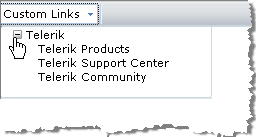
## Using the Links Collection Declaratively
The example below demonstrates how to add a sublist in the Custom Links dropdown treeview. The parent node is the Telerik link and its childs are Telerik Products, Telerik Support Center and Telerik Community:
```ASP.NET
```
## Using Links Programmatically
In the following example, we construct a simple 3-level Custom Links treeview:
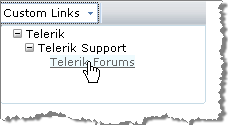
```C#
RadEditor1.Links.Clear();
Telerik.Web.UI.EditorLink telerik = new Telerik.Web.UI.EditorLink();
telerik.Name = "Telerik";
telerik.Href = "https://www.telerik.com/products";
telerik.ToolTip = "Telerik";
Telerik.Web.UI.EditorLink support = new Telerik.Web.UI.EditorLink();
support.Name = "Telerik Support";
support.Href = "https://www.telerik.com/support/home.aspx";
support.ToolTip = "Telerik Support Center";
Telerik.Web.UI.EditorLink forums = new Telerik.Web.UI.EditorLink();
forums.Name = "Telerik Forums";
forums.Href = "https://www.telerik.com/forums";
forums.ToolTip = "Telerik Forums";
RadEditor1.Links.Add(telerik); // Adds the telerik link to the Links dropdown
telerik.ChildLinks.Add(support); //Adds the support link as a child of the telerik link
support.ChildLinks.Add(forums); //Adds the forums link as a child of the support link
```
```VB
RadEditor1.Links.Clear()
Dim telerik As New Telerik.Web.UI.EditorLink()
telerik.Name = "Telerik"
telerik.Href = "https://www.telerik.com/products"
telerik.ToolTip = "Telerik"
Dim support As New Telerik.Web.UI.EditorLink()
support.Name = "Telerik Support"
support.Href = "https://www.telerik.com/support/home.aspx"
support.ToolTip = "Telerik Support Center"
Dim forums As New Telerik.Web.UI.EditorLink()
forums.Name = "Telerik Forums"
forums.Href = "https://www.telerik.com/forums"
forums.ToolTip = "Telerik Forums"
RadEditor1.Links.Add(telerik)
' Adds the telerik link to the Links dropdown
telerik.ChildLinks.Add(support)
'Adds the support link as a child of the telerik link
support.ChildLinks.Add(forums)
'Adds the forums link as a child of the support link
```
## Using the ToolsFile
You can also populate the Custom Links treeview using the ToolsFile.xml file, as shown in the example below:
```XML
```
> note Please bear in mind that RadEditor will persist its state (including the Custom Links set) between post backs. In order to create a new set of Custom Links (e.g. for different users), you will need to clear it first. This can be done using **Remove()** or **Clear()** methods of the Links collection.
## See Also
* [Set Properties](https://www.telerik.com/products/aspnet-ajax/documentation/controls/editor/getting-started/set-properties)