# CSS Styles
In this article you can learn about the usage and configuration of the **Apply CSS Class** tool.
**RadEditor** displays all classes defined in a stylesheet on the page or present in the [external CSS files](https://www.telerik.com/products/aspnet-ajax/documentation/controls/editor/functionality/toolbars/dropdowns/external-css-files) collection in he **Apply CSS Class** dropdown.
You can make the **Apply CSS Class** dropdown show only a subset of those classes by using the **CssClasses** collection. You can add items to the **CssClasses** collection [declaratively](https://www.telerik.com/products/aspnet-ajax/documentation/controls/editor/functionality/toolbars/dropdowns/css-styles#using-the-cssclasses-collection-declaratively), [programmatically](https://www.telerik.com/products/aspnet-ajax/documentation/controls/editor/functionality/toolbars/dropdowns/css-styles#using-cssclasses-programmatically) and by [using the ToolsFile](https://www.telerik.com/products/aspnet-ajax/documentation/controls/editor/functionality/toolbars/dropdowns/css-styles#using-the-toolsfile). The entries you add explicitly must be present in the page stylesheet or in one of the stylesheets defined in the **CssFiles** collection.
Classes that are also present in the **[ContentAreaCssFile](https://www.telerik.com/products/aspnet-ajax/documentation/controls/editor/managing-content/content-area-appearance/using-contentareacssfile-property)** will **not** be displayed in the **Apply CSS Class** dropdown because RadEditor removes all entries from the **ContentAreaCssFile**. The purpose of this stylesheet is to only style the content area and thus it may contain classes/rules that the end user must not see or use. If you have rules/classes that the end user has to see (i.e., ones that will be present where the content will be used), add them in the **[CssFiles](https://www.telerik.com/products/aspnet-ajax/documentation/controls/editor/managing-content/content-area-appearance/contentareacssfile-vs-cssfiles)** collection and not in the **ContentAreaCssFile** stylesheet.
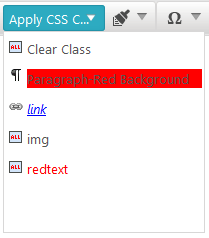
> caption Figure 1: Apply CSS Class dropdown
## Using the CssClasses Collection Declaratively
> note As of **Q3 2015**, **Apply CSS Class** can apply classes to block elements. To instruct the tool to do so, you should add a CSS rule with a selector of this type—`[tag].[classname]`. For example, `p.red-background`.
In the **RadEditor** declaration, add **EditorCssClass** elements to **CssClasses**. In the example below, all three CSS classes are listed along with a "Clear Class" entry. If the **CssClasses** tag is empty, all available classes will be listed.
> important If your page does not contain any css classes and you try set an item in the dropdown with the CssClasses.Add syntax, for example:
>
> `RadEditor1.CssClasses.Add("Links class ", "a.link")`
>
> then the item will not be populated, because the a.link will not exist on the page.
>
> In order for a class to appear in the dropdown it should present either on the page's CSS or in a CSS file added in the **CssFiles** collection.
> important Note that if you have CSS classes defined with the following syntax:
>
> `.Emphasis, p em{color: #A4CE3A; font-style: normal; }`
>
> then the editor will parse and read only the `.Emphasis` class and will populate the **Apply Css Class** dropdown only with this class. If **RadEditor** starts to parse the strings after the comma, this will drastically decrease the editor performance and it will be loaded slower on the page.
> caption Example 1: Configuring Apply CSS Class dropdown.
```ASP.NET
...
```
## Using CssClasses Programmatically
Use the **Add()** method to include classes in the CssClasses collection. In the example below, only the a.link and .img styles will be listed in the dropdown:
> caption Example 2: Adding Classes programatically.
```C#
RadEditor1.CssClasses.Add("Links Class", "a.link");
RadEditor1.CssClasses.Add("Images Class", ".img");
```
```VB
RadEditor1.CssClasses.Add("Links Class", "a.link")
RadEditor1.CssClasses.Add("Images Class", ".img")
```
> caution Make sure you specify the exact name of the class (i.e., " **a.link** " - not "a" or "link"; " **.img** " - not "img").
Using the **Add()** method resets the CssClasses dropdown, so the CssClasses you add will not be appended to the default set, but will rather create a new CssClasses set. If the CssClasses collection is left empty, all available classes will be listed.
| **Default state** | **Programmatic population** |
| ----------------------------------------------------------------------------------------------------------------------------------------------------------------------------------- | ----------------------------------------------------------------------------------------------------------------------------------------------------------------------------------- |
| 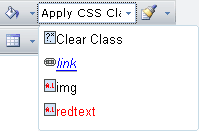 | 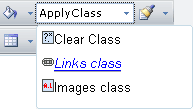 |
| (The CSS class dropdown contains all existing classes) | (The CSS class dropdown contains only the classes added using the **Add()** method) |
## Using the ToolsFile
You can also populate the CSS class dropdown using the **ToolsFile**, as shown in the example below:
> caption Example 3: Adding Classes via ToolsFile.xml file.
```XML
```
> note Bear in mind that **RadEditor** will persist its state (including the CSS classes set) between post backs. In order to create a new set of CSS classes (e.g., for different users), you will need to clear it first. This can be done using **Remove()** and **Clear()** methods of the **CssClasses** collection.
## See Also
* [Set Properties](https://www.telerik.com/products/aspnet-ajax/documentation/controls/editor/getting-started/set-properties)
* [External CSS Files](https://www.telerik.com/products/aspnet-ajax/documentation/controls/editor/functionality/toolbars/dropdowns/external-css-files)
* [CssFiles Collection vs ContentAreaCssFile](https://www.telerik.com/products/aspnet-ajax/documentation/controls/editor/managing-content/content-area-appearance/contentareacssfile-vs-cssfiles)
* [ContentAreaCssFile](https://www.telerik.com/products/aspnet-ajax/documentation/controls/editor/managing-content/content-area-appearance/using-contentareacssfile-property)