# Inline Editing Mode
This article showcases the **Inline Editing** functionality of the **Telerik ASP.NET AJAX Editor** that is available as of **Q3 2014**. You can see it in action in the [Inline Editing](https://demos.telerik.com/aspnet-ajax/editor/examples/inline-editing/defaultcs.aspx) live demo.
This article contains the following sections:
* [What is Inline Editing](https://www.telerik.com/products/aspnet-ajax/documentation/controls/editor/functionality/editor-views-and-modes/inline-editing-mode#what-is-inline-editing)—the key features and specifics of the inline editing mode.
* [Enabling RadEditor Inline Editing](https://www.telerik.com/products/aspnet-ajax/documentation/controls/editor/functionality/editor-views-and-modes/inline-editing-mode#enabling-radeditor-inline-editing)—the basic steps to start using the inline editing together with an example.
* [Customizing the Toolbar](https://www.telerik.com/products/aspnet-ajax/documentation/controls/editor/functionality/editor-views-and-modes/inline-editing-mode#customizing-the-toolbar)—how to customize the editor toolbar by setting its dimensions and choosing tools.
## What is Inline Editing
Inline Editing feature enables you to directly edit the web page content by using **RadEditor** and at the same time to have an overview of the real layout and appearance.
Here are the key features of the **Inline Editing** mode:
* **Click** on the content to **start editing**. At this point the editor toolbar appears above the content. It uses fade animation by default (see **Example 2**).
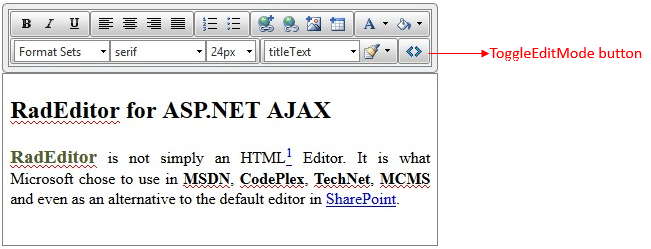
* The default toolbar contains only the most commonly used tools (**Figure 1**).
* While not editing, the borders and the default buttons for switching between the different [edit modes](https://www.telerik.com/products/aspnet-ajax/documentation/controls/editor/functionality/editor-views-and-modes/edit-modes) are hidden.
* The [modules](https://www.telerik.com/products/aspnet-ajax/documentation/controls/editor/functionality/modules/overview) are not available.
* You can switch to HTML edit mode via the **ToggleEditMode** button (**Figure 1**).
* The height of the editor is based on the content height via its [AutoResizeHeight feature](https://www.telerik.com/products/aspnet-ajax/documentation/controls/editor/managing-content/automatic-height-resize) that is enabled by default and cannot be disabled.
* You can set the **Width** property of the control so it matches your current design and layout.
* The [ContentAreaMode](https://www.telerik.com/products/aspnet-ajax/documentation/controls/editor/functionality/editor-views-and-modes/contentareamode-property) of the editor is set to **Div**. Thus, the content area becomes part of the current page and the existing style sheets are automatically inherited.
* You can execute custom client-side code when finished with the inline-editing (i.e., clicking outside of the editor's content area) by handling the [OnClientInlineEditCompleted](https://www.telerik.com/products/aspnet-ajax/documentation/controls/editor/client-side-programming/events/onclientinlineeditcompleted) event.
> caption Figure 1: RadEditor with Inline Editing enabled
## Enabling RadEditor Inline Editing
The inline editing functionality is controlled by the **EditType** property of **RadEditor**. To enable it:
1. Set the **EditType** property to **Inline**.
2. Wrap your already existing layout into the **Content** tag of **RadEditor** (see **Example 1**).
3. Optionally, set the **Width** property of the editor so it fits your layout.
> caption Example 1: Enabling RadEditor inline editing:
```ASP.NET
RadEditor for ASP.NET AJAX
RadEditoris not simply an HTML
1 Editor. It is what Microsoft chose to use in MSDN, CodePlex, TechNet, MCMS and even as an alternative to the default editor in
SharePoint.
```
The result of this example is displayed in **Figure 1**.
## Customizing the Toolbar
The toolbar width has a default value that accommodates the default toolbar. If you set the **Width** property of the editor, however, the toolbar will also inherit this value. If you need to set different width only for the toolbar, you can use the **ToolsWidth** property.
You can see how to add/remove tools in the toolbar in the following help articles:
* [Configure the toolbar using an XML ToolsFile](https://www.telerik.com/products/aspnet-ajax/documentation/controls/editor/functionality/toolbars/using-toolsfile.xml)
* [Adding Standard Buttons](https://www.telerik.com/products/aspnet-ajax/documentation/controls/editor/functionality/toolbars/buttons/add-standard-buttons)
* [Adding Your Own Buttons](https://www.telerik.com/products/aspnet-ajax/documentation/controls/editor/functionality/toolbars/buttons/add-your-own-buttons)
By default, the toolbar shows with a fade-in animation when the editor is in inline edit mode. You can use the **AnimationSettings** inner tag of the control to disable the animation or to change its duration via the **Type** and **Duration** properties of the **ToolbarAnimations** section:
> caption Example 2: Changing the animation settings of RadEditor in Inline edit mode on the server
```ASP.NET
```
You can also change the animation on the client:
> caption Example 3: Changing the animation settings of RadEditor in Inline edit mode on the client
```JavaScript
function changeAnimationSettings() {
var editor = $find("<%=RadEditor1.ClientID%>");
var toolAdapter = editor.get_toolAdapter();
toolAdapter.set_animationType(Telerik.Web.UI.Editor.EditorToolBarAnimationType.None); //or Telerik.Web.UI.Editor.EditorToolBarAnimationType.Fade which is the default value
toolAdapter.set_animationDuration(500);
}
```
## See Also
* [ContentAreaMode Property](https://www.telerik.com/products/aspnet-ajax/documentation/controls/editor/functionality/editor-views-and-modes/contentareamode-property)
* [Edit Modes](https://www.telerik.com/products/aspnet-ajax/documentation/controls/editor/functionality/editor-views-and-modes/edit-modes)
* [Overview](https://www.telerik.com/products/aspnet-ajax/documentation/controls/editor/functionality/modules/overview)
* [Using ToolsFile.xml](https://www.telerik.com/products/aspnet-ajax/documentation/controls/editor/functionality/toolbars/using-toolsfile.xml)
* [Add Standard Buttons](https://www.telerik.com/products/aspnet-ajax/documentation/controls/editor/functionality/toolbars/buttons/add-standard-buttons)
* [Add Your Own Buttons](https://www.telerik.com/products/aspnet-ajax/documentation/controls/editor/functionality/toolbars/buttons/add-your-own-buttons)
* [Automatic Height Resize](https://www.telerik.com/products/aspnet-ajax/documentation/controls/editor/managing-content/automatic-height-resize)
* [OnClientInlineEditCompleted](https://www.telerik.com/products/aspnet-ajax/documentation/controls/editor/client-side-programming/events/onclientinlineeditcompleted)
* [Live demo: Editor - Inline Editing](https://demos.telerik.com/aspnet-ajax/editor/examples/inlineediting/defaultcs.aspx)