# Nested Context Menus
In this help article, you will learn how you can configure **RadEditor** with nested context menus.
The capability to nest the context menus in **RadEditor** is available as of **R2 2016** and it is supported only for [Lightweight rendering](https://www.telerik.com/products/aspnet-ajax/documentation/controls/editor/mobile-support/render-modes).
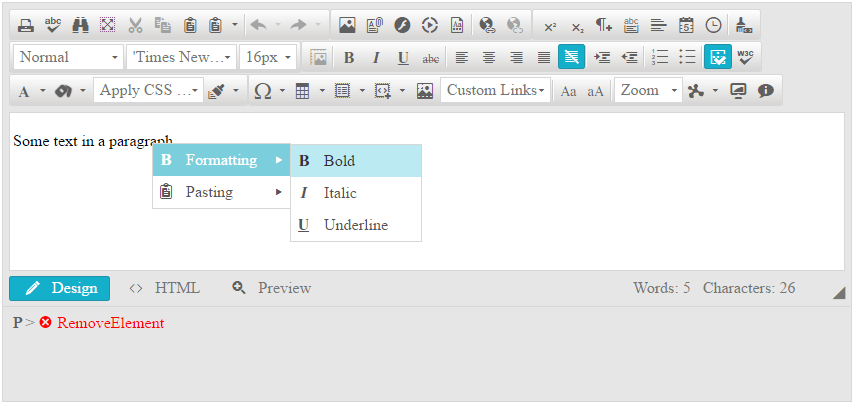
With the new feature, the `Tools` collection of the `EditorContextMenu` class supports a new item — `EditorContextMenuTool`. You can use its `Tools` collection to add additional tools (`EditorTool` items) that will be in the nested menu.
The `EditorContextMenuTool` class can be edited by using the:
* `Name` property to edit the text of the tool that opens the nested menu.
* `IconCssClass` property to add a class name to the icon element in order to style it with CSS later.
You can also configure multilevel nesting, as shown in **Example 3**.
> caption Figure 1: RadEditor with configured nested context menus from Example 1.
> caption Example 1: Configuring nested context menus.
```ASP.NET
Some text in a paragraph.
```
> caption Example 2: Configuring nested context menus from the code behind.
```ASP.NET
Some text in a paragraph.
```
```C#
EditorContextMenuTool formattingMenu = new EditorContextMenuTool("Formatting");
formattingMenu.IconCssClass = "reBold";
formattingMenu.Tools.Add(new EditorTool("Bold"));
formattingMenu.Tools.Add(new EditorTool("Italic"));
formattingMenu.Tools.Add(new EditorTool("Underline"));
EditorContextMenuTool pastingMenu = new EditorContextMenuTool("Pasting");
pastingMenu.IconCssClass = "rePaste";
pastingMenu.Tools.Add(new EditorTool("Cut"));
pastingMenu.Tools.Add(new EditorTool("Copy"));
pastingMenu.Tools.Add(new EditorTool("Paste"));
EditorContextMenu myContextMenu = new EditorContextMenu();
myContextMenu.TagName = "P";
myContextMenu.Tools.Add(formattingMenu);
myContextMenu.Tools.Add(pastingMenu);
RadEditor1.ContextMenus.Add(myContextMenu);
```
```VB
Dim formattingMenu As New EditorContextMenuTool("Formatting")
formattingMenu.IconCssClass = "reBold"
formattingMenu.Tools.Add(New EditorTool("Bold"))
formattingMenu.Tools.Add(New EditorTool("Italic"))
formattingMenu.Tools.Add(New EditorTool("Underline"))
Dim pastingMenu As New EditorContextMenuTool("Pasting")
pastingMenu.IconCssClass = "rePaste"
pastingMenu.Tools.Add(New EditorTool("Cut"))
pastingMenu.Tools.Add(New EditorTool("Copy"))
pastingMenu.Tools.Add(New EditorTool("Paste"))
Dim myContextMenu As New EditorContextMenu()
myContextMenu.TagName = "P"
myContextMenu.Tools.Add(formattingMenu)
myContextMenu.Tools.Add(pastingMenu)
RadEditor1.ContextMenus.Add(myContextMenu)
```
> caption Example 3: Multilevel nesting in context menus.
```ASP.NET
Some text in a paragraph.
```
## See Also
* [Context Menus Overview](https://www.telerik.com/products/aspnet-ajax/documentation/controls/editor/functionality/context-menus/overview)
* [Render Modes](https://www.telerik.com/products/aspnet-ajax/documentation/controls/editor/mobile-support/render-modes)