# Creating RadDock Dynamically
One common use of **RadDock** is creating dynamic personalized **Portal** sites. These sites are highly dynamic and require programmatic creation of the **RadDock** controls on the page related to the currently logged users based on database records. In this case the **RadDock** controls are often the core of the Page layout. To ensure proper operation of their content controls, you should follow the following simple rules:
1. Create the **RadDock** controls and their content in **Page_Init**. This is mandatory if they contain controls which initiate postback or AJAX callback events. If you create a **RadDock** control in other event, such as **Button_Click**, it must be recreated in **Page_Init** on the next postback so that its events can be raised properly.
2. Use the **LoadDockLayout** event of the **RadDockLayout** control to supply it with information about the initial positions of the **RadDock** controls: their index and parent **RadDockZone** control ID.
3. Use the **SaveDockLayout** event to save, in one place, the positions and the state of all **RadDock** controls inside the **RadDockLayout** control. If you need to, you can use any other event to store the positions and the state of the **RadDock** controls, for example **Button_Click**.
4. Always set the **UniqueName** property of the **RadDock** controls.
## Example
The following example demonstrates how to dynamically create RadDock controls on a Web site, similar to the [Dynamically Created Docks](https://demos.telerik.com/aspnet-ajax/Dock/Examples/DynamicDocks/DefaultCS.aspx) example.
1. Create a new ASP.NET AJAX-enabled Web Site. Add a **Button**, **RadDockLayout**, and a few **RadDockZone** controls inside the **RadDockLayout**:
```ASP.NET
```
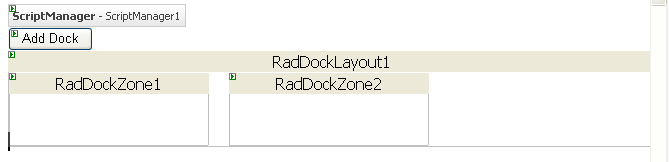
2. The Web page needs some way to store the state of the **RadDock** controls so that it persists across visits to the page. **RadDock** includes a special class, named **DockState**, which is designed for storing the state information about a **RadDock** control. This example uses a list of these **DockState** objects to stores the state information for dynamically created **RadDock** controls. Normally, you would use a permanent medium such as a database to store the list. For simplicity, this example uses the **Session**.
1. At the top of the code behind for your Web page, add two new **using** statements (C#) or **Imports** statements (VB) for System.Collections.Generic and Telerik.Web.UI:
```C#
using System.Collections.Generic;
using Telerik.Web.UI;
```
```VB
Imports System.Collections.Generic
Imports Telerik.Web.UI
```
2. Add the following property definition to the class definition of your Web page:
```C#
private List CurrentDockStates
{
//Store the info about the added docks in the session.
private List CurrentDockStates
{
get
{
List _currentDockStates = (List)Session["CurrentDockStates"];
if (Object.Equals(_currentDockStates, null))
{
_currentDockStates = new List();
Session["CurrentDockStates"] = _currentDockStates;
}
return _currentDockStates;
}
set
{
Session["CurrentDockStates"] = value;
}
}
}
```
```VB
Private Property CurrentDockStates() As List(Of DockState)
Get
Dim _currentDockStates As List(Of DockState) = _
DirectCast(Session("CurrentDockStates"), List(Of DockState))
If [Object].Equals(_currentDockStates, Nothing) Then
_currentDockStates = New List(Of DockState)()
Session("CurrentDockStates") = _currentDockStates
End If
Return _currentDockStates
End Get
Set(ByVal value As List(Of DockState))
Session("CurrentDockStates") = value
End Set
End Property
```
3. Add a **Click** event handler to the Button on the Web page. This event handler creates a new **RadDock** control and adds it to the first **RadDockZone** control. Note that when creating a new **RadDock** control, it must have a **UniqueName** so that the **RadDockLayout** component can distinguish it and accurately manage its state:
```C#
private RadDock CreateRadDock()
{
int docksCount = CurrentDockStates.Count;
RadDock dock = new RadDock();
dock.ID = string.Format("RadDock{0}", docksCount);
dock.Title = string.Format("Dock {0}", docksCount);
dock.Text = string.Format("Added at {0}", DateTime.Now);
dock.UniqueName = Guid.NewGuid().ToString();
dock.Width = Unit.Pixel(300);
return dock;
}
protected void Button1_Click(object sender, EventArgs e)
{
RadDock dock = CreateRadDock();
RadDockLayout1.Controls.Add(dock);
dock.Dock(RadDockZone1);
}
```
```VB
Private Function CreateRadDock() As RadDock
Dim docksCount As Integer = CurrentDockStates.Count
Dim dock As New RadDock()
dock.ID = String.Format("RadDock{0}", docksCount)
dock.Title = String.Format("Dock {0}", docksCount)
dock.Text = String.Format("Added at {0}", DateTime.Now)
dock.UniqueName = Guid.NewGuid().ToString()
dock.Width = Unit.Pixel(300)
Return dock
End Function
Protected Sub Button1_Click(ByVal sender As Object, ByVal e As EventArgs) Handles Button1.Click
Dim dock As RadDock = CreateRadDock()
RadDockLayout1.Controls.Add(dock)
dock.Dock(RadDockZone1)
End Sub
```
> tip If you want the dynamically created **RadDock** controls to store additional information, you can use the **Tag** property to save that information. For an example that uses this technique, see [Adding Controls Inside Dynamically Created Docks](https://www.telerik.com/products/aspnet-ajax/documentation/controls/dock/how-to/adding-controls-inside-dynamically-created-docks).
4. Run the application. Note that you never have more than one **RadDock** control. This is because the dynamically created controls disappear from the page whenever there is a postback, such as when the button **Click** event occurs. You must re-create these controls every time the page loads.
5. In order to let ensure that the state of all created **RadDock** controls persists over a postback, add code to save and load their state.
1. Add a **SaveDockLayout** event handler to the **RadDockLayout** component. This event handler calls the **RadDockLayout.GetRegisteredDocksState** method to obtain the current list of dock states and saves the list to the **CurrentDockStates** property.
```C#
protected void RadDockLayout1_SaveDockLayout(object sender, DockLayoutEventArgs e)
{
CurrentDockStates = RadDockLayout1.GetRegisteredDocksState();
}
```
```VB
Protected Sub RadDockLayout1_SaveDockLayout( _
ByVal sender As Object, _
ByVal e As DockLayoutEventArgs) _
Handles RadDockLayout1.SaveDockLayout
CurrentDockStates = RadDockLayout1.GetRegisteredDocksState()
End Sub
```
2. Add a **Page_Init** event handler to your Web page that recreates the **RadDock** controls after a postback. It uses the **CurrentDockStates** property (which was set in the **SaveDockLayout** event handler) to initialize their properties using the **RadDock.ApplyState** method. This event handler does not need to add the **RadDock** controls to their parent dock zones, it is enough that they are added to the **RadDockLayout** or one of its children. The **RadDockLayout** control will restore the parent dock zones and position after the **LoadDockLayout** event.
```C#
protected void Page_Init(object sender, EventArgs e)
{
for (int i = 0; i < CurrentDockStates.Count; i++)
{
RadDock dock = new RadDock();
dock.ID = string.Format("RadDock{0}", i);
dock.ApplyState(CurrentDockStates[i]);
RadDockLayout1.Controls.Add(dock);
}
}
```
```VB
Protected Sub Page_Init(ByVal sender As Object, ByVal e As EventArgs) Handles Me.Init
Dim i As Integer
For i = 0 To CurrentDockStates.Count - 1
Dim dock As RadDock = New RadDock()
dock.ID = String.Format("RadDock{0}", i)
dock.ApplyState(CurrentDockStates(i))
RadDockLayout1.Controls.Add(dock)
Next i
End Sub
```
> note When the **RadDock** controls are recreated on **Page_Init** , it is important that you always set the same value in their property **ID** . This way you will ensure that the layout of the **RadDock** controls will be persisted after a postback.
3. Add a **LoadDockLayout** event handler. This event handler tells the **RadDockLayout** control the parent dock zones and indices of the **RadDock** controls that were added in the **Page_Init** event handler. **RadDockLayout** uses this information to restore the layout:
```C#
protected void RadDockLayout1_LoadDockLayout(object sender, DockLayoutEventArgs e)
{
foreach (DockState state in CurrentDockStates)
{
e.Positions[state.UniqueName] = state.DockZoneID;
e.Indices[state.UniqueName] = state.Index;
}
}
```
```VB
Protected Sub RadDockLayout1_LoadDockLayout( _
ByVal sender As Object, _
ByVal e As DockLayoutEventArgs) _
Handles RadDockLayout1.LoadDockLayout
For Each state As DockState In CurrentDockStates
e.Positions(state.UniqueName) = state.DockZoneID
e.Indices(state.UniqueName) = state.Index
Next state
End Sub
```
## See Also
* [Lifecycle](https://www.telerik.com/products/aspnet-ajax/documentation/controls/dock/structure/dock/lifecycle)
* [SaveDockLayout](https://www.telerik.com/products/aspnet-ajax/documentation/controls/dock/server-side-programming/events/savedocklayout)
* [LoadDockLayout](https://www.telerik.com/products/aspnet-ajax/documentation/controls/dock/server-side-programming/events/loaddocklayout)