# Configuring the Embedded Time View
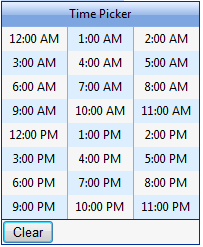
By default, the embedded **RadTimeView** control that the **RadDateTimePicker** control displays as a popup has a header area that says "Time Picker", and three columns of times that the user can select. The times range from 12:00 AM through 11:00 PM, with an entry for every hour:
* To change the text of the header, set the **HeaderText** property. If you set **HeaderText** to an empty string, the header does not appear. You can also hide the header by setting the **ShowHeader** property.
* To change the range of times displayed, use the **StartTime** and **EndTime** properties.
* To change the interval between adjacent times in the time view, set the **Interval** property. The valid values are between **StartTime** and **EndTime** and less than **EndTime - StartTime**.
* To change the number of columns, set the **Columns** property.
You can set these properties at design time by expanding the **TimeView** property:
```ASPNET
```
## RadDateTimePicker custom values
**RadDateTimePicker** allows displaying custom pre-defined time values. This feature is controlled by the **CustomTimeValues** property that the **TimeView** of the time picker exposes. The **CustomTimeValues** is of type object and accepts:
1. A string array where each string represents a given time value. The separator for the various time parts can be a column, a dash or a semi-column. Each string time value can contains:
* day, hour, minutes, seconds, milliseconds
* hour, minutes, seconds, milliseconds
* hour, minutes, seconds
* hour, minutes
2. A **TimeSpan** array with the custom-defined time values.
3. A **DateTime** array containing the user-specified time values.
Here is an example how to set the value of the property
Using a string array:
```C#
protected void SetCustomValuesByStringArray()
{
RadDateTimePicker1.TimeView.CustomTimeValues = new string[] { "12,10,10,57,4", "5,6,3,38,9", "3,8,11,5,7" };
}
```
```VB
Protected Sub SetCustomValuesByStringArray()
RadDateTimePicker1.TimeView.CustomTimeValues = New String() {"12,10,10,57,4", "5,6,3,38,9", "3,8,11,5,7"}
End Sub
```
Using **TimeSpan** array:
```C#
protected void SetCustomValuesByTimeSpansArray()
{
RadDateTimePicker1.TimeView.CustomTimeValues = new TimeSpan[] { new TimeSpan(12, 10, 10), new TimeSpan(5, 6, 3), new TimeSpan(3, 8, 11) };
}
```
```VB
Protected Sub SetCustomValuesByTimeSpansArray()
RadDateTimePicker1.TimeView.CustomTimeValues = New TimeSpan() {New TimeSpan(12, 10, 10), New TimeSpan(5, 6, 3), New TimeSpan(3, 8, 11)}
End Sub
```
Using **DateTime** array:
```C#
protected void SetCustomValuesByDateTimeArray()
{
RadDateTimePicker1.TimeView.CustomTimeValues = new DateTime[] { new DateTime(2012, 12, 15, 12, 10, 10), new DateTime(2012, 12, 15, 5, 6, 3), new DateTime(2012, 12, 15, 3, 8, 11) };
}
```
```VB
Protected Sub SetCustomValuesByDateTimeArray()
RadDateTimePicker1.TimeView.CustomTimeValues = New DateTime() {New DateTime(2012, 12, 15, 12, 10, 10), New DateTime(2012, 12, 15, 5, 6, 3), New DateTime(2012, 12, 15, 3, 8, 11)}
End Sub
```
To enable scrolling for the **TimeView** you can set its Width and Height properties:
```ASPNET
```
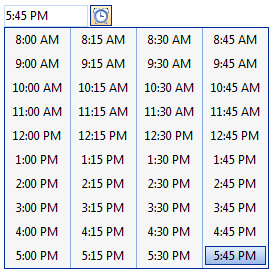
You can also configure the embedded time view control at runtime:
```C#
protected void Page_Load(object sender, EventArgs e)
{
if (!IsPostBack)
{
RadDateTimePicker1.TimeView.StartTime = new TimeSpan(8, 0, 0);
RadDateTimePicker1.TimeView.EndTime = new TimeSpan(18, 0, 0);
RadDateTimePicker1.TimeView.Interval = new TimeSpan(0, 15, 0);
RadDateTimePicker1.TimeView.HeaderText = "";
RadDateTimePicker1.TimeView.Columns = 4;
}
}
```
```VB
Protected Sub Page_Load(ByVal sender As Object, ByVal e As EventArgs) Handles Me.Load
If Not IsPostBack Then
RadDateTimePicker1.TimeView.StartTime = New TimeSpan(8, 0, 0)
RadDateTimePicker1.TimeView.EndTime = New TimeSpan(18, 0, 0)
RadDateTimePicker1.TimeView.Interval = New TimeSpan(0, 15, 0)
RadDateTimePicker1.TimeView.HeaderText = ""
RadDateTimePicker1.TimeView.Columns = 4
End If
End Sub
```
## See Also
* [RadTimeView Structure](https://www.telerik.com/products/aspnet-ajax/documentation/controls/datetimepicker/getting-started/radtimeview-structure)
* [Customizing the Embedded Controls](https://www.telerik.com/products/aspnet-ajax/documentation/controls/datetimepicker/functionality/customizing-embedded-controls)
* [RadTimeView Templates](https://www.telerik.com/products/aspnet-ajax/documentation/controls/datetimepicker/templates/radtimeview-templates)