# Getting Started with the Telerik WebForms DateRangePicker
The following article shows the structure and demonstrates how you can add the RadDateRangePicker control and customize it by setting some of its properties.
## Structure
The structure of the **RadDateRangePicker** control is as follows:
> caption Figure 1: DateRangePicker structure with its calendar and two date pickers
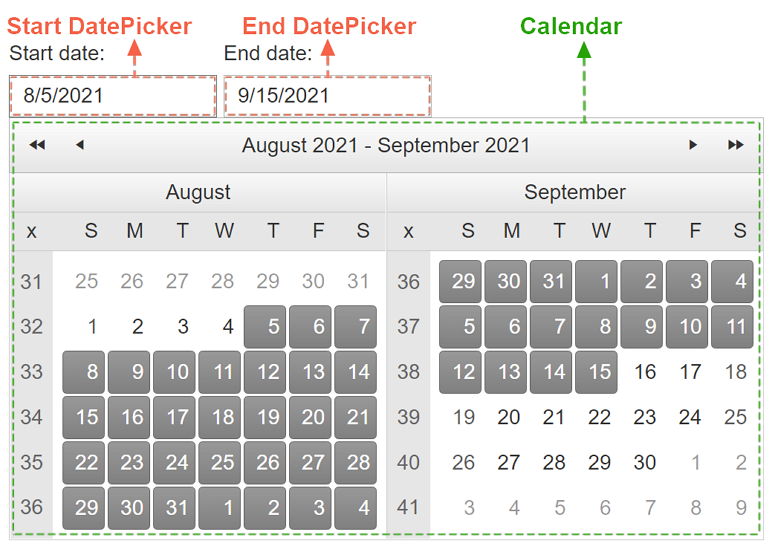
The rich functionality of the built-in RadCalendar and DatePicker(s) determine the flexibility of the RadDateRangePicker itself. You can use the corresponding inner tags to set the properties of the Calendar and pickers in any desired manner as shown below:
> caption Example: Configure the embedded calendar and date pickers
```ASP.NET
```
To find more on how to customize the embedded controls, check out the [Customizing the Embedded Controls](https://www.telerik.com/products/aspnet-ajax/documentation/controls/daterangepicker/functionality/customizing-embedded-controls) article and the the dedicated documentation sections of the embedded components:
* [RadCalendar Overview](https://www.telerik.com/products/aspnet-ajax/documentation/controls/calendar/overview)
* [RadDatePicker Overview](https://www.telerik.com/products/aspnet-ajax/documentation/controls/datepicker/overview)
For the intuitive behavior of a simply declared RadDateRangePicker, we have changed some of the default values in its embedded controls:
> caption Calendar
| Property | Default value in **RadDateRangePicker** | Default value in **RadCalendar** |
| -------------------- | --------------------------------------- | -------------------------------- |
| `RangeSelectionMode` | ConsecutiveClicks | None |
| `MultiViewColumns` | 2 | 1 |
> caption DatePicker(s)
| Property | Default value in **RadDateRangePicker** | Default value in **RadDatePicker** |
| ------------------------- | --------------------------------------- | ---------------------------------- |
| `DatePopupButton-Visible` | False | True |
| `ShowPopupOnFocus` | True | False |
> note
> For the proper functioning of the RadDateRangePicker, some features of the embedded Calendar and DatePickers are disabled.
## Add a RadDateRangePicker Control
1. Add a **ScriptManager** control on a Web Form.
2. Use the **\** tag to declare the RadDateRangePicker.
3. Set the desired properties of the DateRangePickers and its embedded controls: Calendar, StartDatePicker, EndDatePicker:
> caption Example: Add a DateRangePicker with a ScriptManager
```ASP.NET
```
As a next step, you can check out the [Functionality](https://www.telerik.com/products/aspnet-ajax/documentation/controls/daterangepicker/functionality/date-range-selection) of the RadDateRangePicker.
## See Also
* [Server-side Programming](https://www.telerik.com/products/aspnet-ajax/documentation/controls/daterangepicker/server-side-programming/overview)
* [Install Telerik UI for ASP.NET AJAX with MSI installer](https://www.telerik.com/products/aspnet-ajax/documentation/getting-started/installation/install-using-msi)
* [RadDateRangePicker online demos](https://demos.telerik.com/aspnet-ajax/daterangepicker/examples/overview/defaultcs.aspx)