# Data Binding in Templates
When item templates are used, the controls in the template, need to display information associated with RadComboBox item data. Otherwise, the items will all appear the same. For example, consider a simple RadComboBox with a button in the item template:
```ASPNET
```
When you run the application, RadComboBox displays a list of identical buttons in its drop-down list:
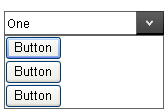
This is hardly useful! To override the **Text** property of the button in the template, the **DataBinder.Eval** statement is used, just as in the example below:
```ASPNET
```
In the DataBinder.Eval statement, **Container** is the RadComboBoxItem and **"Text"** identifies the **Text** property of that item. (If you wanted to bind to the **Value** property, you could use the string "Value" instead.)
> note In this example, the first parameter to the DataBinder.Eval statement is **Container** , because the items are statically bound. If the RadComboBox is bound to a data source, the **Container.DataItem** statement should be used instead. That is <%#DataBinder.Eval(Container.DataItem, "Text") %>
In addition to adding a DataBinder.Eval statement, you must also explicitly call the DataBind method for the items so that the template has access to the **Text** property:
```C#
protected void Page_Load(object sender, EventArgs e)
{
for (int i = 0; i < RadComboBox1.Items.Count; i++)
{
RadComboBox1.Items[i].DataBind();
}
}
```
```VB.NET
Protected Sub Page_Load(ByVal sender As Object, ByVal e As EventArgs) Handles Me.Load
Dim i As Integer = 0
While i < RadComboBox1.Items.Count
RadComboBox1.Items(i).DataBind()
i = i + 1
End While
End Sub
```
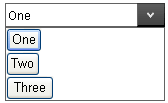
Now the text of the RadComboBox items appears on the buttons:
## See Also
* [Data Binding Overview](https://www.telerik.com/products/aspnet-ajax/documentation/controls/combobox/data-binding/overview)
* [ComboBox Items Overview](https://www.telerik.com/products/aspnet-ajax/documentation/controls/combobox/radcombobox-items/overview)