# Custom Attributes
**RadComboBox** items provide a special collection called **Attributes**. You can use this collection to expand the information stored with the items. The **Attributes** collection lets you store any number of attributes as name / value pairs. You can specify custom attributes declaratively in the **RadComboBoxItem** tag or programmatically using the **Attributes** collection of the RadComboBoxItem. You can also access custom attributes client-side, using the **get_attributes** collection of the **RadComboBoxItem** client-side object.
## Using attributes declaratively
This example shows how to use custom attributes declaratively to display extra information in RadComboBox items:
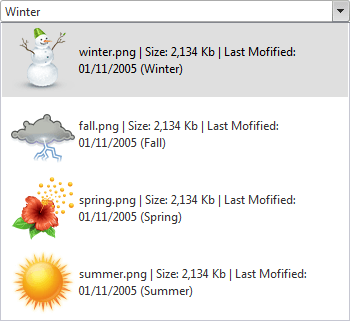
To customize RadComboBox items, this example uses an item [template](https://www.telerik.com/products/aspnet-ajax/documentation/controls/combobox/templates/overview). The custom attributes of the item are used to bind the controls in the template. The template controls are bound using data-binding expressions with typical ASP.NET format and syntax, e.g. "**<%# DataBinder.Eval(Container, "Attributes\['ImagePath']") %>".** Both **ImagePath** and **DisplayName** are custom attributes.
```C#
```
Before the template can use the custom attributes in its data-binding expressions, the application needs to explicitly bind the items by calling the **DataBind** method of the **RadComboBoxItem** objects:
```C#
protected void Page_Load(object sender, EventArgs e)
{
for (int i = 0; i < RadComboBox1.Items.Count; i++)
{
RadComboBox1.Items[i].DataBind();
}
}
```
```VB.NET
Protected Sub Page_Load(ByVal sender As Object, ByVal e As EventArgs) Handles Me.Load
Dim i As Integer = 0
While i < RadComboBox1.Items.Count
RadComboBox1.Items(i).DataBind()
i = i + 1
End While
End Sub
```
## Using custom attributes server-side
## Creating items programmatically
You can add any name/value pair (value must be string) in the Attributes collection of each RadComboBoxItem and retrieve it later.
```C#
...
RadComboBoxItem item = new RadComboBoxItem("Some Item");
item.Attributes["ImagePath"] = "fall.png";
item.Attributes["DisplayName"] = "fall.png | Size: 2,134 Kb | Last Mofified: 01/11/2005";
...
```
```VB.NET
...
Dim item As New RadComboBoxItem("Some Item")
item.Attributes("ImagePath") = "fall.png"
item.Attributes("DisplayName") = "fall.png | Size: 2,134 Kb | Last Mofified: 01/11/2005"s
...
```
## RadComboBox data binding
You can handle the RadComboBox' **ItemDataBound** event and set the Attributes for each Item there.
```C#
protected void RadComboBox1_ItemDataBound(object sender, RadComboBoxItemEventArgs e)
{
DataRowView dataItem = (DataRowView)e.Item.DataItem;
e.Item.Attributes["ImagePath"] = dataItem["ImagePath"];
e.Item.Attributes["Description"] = dataItem["Description"];
}
```
```VB.NET
Protected Sub RadComboBox1_ItemDataBound(ByVal sender As Object, ByVal e As RadComboBoxItemEventArgs) Handles RadComboBox1.ItemDataBound
Dim dataItem As DataRowView = CType(e.Item.DataItem, DataRowView)
e.Item.Attributes("ImagePath") = dataItem("ImagePath")
e.Item.Attributes("Description") = dataItem("Description")
End Sub
```
## Using custom attributes client-side
Custom attributes are exposed in the client-side API as well. Each client-side instance of **RadComboBoxItem** has a collection named **Attributes** that contains all custom attributes for the respective item. This example demonstrates how to show some custom attributes for the selected item:
```C#
```
## See Also
* [Data Binding Overview](https://www.telerik.com/products/aspnet-ajax/documentation/controls/combobox/data-binding/overview)
* [ItemDataBound](https://www.telerik.com/products/aspnet-ajax/documentation/controls/combobox/server-side-programming/itemdatabound)