# ShowMoreResultsBox/Virtual Scrolling
## Using the ShowMoreResultsBox with the ItemsRequested event
Both the **ShowMoreResultsBox** and **Virtual Scrolling** mechanisms fire the **ItemsRequested** event upon each click on the ShowMoreResultsBox or scrolling down using the vertical scrollbar of the drop-down area.
The **ShowMoreResultsBox** and the **EnableVirtualScrolling** properties let you load portions of the combobox items in each **ItemsRequested** event handler to achieve a faster loading speed.
> note You can use these approaches separately from one another.
> note To use the VirtualScrolling mechanism, the **Height** or **MaxHeight** property of the **RadComboBox** should be set.
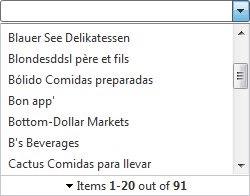
For example, you could add 10 items per a request:
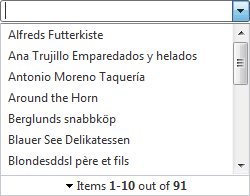
After clicking on the **ShowMoreResultsBox** or **scrolling down** via the vertical scrollbar of the dropdown, the next 10 items will be added to the Items list.
To enable load-on-demand with a show more results box and/or virtual scrolling:
1. Set the **ShowMoreResultsBox** property to **True**.
2. Set the **EnableVirtualScrolling** property to **True** and the **Height** or **MaxHeight** properties if you need to also enable the virtual scrolling mechanism.
3. Set the **EnableLoadOnDemand** property to **True**.
4. Add an **ItemsRequested** event handler that supplies the next batch of items. On the EventArgs of the event handler, the **NumberOfItems** property indicates the number of items that have already been loaded and the **Message** property lets you specify the message that appears in the ShowMoreResults box.
```C#
protected void RadComboBox1_ItemsRequested(object sender, RadComboBoxItemsRequestedEventArgs e)
{
string sql = "SELECT * from Customers WHERE CompanyName LIKE '" + e.Text + "%'";
SqlDataAdapter adapter = new SqlDataAdapter(sql, ConfigurationManager.ConnectionStrings["NorthwindConnectionString"].ConnectionString);
DataTable data = new DataTable();
adapter.Fill(data);
try
{
int itemsPerRequest = 10;
int itemOffset = e.NumberOfItems;
int endOffset = itemOffset + itemsPerRequest;
if (endOffset > data.Rows.Count)
{
endOffset = data.Rows.Count;
}
for (int i = itemOffset; i < endOffset; i++)
{
RadComboBox1.Items.Add(new RadComboBoxItem(data.Rows[i]["CompanyName"].ToString(), data.Rows[i]["CompanyName"].ToString() + "'"));
}
if (data.Rows.Count > 0)
{
e.Message = String.Format("Items 1-{0} out of {1}", endOffset.ToString(), data.Rows.Count.ToString());
}
else { e.Message = "No matches"; }
}
catch
{
e.Message = "No matches";
}
}
```
```VB.NET
Protected Sub RadComboBox1_ItemsRequested(ByVal sender As Object, ByVal e As RadComboBoxItemsRequestedEventArgs) Handles RadComboBox1.ItemsRequested
Dim sql As String = "SELECT * from Customers WHERE CompanyName LIKE '" + e.Text + "%'"
Dim adapter As New SqlDataAdapter(sql, ConfigurationManager.ConnectionStrings("NorthwindConnectionString").ConnectionString)
Dim data As New DataTable()
adapter.Fill(data)
Try
Dim itemsPerRequest As Integer = 10
Dim itemOffset As Integer = e.NumberOfItems
Dim endOffset As Integer = itemOffset + itemsPerRequest
If endOffset > data.Rows.Count Then
endOffset = data.Rows.Count
End If
Dim i As Integer = itemOffset
While i < endOffset
RadComboBox1.Items.Add(New RadComboBoxItem(data.Rows(i)("CompanyName").ToString(), data.Rows(i)("CompanyName").ToString() + "'"))
i = i + 1
End While
If data.Rows.Count > 0 Then
e.Message = [String].Format("Items 1-{0} out of {1}", endOffset.ToString(), data.Rows.Count.ToString())
Else
e.Message = "No matches"
End If
Catch
e.Message = "No matches"
End Try
End Sub
```
## Using the ShowMoreResultsBox with a WebService
In addition you can populate the combobox items via a **WebService** and still use the **ShowMoreResultsBox** or the **Virtual Scrolling** approaches.
You should properly set the **WebServiceSettings** tag of the combobox to point to the right *asmx* file, like:
```XML
```
In the WebService's method, you should pass a parameter (this parameter should be called **context**) of type **RadComboBoxContext**:
```XML
public RadComboBoxData GetCustomers(RadComboBoxContext context)
```
The context object is used to obtain:
* The text entered in the input field by the user: **context.Text**
* The number of items per request: **context.NumberOfItems**
> note Note that the WebService's method is of type **RadComboBoxData** unlike the method used in the WebService when the **ShowMoreResultsBox** is disabled. Then, the WebService's method can be either of type **RadComboBoxItemData** or **RadComboBoxData**.
```C#
public RadComboBoxData GetCustomers(RadComboBoxContext context)
{
string sql = "SELECT * from Customers WHERE CompanyName LIKE '" + context.Text + "%'";
SqlDataAdapter adapter = new SqlDataAdapter(sql, ConfigurationManager.ConnectionStrings["NorthwindConnectionString"].ConnectionString);
DataTable data = new DataTable();
adapter.Fill(data);
List result = new List(context.NumberOfItems);
RadComboBoxData comboData = new RadComboBoxData();
try
{
int itemsPerRequest = 10;
int itemOffset = context.NumberOfItems;
int endOffset = itemOffset + itemsPerRequest;
if (endOffset > data.Rows.Count)
{
endOffset = data.Rows.Count;
}
if (endOffset == data.Rows.Count)
{
comboData.EndOfItems = true;
}
else
{
comboData.EndOfItems = false;
}
result = new List(endOffset - itemOffset);
for (int i = itemOffset; i < endOffset; i++)
{
RadComboBoxItemData itemData = new RadComboBoxItemData();
itemData.Text = data.Rows[i]["CompanyName"].ToString();
itemData.Value = data.Rows[i]["CompanyName"].ToString(); result.Add(itemData);
}
if (data.Rows.Count > 0)
{
comboData.Message = String.Format("Items 1-{0} out of {1}", endOffset.ToString(), data.Rows.Count.ToString());
}
else
{
comboData.Message = "No matches";
}
}
catch
(Exception e)
{
comboData.Message = e.Message;
}
comboData.Items = result.ToArray();
return comboData;
}
```
```VB.NET
Public Function GetCustomers(ByVal context As RadComboBoxContext) As RadComboBoxData
Dim sql As String = "SELECT * from Customers WHERE CompanyName LIKE '" + Context.Text + "%'"
Dim adapter As New SqlDataAdapter(sql, ConfigurationManager.ConnectionStrings("NorthwindConnectionString").ConnectionString)
Dim data As New DataTable()
adapter.Fill(data)
Dim result As New List(Of RadComboBoxItemData)(context.NumberOfItems)
Dim comboData As New RadComboBoxData()
Try
Dim itemsPerRequest As Integer = 10
Dim itemOffset As Integer = context.NumberOfItems
Dim endOffset As Integer = itemOffset + itemsPerRequest
If endOffset > data.Rows.Count Then
endOffset = data.Rows.Count
End If
If endOffset = data.Rows.Count Then
comboData.EndOfItems = True
Else
comboData.EndOfItems = False
End If
result = New List(Of RadComboBoxItemData)(endOffset - itemOffset)
Dim i As Integer = itemOffset
While i < endOffset
Dim itemData As New RadComboBoxItemData()
itemData.Text = data.Rows(i)("CompanyName").ToString()
itemData.Value = data.Rows(i)("CompanyName").ToString()
result.Add(itemData)
i = i + 1
End While
If data.Rows.Count > 0 Then
comboData.Message = [String].Format("Items 1-{0} out of {1}", endOffset.ToString(), data.Rows.Count.ToString())
Else
comboData.Message = "No matches"
End If
Catch e As Exception
comboData.Message = e.Message
End Try
comboData.Items = result.ToArray()
Return comboData
EndFunction
```
For a live example, see [Load On Demand](https://demos.telerik.com/aspnet-ajax/ComboBox/Examples/PopulatingWithData/AutoCompleteSql/DefaultCS.aspx)