# Getting Started with the Telerik WebForms ClientDataSource

The **RadClientDataSource** control is a server-side **ASP.NET AJAX wrapper** of the **Kendo.UI DataSource** component, which could be used for performing various data source operations on the client. It fully supports binding to different kinds of web services and also provides both local and server-side support for **sorting**, **paging**, **filtering**, **grouping**, and **aggregates**.

With the steps below, we will show how to entirely bind a **RadGrid** control to a **RadClientDataSource** declaratively by involving the **Design Time** of the control.

1. From the **Toolbox** in **Visual Studio**, drag a **RadClientDataSource** and a **RadGrid** instances to the design surface of your page.

2. Set a **WebService** using the **Url** property.

```ASP.NET
<telerik:RadClientDataSource ID="RadClientDataSource1" runat="server">
    <DataSource>
        <WebServiceDataSourceSettings ServiceType="OData">
            <Select Url="https://demos.telerik.com/kendo-ui/service/Northwind.svc/Products" DataType="JSONP" />
        </WebServiceDataSourceSettings>
    </DataSource>
</telerik:RadClientDataSource>
```

3. Configure the **Model Schema** and set the **Fileds** for the data source control

```ASP.NET
<telerik:RadClientDataSource ID="RadClientDataSource1" runat="server">
    <DataSource>
        <WebServiceDataSourceSettings ServiceType="OData">
            <Select Url="https://demos.telerik.com/kendo-ui/service/Northwind.svc/Products" DataType="JSONP" />
        </WebServiceDataSourceSettings>
    </DataSource>
    <Schema>
        <Model>
            <telerik:ClientDataSourceModelField FieldName="ProductName" DataType="String" />
            <telerik:ClientDataSourceModelField FieldName="QuantityPerUnit" DataType="String" />
            <telerik:ClientDataSourceModelField FieldName="UnitPrice" DataType="Number" />
            <telerik:ClientDataSourceModelField FieldName="UnitsInStock" DataType="Number" />
            <telerik:ClientDataSourceModelField FieldName="Discontinued" DataType="Boolean" />
        </Model>
    </Schema>
</telerik:RadClientDataSource>
```

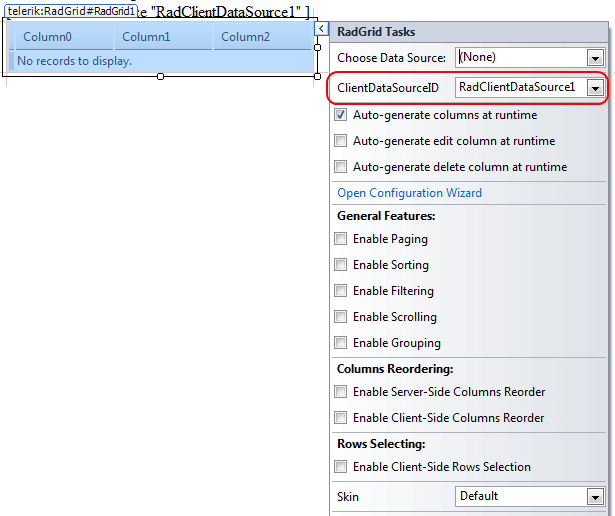
4. Click on the smart tag of **RadGrid** controland specify the **ClientdataSourceID**
   ![client-data-source-id](https://www.telerik.com/products/aspnet-ajax/documentation/assets/292e39df434313ce24d2d374315ccd91/client-data-source-id.png "client-data-source-id")

5. Specify the RadGrid columns, their **DataFields** and the other required settings like **paging**, **filtering** ect.

```ASP.NET
<telerik:RadClientDataSource ID="RadClientDataSource1" runat="server">
    <DataSource>
        <WebServiceDataSourceSettings ServiceType="OData">
            <Select Url="https://demos.telerik.com/kendo-ui/service/Northwind.svc/Products" DataType="JSONP" />
        </WebServiceDataSourceSettings>
    </DataSource>
    <Schema>
        <Model>
            <telerik:ClientDataSourceModelField FieldName="ProductName" DataType="String" />
            <telerik:ClientDataSourceModelField FieldName="QuantityPerUnit" DataType="String" />
            <telerik:ClientDataSourceModelField FieldName="UnitPrice" DataType="Number" />
            <telerik:ClientDataSourceModelField FieldName="UnitsInStock" DataType="Number" />
            <telerik:ClientDataSourceModelField FieldName="Discontinued" DataType="Boolean" />
        </Model>
    </Schema>
</telerik:RadClientDataSource>
<telerik:RadGrid runat="server" ID="RadGrid1" ClientDataSourceID="RadClientDataSource1"
    RenderMode="Lightweight" Width="306px" Skin="Metro">
    <MasterTableView DataKeyNames="ProductName">
        <Columns>
            <telerik:GridBoundColumn DataField="ProductName" HeaderText="ProductName" UniqueName="column">
            </telerik:GridBoundColumn>
            <telerik:GridBoundColumn DataField="UnitPrice" HeaderText="UnitPrice" UniqueName="column1">
            </telerik:GridBoundColumn>
            <telerik:GridBoundColumn DataField="UnitsInStock" HeaderText="UnitsInStock" UniqueName="column2">
            </telerik:GridBoundColumn>
            <telerik:GridBoundColumn DataField="Discontinued" HeaderText="Discontinued" UniqueName="column3">
            </telerik:GridBoundColumn>
        </Columns>
    </MasterTableView>
</telerik:RadGrid>
```

> note Note that **autogenerated** columns and **Hierarchical structures** of **RadGrid** control are not supported with **RadClientDataSource** Control binding .

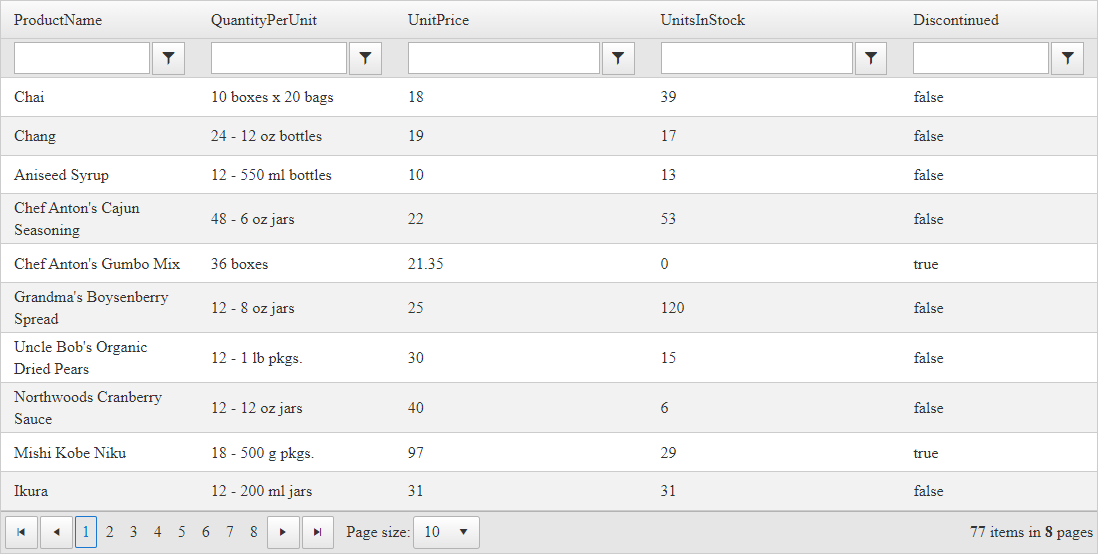
6. We are ready to view the page in the browser
   ![client-data-source-grid](https://www.telerik.com/products/aspnet-ajax/documentation/assets/a247726702fb6fdfa822e0404ec58755/client-data-source-grid.png "client-data-source-grid")
