# Appearance
The Chip provides predefined appearance options such as different sizes, border radiuses, fill modes and theme colors.
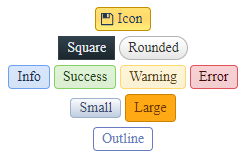
For a live example, visit the [Appearance Demo of the Chip](https://demos.telerik.com/aspnet-ajax/chip/appearance/defaultcs.aspx).
## Options
The Telerik WebForms Chip supports the following styling options:
* [`Size`](https://www.telerik.com/products/aspnet-ajax/documentation/controls/chip/appearance#size)—Configures the overall size of the component.
* [`ThemeColor`](https://www.telerik.com/products/aspnet-ajax/documentation/controls/chip/appearance#themecolor)—Configures what color will be applied to the component.
* [`FillMode`](https://www.telerik.com/products/aspnet-ajax/documentation/controls/chip/appearance#fillmode)—Configures how the color is applied to the component.
* [`Rounded`](https://www.telerik.com/products/aspnet-ajax/documentation/controls/chip/appearance#rounded)—Configures the border radius of the component.
* [`Icon`](https://www.telerik.com/products/aspnet-ajax/documentation/controls/chip/appearance#icon)—Displays an icon.
## Size
The size option controls how big or small the rendered chip looks.

The following values are available for the `size` option:
* `Small`
* `Medium` (default)
* `Large`
* `None` - The chip will naturally resize based on the content
Example
```ASP.NET
```
## FillMode
The `FillMode` option controls the way the color is applied to the rendered div.
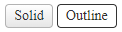
The following values are available for the `FillMode` option:
* `Solid` (default)
* `Outline`
Example
```ASP.NET
```
## ThemeColor
The `ThemeColor` option controls the color that will be applied to the rendered Chip.

The following values are available for the `ThemeColor` option:
* `Base` (default)
* `Info`
* `Success`
* `Warning`
* `Error`
Example
```ASP.NET
```
## Rounded
The `Rounded` option controls how much border radius is applied to the rendered Chip.

The following values are available for the `Rounded` option:
* `Small`
* `Medium` (default)
* `Large`
* `Full`
* `None`
Example
```ASP.NET
```
## Icon
To enable icons for the chip, set the `Icon` property to the **name** of the embedded icon.
Visit the [Web Font Icons - List of Font Icons](https://docs.telerik.com/kendo-ui/styles-and-layout/sass-themes/font-icons#list-of-font-icons) page and find the icon of your choice then copy its name without the `.k-i-` prefix.
For example, if the icon is called `.k-i-plus-outline` the name would be `plus-outline`.

Example

Code
```ASP.NET
```
More examples

Code
```ASP.NET
```
## Next Steps
* [Customize the Chip](https://www.telerik.com/products/aspnet-ajax/documentation/controls/chip/customization)
* [Client-side Programming](https://www.telerik.com/products/aspnet-ajax/documentation/controls/chip/client-side-programming/overview)
* [Server-side Programming](https://www.telerik.com/products/aspnet-ajax/documentation/controls/chip/server-side-programming/overview)
## See Also
* [Overview](https://www.telerik.com/products/aspnet-ajax/documentation/controls/chip/overview)
* [Getting Started with the Telerik WebForms Chip](https://www.telerik.com/products/aspnet-ajax/documentation/controls/chip/getting-started)
* [Customize the Chip](https://www.telerik.com/products/aspnet-ajax/documentation/controls/chip/customization)
* [Client-side Programming](https://www.telerik.com/products/aspnet-ajax/documentation/controls/chip/client-side-programming/overview)
* [Server-side Programming](https://www.telerik.com/products/aspnet-ajax/documentation/controls/chip/server-side-programming/overview)