# Day Templates

The [ASP NET AJAX Calendar](https://www.telerik.com/products/aspnet-ajax/calendar.aspx) allows you to define a collection of dynamic templates that customize the presentation of calendar days on a "per day" basis. The templates can contain regular HTML and are particularly useful if you want to implement a scheduler-like interface with extra information, such as images illustrating events, links to additional sources, etc.
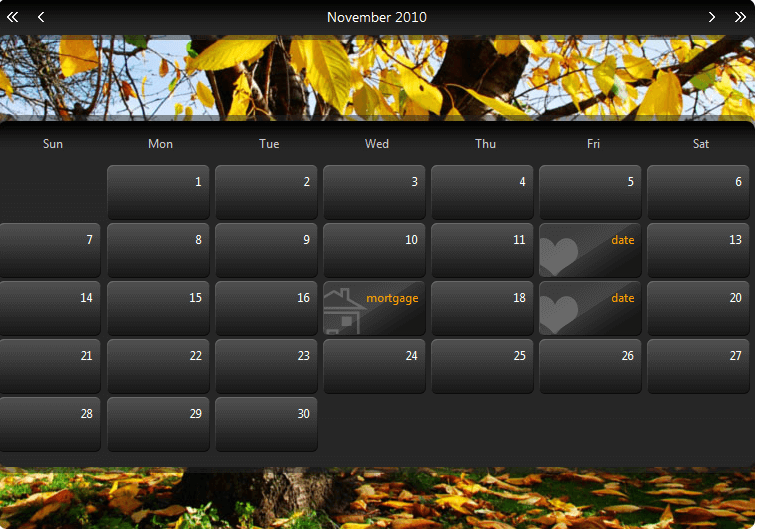
![Templated RadCalendar](https://www.telerik.com/products/aspnet-ajax/documentation/assets/48e9681e6a8d2ec287fc62b320865c26/calendar_specialdaytemplates.png)

The following steps describe how to implement Day Templates:

1. Define the Dynamic Template types.

   1. Click the ellipsis button next to the **CalendarDayTemplates** property in the properties pane. This brings up the [DayTemplate Collection Editor](https://www.telerik.com/products/aspnet-ajax/documentation/controls/calendar/design-time/daytemplate-collection-editor).

   2. In the collection editor, create individual template types for each type of day you want to customize, giving each unique ID. The following example shows the result of this step:
      ```ASPNET
      <telerik:RadCalendar RenderMode="Lightweight" ID="RadCalendar1" runat="server" AutoPostBack="true" Skin="Special"
             EnableEmbeddedSkins="false" EnableEmbeddedBaseStylesheet="false" EnableMonthYearFastNavigation="false" DayNameFormat="Short"
             ShowRowHeaders="false" ShowOtherMonthsDays="false" OnDefaultViewChanged="RadCalendar1_DefaultViewChanged">
             <CalendarDayTemplates>
                  <telerik:DayTemplate ID="DateTemplate" runat="server">
                  </telerik:DayTemplate>
                  <telerik:DayTemplate ID="MortgageTemplate" runat="server">
                  </telerik:DayTemplate>
                  <telerik:DayTemplate ID="BirthdayTemplate" runat="server">
                  </telerik:DayTemplate>
             </CalendarDayTemplates>
      </telerik:RadCalendar>
      ```

2. Create the templates.

   1. For each template type, bring up the **RadCalendar** context menu, select **Edit Template**, and choose the template type. This brings up the [Template Design Surface](https://www.telerik.com/products/aspnet-ajax/documentation/controls/calendar/design-time/template-design-surface) for the template.

   2. Drag controls from the toolbox onto the template design surface and set their properties to create the templates:
      ```ASPNET
      <telerik:RadCalendar RenderMode="Lightweight" ID="RadCalendar1" runat="server" AutoPostBack="true" Skin="Special"
             EnableEmbeddedSkins="false" EnableEmbeddedBaseStylesheet="false" EnableMonthYearFastNavigation="false" DayNameFormat="Short"
             ShowRowHeaders="false" ShowOtherMonthsDays="false" OnDefaultViewChanged="RadCalendar1_DefaultViewChanged">
              <CalendarDayTemplates>
                   <telerik:DayTemplate ID="DateTemplate" runat="server">
                       <Content>
                         <div class="rcTemplate rcDayDate">
                             date
                         </div>
                       </Content>
                   </telerik:DayTemplate>
                   <telerik:DayTemplate ID="MortgageTemplate" runat="server">
                       <Content>
                         <div class="rcTemplate rcDayMortgage">
                             mortgage
                         </div>
                       </Content>
                   </telerik:DayTemplate>
                   <telerik:DayTemplate ID="BirthdayTemplate" runat="server">
                       <Content>
                           <div class="rcTemplate rcDayBirthday">
                             birthday
                           </div>
                       </Content>
                   </telerik:DayTemplate>
              </CalendarDayTemplates>
      </telerik:RadCalendar>
      ```

3. Add Special Days to the calendar and assign the templates.

   1. You can define the special days at design time using the [RadCalendarDay Collection Editor](https://www.telerik.com/products/aspnet-ajax/documentation/controls/calendar/design-time/radcalendarday-collection-editor). For each special day you add, in addition to any other properties, set the **TemplateID** property to the ID of the template you want to assign to that special day:
      ```ASPNET
      <telerik:RadCalendar RenderMode="Lightweight" ID="RadCalendar1" runat="server" AutoPostBack="true" Skin="Special"
             EnableEmbeddedSkins="false" EnableEmbeddedBaseStylesheet="false" EnableMonthYearFastNavigation="false" DayNameFormat="Short"
             ShowRowHeaders="false" ShowOtherMonthsDays="false" OnDefaultViewChanged="RadCalendar1_DefaultViewChanged">
             <SpecialDays>
                 <telerik:RadCalendarDay Date="2010/06/12" Repeatable="DayInMonth" TemplateID="DateTemplate" />
                 <telerik:RadCalendarDay Date="2010/06/19" Repeatable="DayInMonth" TemplateID="DateTemplate" />
                 <telerik:RadCalendarDay Date="2010/06/17" Repeatable="DayInMonth" TemplateID="MortgageTemplate" />
                 <telerik:RadCalendarDay Date="2010/06/8" Repeatable="DayAndMonth" TemplateID="BirthdayTemplate" />
                 <telerik:RadCalendarDay Date="2010/08/7" Repeatable="DayAndMonth" TemplateID="BirthdayTemplate" />
                 <telerik:RadCalendarDay Date="2010/10/8" Repeatable="DayAndMonth" TemplateID="BirthdayTemplate" />
                 <telerik:RadCalendarDay Date="2010/12/23" Repeatable="DayAndMonth" TemplateID="BirthdayTemplate" />
                 <telerik:RadCalendarDay Date="2010/2/14" Repeatable="DayAndMonth" TemplateID="BirthdayTemplate" />
             </SpecialDays>
             <CalendarDayTemplates>
                  <telerik:DayTemplate ID="DateTemplate" runat="server">
                      <Content>
                           <div class="rcTemplate rcDayDate">
                                date
                           </div>
                      </Content>
                  </telerik:DayTemplate>
                  <telerik:DayTemplate ID="MortgageTemplate" runat="server">
                      <Content>
                           <div class="rcTemplate rcDayMortgage">
                             mortgage
                           </div>
                      </Content>
                  </telerik:DayTemplate>
                  <telerik:DayTemplate ID="BirthdayTemplate" runat="server">
                      <Content>
                           <div class="rcTemplate rcDayBirthday">
                             birthday
                           </div>
                      </Content>
                  </telerik:DayTemplate>
             </CalendarDayTemplates>
      </telerik:RadCalendar>
      ```

   2. You can also add special days dynamically at runtime:

   > note Note that the best approach for adding days to the **SpecialDays** collection is on **Page_Load** event. Also if the special days should persist not only in the current view but in other month views the **AutoPostBack** property of the **RadCalendar** should be set to **true** .

```C#
protected void Page_Load(object sender, EventArgs e)
{
    if (!IsPostBack)
    {
        RadCalendarDay NewDay = new RadCalendarDay(RadCalendar1);
        NewDay.Date = new DateTime(2010, 11, 12);
        NewDay.Repeatable = RecurringEvents.DayAndMonth;
        NewDay.TemplateID = "BirthdayTemplate";
        NewDay.ToolTip = "Anne's Birthday";
        RadCalendar1.SpecialDays.Add(NewDay);
    }
}
```

```VB.NET
Protected Sub Page_Load(ByVal sender As Object, ByVal e As EventArgs) Handles Me.Load
    If Not IsPostBack Then
        Dim NewDay As New RadCalendarDay(RadCalendar1)
        NewDay.Date = New DateTime(2010, 11, 12)
        NewDay.Repeatable = RecurringEvents.DayAndMonth
        NewDay.TemplateID = "BirthdayTemplate"
        NewDay.ToolTip = "Anne's Birthday"
        RadCalendar1.SpecialDays.Add(NewDay)
    End If
End Sub	
```

> note
> You can add special days to a calendar without using templates. You can use their **ItemStyle** property to make them visually distinct.
