# Fluid and Elastic Capabilities
The [ASP NET AJAX Calendar](https://www.telerik.com/products/aspnet-ajax/calendar.aspx) including the picker controls provide elastic and fluid capabilities which allow keeping the control’s component proportion on different mobile devices.
> note As of 2016 Q1 SP1 **RadCalendar** takes the [font-size](https://www.telerik.com/products/aspnet-ajax/documentation/styling/controlling-visual-appearance/fonts) of the page automatically. If the developer does not set it explicitly (**Example 1**), this is up to the client's browser and a common default value is 16px.
> caption **Example 1**: Setting default font for the page with the default value for the Telerik controls.
```CSS
body {
font-size: 20px;
font-family: "Segoe UI", Arial, Sans-serif;
}
```
## Fluid capability
The **fluid** capabilities are simply achievable by setting the control’s width in **percentages**.
## Elastic capability
To take advantage **elastic** functionality advantage you could set a specific **font size** based on the application target **mobile device** and follow three simple steps to transform the **RadCalendar/Picker** controls to be **elastic**:
1. By using specific CSS selectors apply "**1em**" font size for all the **Calendar** components like this:
```ASPNET
```
2. Set the **RenderMode** property of the **Calendar**, **DatePicker**, **DateTimePicker**, **MonthYearPicker** controls to "**Lightweight**"
```ASPNET
```
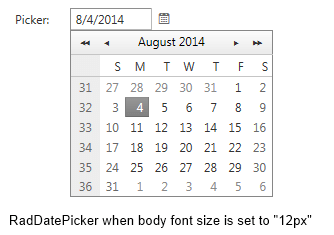
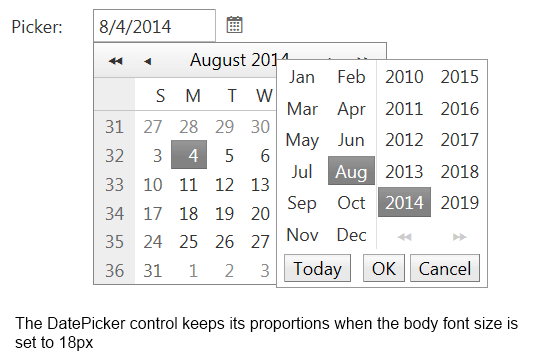
3. Set the picker components **width** in "**em**". In order to keep the default calendar/pickers **proportion** on mobile devices we would suggest you to set **width="13.3333em"** as the default width of the components is "**160px**" and the font-size is originally set to "**12px**"See the both images bellow that presents the control's **elastic** capability
* DatePicker control's rendering in case the body font size is set to 12px
* DatePicker control's rendering in case the body font size is set to 18px
## See Also
* [Fonts](https://www.telerik.com/products/aspnet-ajax/documentation/styling/controlling-visual-appearance/fonts)
* [Visual and Dimension Improvements in UI for ASP.NET AJAX](http://www.telerik.com/blogs/visual-and-dimension-improvements-in-ui-for-asp.net-ajax)