# Client Templates
## Overview
RadAutoCompleteBox provides support for client templates. The template itself contains mark up and binding expressions which are evaluated against a **DataItem** and then rendered as the Item's content on the client. The templates support the following type of expressions which are evaluated at run-time:
* **#=...#** - Evaluates the JavaScript code expression or a string property from the data item and outputs the result in the template.
* **#...#** - Evaluates the JavaScript code expression inside, but does not output value.
* **#:...#** - Evaluates the JavaScript code expression or a string property from the data item, and outputs the HTML encoeded result in the template.
> important Client templates **can not** contain server controls.
> note When a WCF service is used, the Attributes collection is serialized as an array of Name-Value pairs, and inside the ClientTemplate the attributes are accessed by index: **#=Attributes\[0].Value#**
## Server side representation
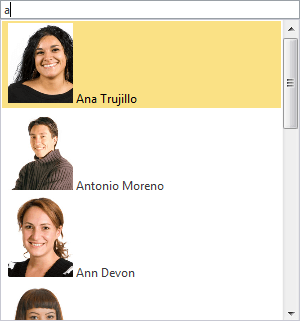
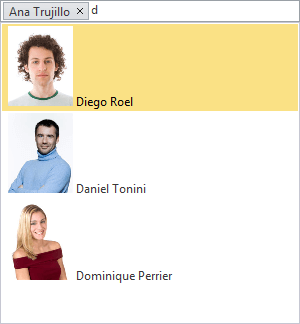
On the server, the template will be represented as a string property of the control named **ClientDropDownItemTemplate**. The following application scenario shows an example of client templates.
```ASPNET
 #= Text #
```
```C#
[WebMethod]
public static AutoCompleteBoxData GetChildren(object context)
{
string searchString = ((Dictionary)context)["Text"].ToString();
DataTable data = GetChildNodes(searchString);
List result = new List();
foreach (DataRow row in data.Rows)
{
AutoCompleteBoxItemData childNode = new AutoCompleteBoxItemData();
childNode.Text = row["ContactName"].ToString();
childNode.Value = row["CustomerID"].ToString();
result.Add(childNode);
}
AutoCompleteBoxData res = new AutoCompleteBoxData();
res.Items = result.ToArray();
return res;
}
private static DataTable GetChildNodes(string searchString)
{
SqlCommand selectCommand = new SqlCommand(@"SELECT * FROM [CustomerPhotos] WHERE ContactName LIKE @ContactName + '%'");
selectCommand.Parameters.AddWithValue("ContactName", searchString);
return GetData(selectCommand);
}
private static DataTable GetData(SqlCommand selectCommand)
{
selectCommand.Connection = new SqlConnection(ConfigurationManager.ConnectionStrings["TelerikConnectionString"].ConnectionString);
SqlDataAdapter adapter = new SqlDataAdapter(selectCommand);
DataTable data = new DataTable();
adapter.Fill(data);
return data;
}
```
```VB.NET
Public Shared Function GetChildren(context As Object) As AutoCompleteBoxData
Dim searchString As String = DirectCast(context, Dictionary(Of String, Object))("Text").ToString()
Dim data As DataTable = GetChildNodes(searchString)
Dim result As New List(Of AutoCompleteBoxItemData)()
For Each row As DataRow In data.Rows
Dim childNode As New AutoCompleteBoxItemData()
childNode.Text = row("ContactName").ToString()
childNode.Value = row("CustomerID").ToString()
result.Add(childNode)
Next
Dim res As New AutoCompleteBoxData()
res.Items = result.ToArray()
Return res
End Function
Private Shared Function GetChildNodes(searchString As String) As DataTable
Dim selectCommand As New SqlCommand("SELECT * FROM [CustomerPhotos] WHERE ContactName LIKE @ContactName + '%'")
selectCommand.Parameters.AddWithValue("ContactName", searchString)
Return GetData(selectCommand)
End Function
Private Shared Function GetData(selectCommand As SqlCommand) As DataTable
selectCommand.Connection = New SqlConnection(ConfigurationManager.ConnectionStrings("TelerikConnectionString").ConnectionString)
Dim adapter As New SqlDataAdapter(selectCommand)
Dim data As New DataTable()
adapter.Fill(data)
Return data
End Function
```
| **RadAutoCompleteBox** before a selection is made. | **RadAutoCompleteBox** after a selection is made. |
| ------------------------------------------------------------------------------------------------------------------------------------------------------------------------------ | ---------------------------------------------------------------------------------------------------------------------------------------------------------------------------- |
|  |  |
## See Also
* [Overview](https://www.telerik.com/products/aspnet-ajax/documentation/controls/autocompletebox/client-side-programming/overview)