# Localizing RadAsyncUpload
The localization support for **RadAsyncUpload** lets you translate the user interface, or simply adapt a few strings. This article provides information on how you can use localization with the **RadAsyncUpload** control.
## Localization Property
The **Localization** property specifies the strings that appear in the runtime user interface of **RadAsyncUpload**. By changing the values of each named sub-property, you change the appearance of the string the upload uses:
```ASPNET
```

> note This technique is useful when customizing some of the messages of a particular instance. The messages are not shared between upload instances. A complete translation using this approach is not appropriate.
> caption
| Property Name | Default Value | Description |
| ------------- | --------------- | -------------------------------------------------------------------------------------------------------- |
| **Add** | Add | Sets the text of the **Add** button. |
| **Remove** | Remove | Sets the text of the **Remove** button. |
| **Select** | Select | Sets the text of the **Select** button. |
| **DropZone** | Drop files here | Sets the text of the **DropZone** that appears when the file is about to be dropped (added Q3 2012 SP1). |
## Global Resource Files
The primary means for localization in ASP.NET is to use resource files. Resource files are simple XML files that can be easily edited and transferred to other applications. You can use resource files to change the default (English) localization for **RadUAsyncpload** that is stored in the Telerik.Web.UI assembly.
To create a global resource file to localize the upload follow these steps:
1. Create the **App_GlobalResources** folder in the root of your web application.
2. Copy the default resource **RadAsyncUpload.resx** file into it. This file can be found in the App_GlobalResources folder of the directory where you installed the RadControls.
3. Make a copy of the file and rename the copy so that its name contains the Culture Identifier. The resource files used by **RadAsyncUpload** follow a strict naming convention: **RadAsyncUpload.\.resx**
> note The **Culture Identifier** consists of a language code followed by a dash and the country code. Example: “en-US”, “fr-CA” and so on.
>
> For example\* RadAsyncUpload.fr-CA.resx\*. Both files should be present in the App_GlobalResources folder:
1. Edit the strings using the Visual Studio editor or your favorite text editor. Customize strings just as you would set the **Localization** property.
> caution Make sure that the **ReservedResource** message is preserved. It is used for identification purposes and is never displayed.
>
> You can now switch the **RadAsyncUpload** so that it uses your new resource file by setting the **Culture** property: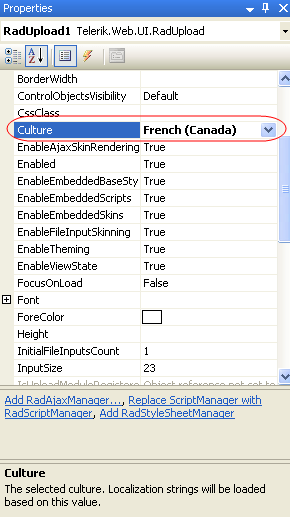
## See Also
* [Getting Started](https://www.telerik.com/products/aspnet-ajax/documentation/controls/asyncupload/getting-started)
* [Keyboard Support](https://www.telerik.com/products/aspnet-ajax/documentation/controls/asyncupload/accessibility-and-internationalization/keyboard-support)
* [RTL Support](https://www.telerik.com/products/aspnet-ajax/documentation/controls/asyncupload/accessibility-and-internationalization/rtl-support)