# .NET MAUI TreeDataGrid Item Hierarchy
The TreeDataGrid for MAUI exposes an `ItemDescriptor` property (of type `TreeDataGridItemDescriptor`), which defines the entities that describe an item.
To specify the data items' hierarchy and how each item is visualized, use the `TreeDataGridItemDescriptor` class.
The `TreeDataGridItemDescriptor` class exposes the following properties:
| Property | Description |
| ------------------------------------- | ------------------------------------------------------------------------------------------------ |
| `ItemsSourceBinding` (`BindingBase`) | Specifies the binding that provides the children of an item in the TreeDataGrid. |
| `IsExpandableBinding` (`BindingBase`) | Specifies the binding that determines whether a tree arrow is displayed for items with children. |
Here is an example demonstrating how to define the data items' hierarchy by using the TreeDataGrid descriptor:
**1.** Set up the `RadTreeDataGrid` instance:
```XAML
```
**2.** Add the `telerik` namespace:
```XAML
xmlns:telerik="http://schemas.telerik.com/2022/xaml/maui"
```
**3.** Create a sample `Data` class:
```C#
public class Data
{
public Data(string name, int size, string type)
{
this.Name = name;
this.Size = size;
this.Type = type;
this.Children = new ObservableCollection();
}
public string Name { get; set; }
public int Size { get; set; }
public string Type { get; set; }
public ObservableCollection Children { get; set; }
}
```
**4.** Add the `ViewModel` class:
```C#
public class ViewModel
{
public ViewModel()
{
Items = new ObservableCollection();
Items.Add(new Data("My Projects", 234 ,"Folder")
{
Children = new ObservableCollection()
{
new Data("Using latest Telerik .NET MAUI controls", 234 ,"Folder")
{
Children = new ObservableCollection()
{
new Data("TreeDataGrid", 6, "File"),
new Data("CollectionView", 6, "File"),
new Data("DataGrid", 54, "File"),
new Data("Scheduler", 12, "File"),
new Data("TreeView", 2, "File"),
new Data("Calendar", 23, "File"),
new Data("RichTextEditor", 0, "File"),
new Data("PdfViewer", 55, "File"),
new Data("ToggleButton", 21, "File"),
new Data("TemplatedButton", 88, "File"),
}
},
new Data("Blank project", 0, "Folder")
}
});
Items.Add(new Data("Shared Documents", 643, "Folder")
{
Children = new ObservableCollection()
{
new Data("Reports", 643, "Folder")
{
Children = new ObservableCollection()
{
new Data("October", 234, "File"),
new Data("November", 0, "File"),
new Data("December", 409, "File")
}
}
}
});
Items.Add(new Data("Pictures", 643, "Folder")
{
Children = new ObservableCollection()
{
new Data("Camera Roll", 231, "Folder")
{
Children = new ObservableCollection()
{
new Data("hello.png", 107, "File"),
new Data("happy_summer.png", 0, "File"),
new Data("avatar.png", 124, "File")
}
},
new Data("Saved Pictures", 453, "Folder")
{
Children = new ObservableCollection()
{
new Data("vacation.png", 234, "File"),
new Data("november.png", 0, "File"),
new Data("mountains.png", 227, "File")
}
}
}
});
Items.Add(new Data("Documents", 876, "Folder")
{
Children = new ObservableCollection()
{
new Data("Internal Usage Only", 643, "Folder")
{
Children = new ObservableCollection()
{
new Data("reports.docx", 234, "File"),
new Data("confidential.xlsx", 0, "File"),
new Data("internal_usage.pdf", 409, "File")
}
}
}
});
}
public ObservableCollection Items { get; set; }
}
```
**5.** Register the Telerik controls through the `Telerik.Maui.Controls.Compatibility.UseTelerik` extension method called inside the `CreateMauiApp` method of the `MauiProgram.cs` file of your project:
```C#
using Telerik.Maui.Controls.Compatibility;
public static class MauiProgram
{
public static MauiApp CreateMauiApp()
{
var builder = MauiApp.CreateBuilder();
builder
.UseTelerik()
.UseMauiApp()
.ConfigureFonts(fonts =>
{
fonts.AddFont("OpenSans-Regular.ttf", "OpenSansRegular");
});
return builder.Build();
}
}
```
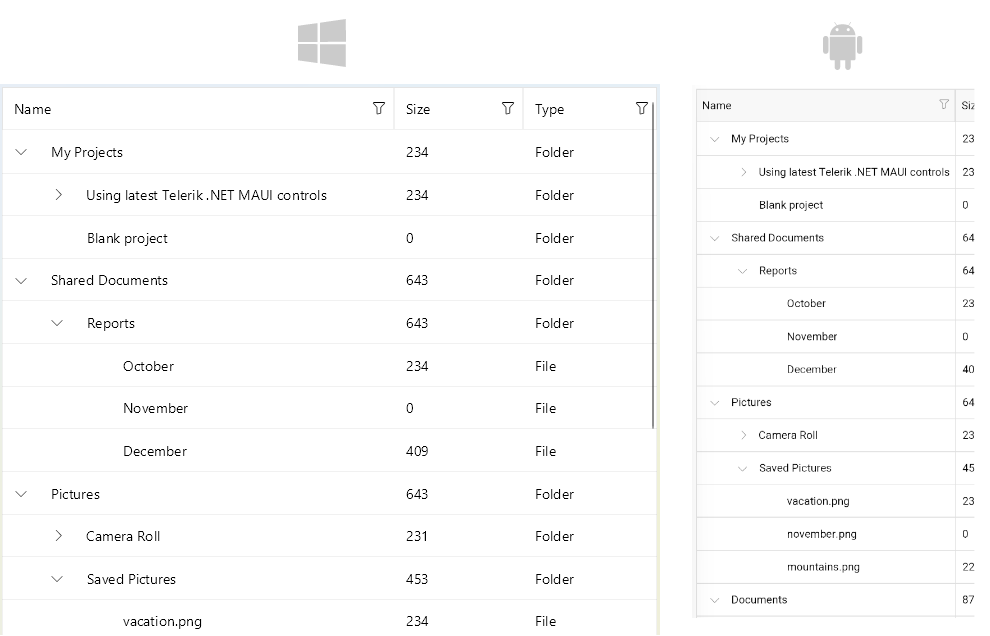
This is the result on winUi and on Android:
> For a runnable example with the TreeDataGrid Descriptor scenario, see the [SDKBrowser Demo Application](https://www.telerik.com/maui-ui/documentation/demos-and-sample-apps/sdkbrowser-app) and go to **TreeDataGrid > Getting Started** category.
## See Also
* [.NET MAUI TreeDataGrid Product Page](https://www.telerik.com/maui-ui/treedatagrid)
* [.NET MAUI TreeDataGrid Forum Page](https://www.telerik.com/forums/maui?tagId=2056)
* [Telerik .NET MAUI Blogs](https://www.telerik.com/blogs/mobile-net-maui)
* [Telerik .NET MAUI Roadmap](https://www.telerik.com/support/whats-new/maui-ui/roadmap)