# .NET MAUI TimePicker Templates

In case the default templates of the TimePicker control do not suit your needs, you can define a custom template.

The available templates for customization are:

* `PlaceholderTemplate`(`ControlTemplate`)—Defines the template visualized for the placeholder.
* `DisplayTemplate`(`ControlTemplate`)—Defines the template visualized when the picked time is displayed.
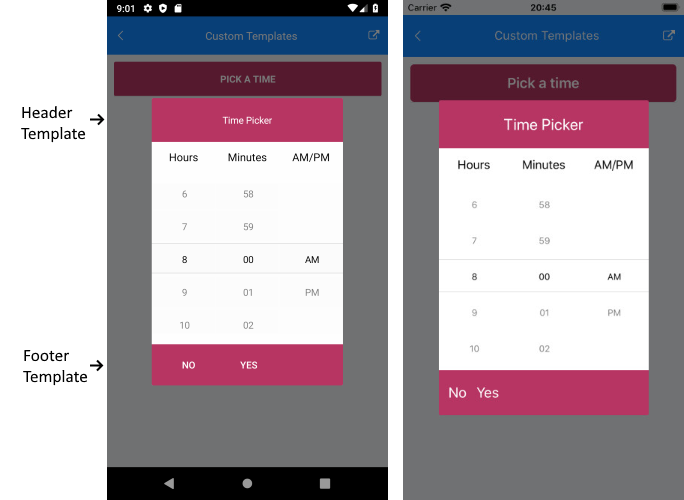
* `HeaderTemplate`(`ControlTemplate`)—Defines what will be displayed inside the dialog (popup) header.
* `FooterTemplate`(`ControlTemplate`)—Defines what will be displayed inside the dialog (popup) footer.

The example below shows a sample TimePicker definition with the listed above template properties applied:

**1.** Define the TimePicker:

```XAML
<telerik:RadTimePicker SpinnerFormat="H:mm"
                       PlaceholderTemplate="{StaticResource placeholderTemplate}"
                       DisplayTemplate="{StaticResource displayTemplate}"
                       AutomationId="timePicker">
    <telerik:RadTimePicker.PopupSettings>
        <telerik:PickerPopupSettings HeaderTemplate="{StaticResource headerTemplate}"
                                     FooterTemplate="{StaticResource footerTemplate}"/>
    </telerik:RadTimePicker.PopupSettings>
    <telerik:RadTimePicker.DropDownSettings>
        <telerik:PickerDropDownSettings FooterTemplate="{StaticResource footerTemplate}"/>
    </telerik:RadTimePicker.DropDownSettings>
</telerik:RadTimePicker>
```

**2.** Add the following namespace:

```XAML
xmlns:telerik="http://schemas.telerik.com/2022/xaml/maui"
```

For the example, the template definitions are added to the page resources as follows.

## Placeholder Template

```XAML
<ControlTemplate x:Key="placeholderTemplate">
    <Button Text="Pick a time" 
            FontAttributes="Bold" 
            TextColor="White"
            BackgroundColor="#B73562" 
            HeightRequest="50" Command="{TemplateBinding ToggleCommand}" />
</ControlTemplate>
```

![TimePicker Placeholder Template](https://www.telerik.com/maui-ui/documentation/assets/4810873945e629b0b71b08bc256c34f3/timepicker_placeholder_template.png)

## Display Template

```XAML
<ControlTemplate x:Key="displayTemplate">
    <Button Text="{TemplateBinding DisplayString}" 
            TextColor="White" 
            BackgroundColor="#7BAEFF"
            HeightRequest="50"
            Command="{TemplateBinding ToggleCommand}" />
</ControlTemplate>
```

![TimePicker Display Template](https://www.telerik.com/maui-ui/documentation/assets/b45c15230cbf649f1bd3ac06a54af45f/timepicker_display_template.png)

## Header Template

```XAML
<ControlTemplate x:Key="headerTemplate">
    <Grid>
        <Label Text="Time Picker"
               Padding="20"
               TextColor="White"
               VerticalTextAlignment="Center"
               HorizontalTextAlignment="Center"
               BackgroundColor="#B73562"/>
    </Grid>
</ControlTemplate>
```

## Footer Template

```XAML
<ControlTemplate x:Key="footerTemplate">
    <StackLayout Orientation="Horizontal" Spacing="0" HorizontalOptions="FillAndExpand" BackgroundColor="#B73562">
        <telerik:RadButton Text="No"
                           WidthRequest="75"
                           TextColor="White"
                           BackgroundColor="Transparent"
                           Command="{TemplateBinding CancelCommand}" />
        <telerik:RadButton Text="Yes"
                           WidthRequest="75"
                           TextColor="White"
                           BackgroundColor="Transparent"
                           Command="{TemplateBinding AcceptCommand}" />
    </StackLayout>
</ControlTemplate>
```

![TimePicker Footer Template](https://www.telerik.com/maui-ui/documentation/assets/1f2f332a14f53b5b5fa967515a40f083/timepicker_header_footer_template.png)

## See Also

* [Supported Standard Time Format Strings](https://www.telerik.com/maui-ui/documentation/controls/timepicker/formatting)
* [Styling](https://www.telerik.com/maui-ui/documentation/controls/timepicker/styling/styling)