# .NET MAUI TabView Data Binding

For all cases where the business items are not simple strings, data-binding is necessary to correctly visualize information. The TabView for .NET MAUI component supports data binding starting with the Telerik .NET MAUI 7.0.0 version.

* `ItemsSource`(`IEnumerable`)—Defines the items source from which TabView items are generated.

In a combination with the `ItemsSource`, the developer has to define the `ItemTemplate`. The `ItemTemplate` (of type `DataTemplate`) is used to specify the template for the `TabViewItem`.

## Data Binding Example

Here is an example showing how to bind the TabView to a data source:

**1.** Define the TabView control:

```XAML
<telerik:RadTabView x:Name="tabView" ItemsSource="{Binding Data}">
    <telerik:RadTabView.ItemTemplate>
        <DataTemplate>
            <telerik:TabViewItem HeaderText="{Binding Name}">
                <telerik:TabViewItem.ContentTemplate>
                    <DataTemplate>
                        <telerik:RadItemsControl ItemsSource="{Binding Customers}">
                            <telerik:RadItemsControl.ItemTemplate>
                                <DataTemplate>
                                    <Grid>
                                        <telerik:RadBorder BorderColor="LightGray"
                                                           Padding="10"
                                                           Margin="10,5"
                                                           BorderThickness="1" 
                                                           CornerRadius="5">
                                            <Grid RowDefinitions="Auto, Auto" 
                                                  RowSpacing="5">
                                                <HorizontalStackLayout Spacing="10">
                                                    <Label Text="&#xe836;"
                                                           FontFamily="TelerikFontExamples" />
                                                    <Label Text="{Binding Name}" />
                                                </HorizontalStackLayout>
                                                <HorizontalStackLayout Spacing="10" 
                                                                       Grid.Row="1">
                                                    <Label Text="&#xe85d;" 
                                                           FontFamily="TelerikFontExamples" />
                                                    <Label Text="{Binding Number}" />
                                                </HorizontalStackLayout>
                                            </Grid>
                                        </telerik:RadBorder>
                                    </Grid>
                                </DataTemplate>
                            </telerik:RadItemsControl.ItemTemplate>
                        </telerik:RadItemsControl>
                    </DataTemplate>
                </telerik:TabViewItem.ContentTemplate>
            </telerik:TabViewItem>
        </DataTemplate>
    </telerik:RadTabView.ItemTemplate>
    <telerik:RadTabView.BindingContext>
        <local:ViewModel/>
    </telerik:RadTabView.BindingContext>
</telerik:RadTabView>
```

**2.** Define the data model class:

```C#
public class Customer
{
    public string Name { get; set; }
    public int Number { get; set; }
}

public class Location
{
    public string Name { get; set; }
    public ObservableCollection<Customer> Customers { get; set; }
}
```

**3.** Define the `ViewModel` class:

```C#
public class ViewModel
{
    public ViewModel()
    {
        this.Data = new ObservableCollection<Location>()
        {
            new Location() 
            { 
                Name = "London",
                Customers = new ObservableCollection<Customer>
                {
                    new Customer{ Name = "Jane", Number = 221144},
                    new Customer{ Name = "Fred", Number = 432457},
                    new Customer{ Name = "Jack", Number = 2783344},
                    new Customer{ Name = "Maya", Number = 645664},
                    new Customer{ Name = "Gabriel", Number = 8675},
                }
            },
            new Location()
            {
                Name = "Madrid",
                Customers = new ObservableCollection<Customer>
                {
                    new Customer{ Name = "Joan", Number = 345435},
                    new Customer{ Name = "Alex", Number = 232146},
                    new Customer{ Name = "Jose", Number = 65678},
                }
            },
            new Location()
            {
                Name = "Milan",
                Customers = new ObservableCollection<Customer>
                {
                    new Customer{ Name = "Luca", Number = 8960},
                    new Customer{ Name = "Giovanni", Number = 9876},
                    new Customer{ Name = "Enzo", Number = 4365},
                    new Customer{ Name = "Enzo", Number = 64545},
                    new Customer{ Name = "Enzo", Number = 2134},
                }
            },
            new Location()
            {
                Name = "New York",
                Customers = new ObservableCollection<Customer>
                {
                    new Customer{ Name = "William", Number = 546},
                    new Customer{ Name = "James", Number = 276654},
                    new Customer{ Name = "Sebastian", Number = 09867},
                    new Customer{ Name = "Andrea", Number = 53376},
                    new Customer{ Name = "John", Number = 3624},
                    new Customer{ Name = "Jane", Number = 6768},
                }
            }
        };
    }
    public ObservableCollection<Location> Data { get; set; }
}
```

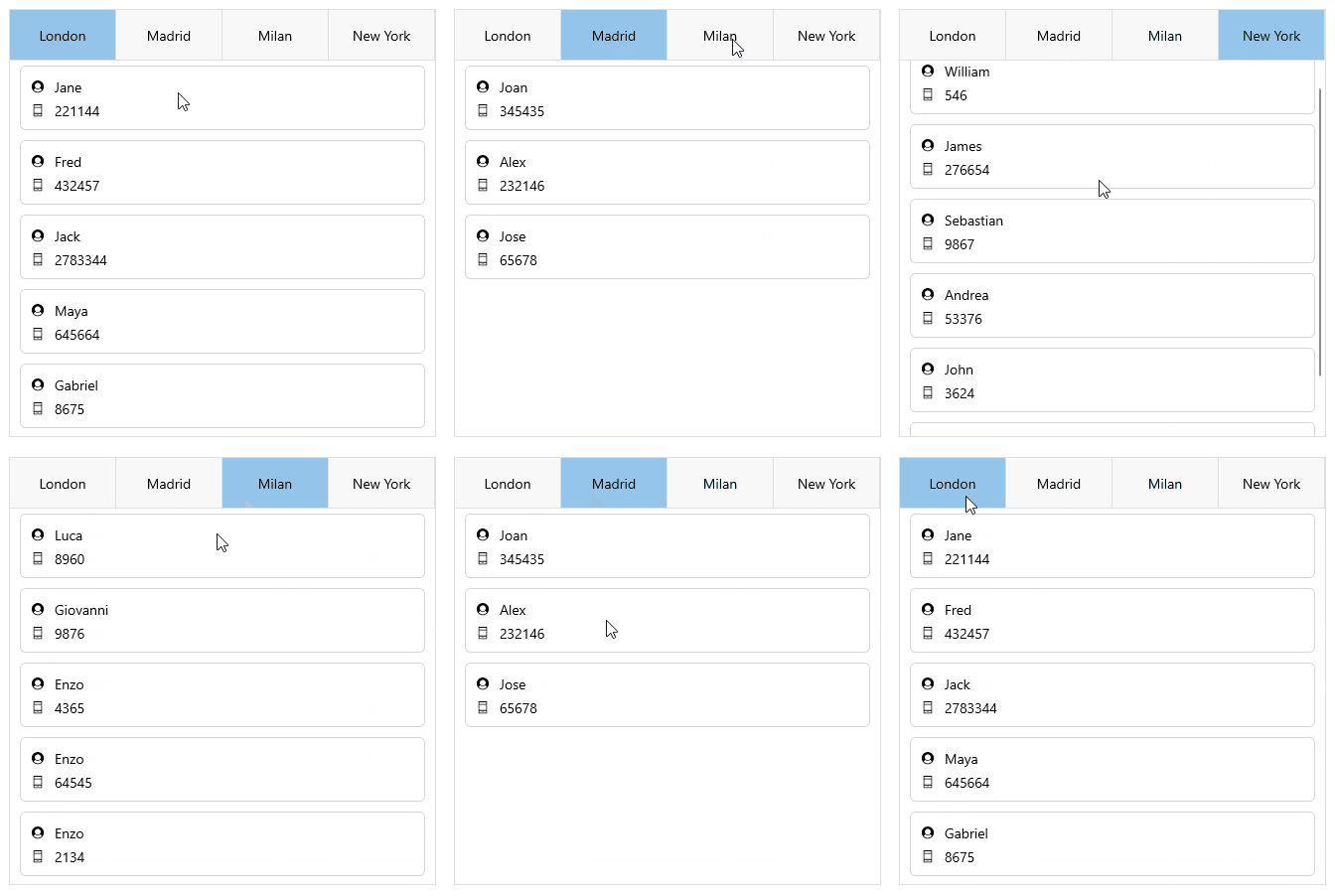
Here is the TabView after `DataBinding` scenario:
![.NET MAUI TabView DataBinding](https://www.telerik.com/maui-ui/documentation/assets/07e6577ea98151525492a27aa8ca5b36/tabview-databinding.gif)

> For a runnable example with the TabView Data Binding scenario, see the [SDKBrowser Demo Application](https://www.telerik.com/maui-ui/documentation/demos-and-sample-apps/sdkbrowser-app) and go to **TabView > Features**.

## See Also

* [TabViewItem](https://www.telerik.com/maui-ui/documentation/controls/tabview/tabviewitem)
* [Styling](https://www.telerik.com/maui-ui/documentation/controls/tabview/styling/overview)
* [Templates](https://www.telerik.com/maui-ui/documentation/controls/tabview/templates)
