# .NET MAUI Slider Backtrack
The thumb runs along the backtrack of the Slider. The backtrack represents all the values your end users can choose from.
## Minimum and Maximum
You need to configure a `Minimum` value and a `Maximum` value for the Slider. These values define the limits of the backtrack.
* `Minimum`(`double`)—Defines the minimum value of the slider.
* `Maximum`(`double`)—Defines the maximum value of the Slider.
```XAML
```
## Backtrack Extent
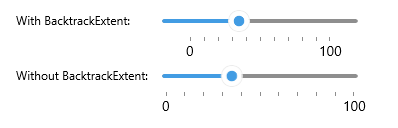
By default, the backtrack is drawn between the `Minimum` and `Maximum` values. Through the `BacktrackExtent` property you can extend the backtrack at the edges beyond the minimum and the maximum values.
* `BacktrackExtent`(`double`)—Defines how many pixels beyond the minimum and the maximum values the backtrack will extend.
```XAML
```
## See Also
* [Value Thumb](https://www.telerik.com/maui-ui/documentation/controls/slider/value-thumb)
* [Range Track](https://www.telerik.com/maui-ui/documentation/controls/slider/range-track)
* [Track Styling](https://www.telerik.com/maui-ui/documentation/controls/slider/styling/track-styling)