# .NET MAUI Scheduler Appointments Styling

The Scheduler for .NET MAUI control makes it easy to customize the look & feel of the appointments.

Scheduler exposes an `AppointmentStyleSelector` (type `Telerik.Maui.Controls.IStyleSelector`) property which conditionally applies different appointment styles depending on some logic.

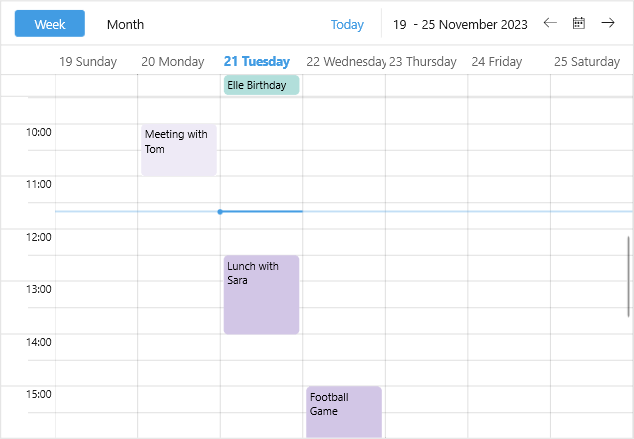
In the example below the custom `AppointmentStyleSelector` applies separate style to past and future appointments.

**1.** Create a custom Style Selector class:

```C#
public class CustomAppointmentStyleSelector : IStyleSelector
{
    public Style AllDayAppointmentStyle { get; set; }
    public Style ExpiredAppointmentStyle { get; set; }
    public Style OngoingAppointmentStyle { get; set; }

    public Style SelectStyle(object item, BindableObject bindable)
    {
        var appointment = (item as AppointmentNode).Occurrence.Appointment;

        if (appointment.IsAllDay)
        {
            return this.AllDayAppointmentStyle;
        }
        else if (appointment.Start < DateTime.Now)
        {
            return this.ExpiredAppointmentStyle;
        }
        else
        {
            return this.OngoingAppointmentStyle;
        }
    }
}
```

**2.** Add the style selector with the corresponding styles to the page resources:

```XAML
<local:CustomAppointmentStyleSelector x:Key="CustomAppointmentStyleSelector">
    <local:CustomAppointmentStyleSelector.AllDayAppointmentStyle>
        <Style TargetType="telerik:AppointmentView">
            <Setter Property="BackgroundColor" Value="#B2DFDB" />
            <Setter Property="SubjectTextColor" Value="Black" />
        </Style>
    </local:CustomAppointmentStyleSelector.AllDayAppointmentStyle>
    <local:CustomAppointmentStyleSelector.ExpiredAppointmentStyle>
        <Style TargetType="telerik:AppointmentView">
            <Setter Property="BackgroundColor" Value="#EEEAF6" />
            <Setter Property="SubjectTextColor" Value="Black" />
        </Style>
    </local:CustomAppointmentStyleSelector.ExpiredAppointmentStyle>
    <local:CustomAppointmentStyleSelector.OngoingAppointmentStyle>
        <Style TargetType="telerik:AppointmentView">
            <Setter Property="BackgroundColor" Value="#D2C6E6" />
            <Setter Property="SubjectTextColor" Value="Black" />
        </Style>
    </local:CustomAppointmentStyleSelector.OngoingAppointmentStyle>
</local:CustomAppointmentStyleSelector>
```

**3.** Define the Scheduler with the `AppointmentStyleSelector` applied:

```XAML
<telerik:RadScheduler x:Name="scheduler"
                      AppointmentStyleSelector="{StaticResource CustomAppointmentStyleSelector}">
    <telerik:RadScheduler.ViewDefinitions>
        <telerik:WeekViewDefinition />
        <telerik:MonthViewDefinition />
    </telerik:RadScheduler.ViewDefinitions>
</telerik:RadScheduler>
```

Check the result on Windows below:
![Scheduler Appointments Styling](https://www.telerik.com/maui-ui/documentation/assets/fe77ae07ec2188299affa7c78d4ef198/scheduler-appointments-styling.png)

## See Also

* [Appointments](https://www.telerik.com/maui-ui/documentation/controls/scheduler/appointments/overview)
* [Appointment Template](https://www.telerik.com/maui-ui/documentation/controls/scheduler/appointments/appointment-template)
