# RichTextEditor Toolbar
The [.NET MAUI RichTextEditor](https://www.telerik.com/maui-ui/documentation/controls/richtexteditor/overview) control comes with various editing capabilities. With the help of the `RadRichTextEditorToolbar`, you can enable the users to effortlessly edit HTML content. The default toolbar includes items for all the available text formatting options. Alternatively, you can customize the shown editing options according to your needs.
By default, the `RadRichTextEditorToolbar` Items are auto-populated. You can change this by setting the `RadRichTextEditorToolbar` boolean `AutoGenerateItems` property to `False`. In this case, you will need to manually define the available editing options. For more details, check [Custom Toolbar](https://www.telerik.com/maui-ui/documentation/controls/richtexteditor/toolbar/custom-toolbar) article.
To attach the RichTextEditor control to the `RadRichTextEditorToolbar` control, you need to set the `RichTextEditor` (from type `RadRichTextEditor`) property. All toolbar items execute their actions against the specified rich text editor.
```XAML
```
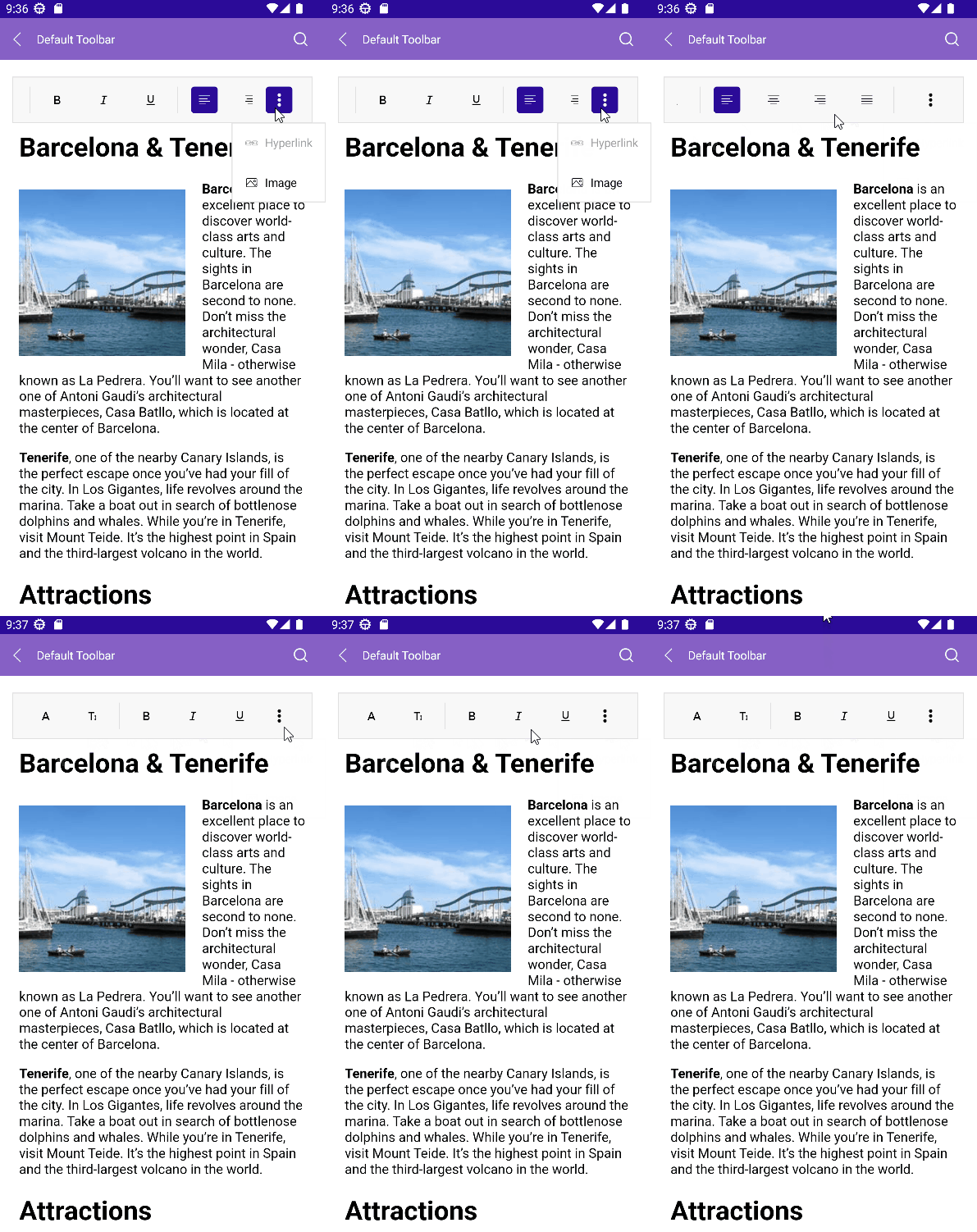
On Mobile, the `RichTextEditorToolbar` is horizontally scrollable, so that the toolbar items can be accessed:
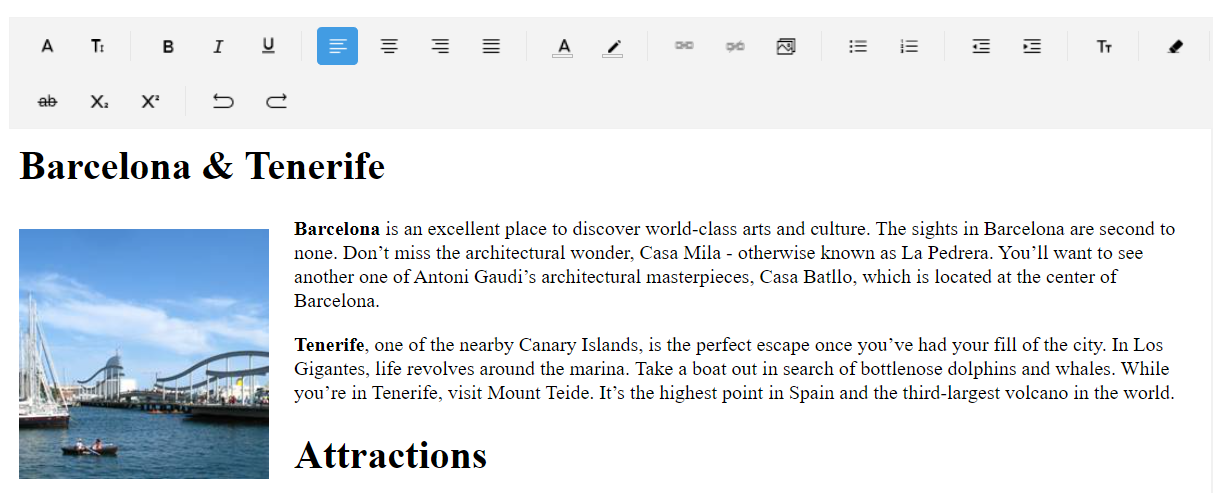
On Desktop, the toolbar items are wrapped:
## Predefined Toolbar Items
The table below shows all toolbar items available for both Desktop and Mobile:
| RichTextEditor Toolbar Item | Description |
| ---------------------------------------------- | --------------------------------------------------------------------------------------------------------------------------------------------------------------------------------------------------------------------------------------------- |
| `RichTextEditorFontFamilyToolbarItem` | Changes the font family of the text with the selected from predefined font families. |
| `RichTextEditorFontSizeToolbarItem` | Changes the font size of the text. |
| `SeparatorToolbarItem` | Separates the toolbar items. |
| `RichTextEditorBoldToolbarItem` | Bolds the text. |
| `RichTextEditorItalicToolbarItem` | Makes the text italic. |
| `RichTextEditorUnderlineToolbarItem` | underlines the text. |
| `RichTextEditorAlignLeftToolbarItem` | Align the content to the left of the available space. |
| `RichTextEditorAlignCenterToolbarItem` | Aligns the content centered in the available space. |
| `RichTextEditorAlignRightToolbarItem` | Align the content to the right of the available space. |
| `RichTextEditorAlignJustifyToolbarItem` | Distributes the content evenly in the available space. |
| `RichTextEditorTextColorToolbarItem` | Changes the text color of the text with a selection from predefined colors. |
| `RichTextEditorHighlightTextColorToolbarItem` | Changes the highlight color of the text with the selected from predefined colors. |
| `RichTextEditorBulletingToolbarItem` | Creates a bulleted/unordered list. |
| `RichTextEditorNumberingToolbarItem` | Creates a numbered/ordered list. |
| `RichTextEditorOutdentToolbarItem` | Moves the content of the current or selected paragraphs closer the margin of the control. |
| `RichTextEditorIndentToolbarItem` | Moves the content of the current or selected paragraphs farther away from the margin of the control. |
| `RichTextEditorTextFormattingToolbarItem` | Provides a dropdown list of text formatting styles, allowing users to apply selected styles to the current text selection. |
| `RichTextEditorClearFormattingToolbarItem` | Clears all formatting for the selection. |
| `RichTextEditorStrikethroughToolbarItem` | Crosses out the text. |
| `RichTextEditorSuperscriptToolbarItem` | Makes the text small and positioned below the paragraph line. |
| `RichTextEditorSubscriptToolbarItem` | Makes the text small and positioned above the paragraph line. |
| `RichTextEditorUndoToolbarItem` | Undoes the last action. |
| `RichTextEditorRedoToolbarItem` | Redoes the last action. |
| `RichTextEditorColorPickerToolbarItem` | Allows picking a specific color from a collection of colors. |
| `RichTextEditorCopyToolbarItem` | Copies the selected HTML to the clipboard. |
| `RichTextEditorCutToolbarItem` | Cuts the selected HTML to the clipboard. |
| `RichTextEditorPasteHtmlToolbarItem` | Pastes HTML from the clipboard. |
| `RichTextEditorAddOrEditHyperlinkToolbarItem` | Opens a popup to add or edit a hyperlink. |
| `RichTextEditorAddHyperlinkToolbarItem` | Adds a hyperlink. |
| `RichTextEditorRemoveHyperlinkToolbarItem` | Remove the hyperlink for the current selection. |
| `RichTextEditorAddOrEditImageToolbarItem` | If image is selected, a dialog opens. If image is not selected, the `PickImage` event fires. |
| `RichTextEditorHyperlinkNavigationToolbarItem` | If hyperlink is selected, navigates to the predefined toolbar items related to hyperlink operations like: Edit, Open, Remove. If hyperlink is not selected, opens a popup with predefined UI for adding a hyperlink to the current selection. |
| `RichTextEditorImageNavigationToolbarItem` | If image is selected, navigates to the operations related to image editing like: Cut, Copy, Remove, Paste, Edit. |
Here are the all toolbar items definition:
```XAML
```
## RichTextEditor Toolbar Placement
Some specifics you'd need to take into account when placing `RichTextEditorToolbar` on the page:
* On Android—The toolbar monitors soft-keyboard visibility through window insets and automatically adjusts the attached layout's bottom padding so that all content remains above the keyboard. The .NET MAUI layout system re-measures automatically: a Grid's star-sized rows shrink while Auto rows (toolbar, status bar, etc.) keep their natural size. On other platforms this behavior is a no-op.
The class used for the Android keyboard padding behavior:
```C#
///
/// On Android, monitors soft-keyboard visibility via window insets and adjusts
/// the attached layout's bottom so that all content
/// remains above the keyboard. The MAUI layout system re-measures automatically:
/// a Grid's star-sized rows shrink while Auto rows (toolbar, status bar, etc.)
/// keep their natural size.
/// On other platforms the behavior is a no-op.
///
public class AndroidKeyboardPaddingBehavior : Behavior
{
#if ANDROID
private Layout layout;
private Thickness originalPadding;
private InsetObserver observer;
private global::Android.Views.View rootView;
private readonly System.Collections.Generic.List savedTranslationTargets = new();
private readonly System.Collections.Generic.List savedTranslationPivots = new();
protected override void OnAttachedTo(Layout layout)
{
base.OnAttachedTo(layout);
this.layout = layout;
this.originalPadding = layout.Padding;
layout.Loaded += this.OnLoaded;
layout.Unloaded += this.OnUnloaded;
}
protected override void OnDetachingFrom(Layout layout)
{
layout.Loaded -= this.OnLoaded;
layout.Unloaded -= this.OnUnloaded;
this.RemoveObserver();
layout.Padding = this.originalPadding;
this.layout = null;
base.OnDetachingFrom(layout);
}
private void OnLoaded(object sender, EventArgs e)
{
this.DisableInnerTranslations();
this.AttachObserver();
}
private void OnUnloaded(object sender, EventArgs e)
{
this.RemoveObserver();
this.RestoreInnerTranslations();
if (this.layout != null)
{
this.layout.Padding = this.originalPadding;
}
}
// Scans direct children of the layout and disables any KeyboardHelper translation
// properties so they don't conflict with the padding-based keyboard avoidance.
private void DisableInnerTranslations()
{
if (this.layout == null)
{
return;
}
foreach (var child in this.layout.Children)
{
if (child is not BindableObject bindable)
{
continue;
}
if (Telerik.Maui.Controls.KeyboardHelper.GetIsTranslationTarget(bindable))
{
this.savedTranslationTargets.Add(bindable);
Telerik.Maui.Controls.KeyboardHelper.SetIsTranslationTarget(bindable, false);
}
if (Telerik.Maui.Controls.KeyboardHelper.GetIsTranslationPivot(bindable))
{
this.savedTranslationPivots.Add(bindable);
Telerik.Maui.Controls.KeyboardHelper.SetIsTranslationPivot(bindable, false);
}
}
}
private void RestoreInnerTranslations()
{
foreach (var bindable in this.savedTranslationTargets)
{
Telerik.Maui.Controls.KeyboardHelper.SetIsTranslationTarget(bindable, true);
}
foreach (var bindable in this.savedTranslationPivots)
{
Telerik.Maui.Controls.KeyboardHelper.SetIsTranslationPivot(bindable, true);
}
this.savedTranslationTargets.Clear();
this.savedTranslationPivots.Clear();
}
private void AttachObserver()
{
this.RemoveObserver();
var activity = Microsoft.Maui.ApplicationModel.Platform.CurrentActivity;
this.rootView = activity?.Window?.DecorView?.RootView;
var viewTreeObserver = this.rootView?.ViewTreeObserver;
if (viewTreeObserver == null || !viewTreeObserver.IsAlive)
{
return;
}
this.observer = new InsetObserver(this.rootView, this.OnKeyboardHeightChanged);
viewTreeObserver.AddOnGlobalLayoutListener(this.observer);
}
private void RemoveObserver()
{
if (this.observer == null)
{
return;
}
var viewTreeObserver = this.rootView?.ViewTreeObserver;
if (viewTreeObserver != null && viewTreeObserver.IsAlive)
{
viewTreeObserver.RemoveOnGlobalLayoutListener(this.observer);
}
this.observer.Dispose();
this.observer = null;
this.rootView = null;
}
private void OnKeyboardHeightChanged(double keyboardHeight)
{
if (this.layout == null)
{
return;
}
this.layout.Dispatcher.Dispatch(() =>
{
if (this.layout == null)
{
return;
}
this.layout.Padding = new Thickness(
this.originalPadding.Left,
this.originalPadding.Top,
this.originalPadding.Right,
this.originalPadding.Bottom + keyboardHeight);
});
}
private sealed class InsetObserver : Java.Lang.Object, global::Android.Views.ViewTreeObserver.IOnGlobalLayoutListener
{
private readonly global::Android.Views.View rootView;
private readonly Action callback;
private double lastHeight;
public InsetObserver(global::Android.Views.View rootView, Action callback)
{
this.rootView = rootView;
this.callback = callback;
}
public void OnGlobalLayout()
{
var insets = AndroidX.Core.View.ViewCompat.GetRootWindowInsets(this.rootView);
if (insets == null)
{
return;
}
double keyboardHeight = 0;
if (insets.IsVisible(AndroidX.Core.View.WindowInsetsCompat.Type.Ime()))
{
var imeInsets = insets.GetInsets(AndroidX.Core.View.WindowInsetsCompat.Type.Ime());
var navInsets = insets.GetInsets(AndroidX.Core.View.WindowInsetsCompat.Type.NavigationBars());
// IME bottom includes the navigation-bar area; subtract it so we get
// only the keyboard height above the nav bar (the MAUI content area
// already stops at the nav bar).
int effectivePixels = Math.Max(0, imeInsets.Bottom - navInsets.Bottom);
keyboardHeight = this.rootView.Context.FromPixels(effectivePixels);
}
if (Math.Abs(keyboardHeight - this.lastHeight) > 1)
{
this.lastHeight = keyboardHeight;
this.callback(keyboardHeight);
}
}
}
#endif
}
```
Attach the behavior to the Grid layout:
```C#
this.grid.Behaviors.Add(new AndroidKeyboardPaddingBehavior());
```
* On iOS—If the `RadRichTextEditorToolbar` is positioned under the keyboard, when the keyboard shows, the control is translated over the keyboard so users can access it without a problem. Due to the [.NET MAUI implementation](https://learn.microsoft.com/en-us/dotnet/api/microsoft.maui.controls.visualelement.translationy?view=net-maui-6.0), it is important that the `RadRichTextEditorToolbar` is placed in a container which bounds will contain it after the control is translated over the keyboard. Otherwise, the tap and pan gestures on the `RadRichTextEditorToolbar` will not work until the keyboard is hidden and the control is translated back to its original place.
* `RichTextEditorToolbar` must have a greater `ZIndex` than the other elements in its parent layout to be visible (and not behind other views, like RichTextEditor) when translated over the keyboard. Also, it must be contained in the bounds of its parent layout after translation. In this case, set the `ZIndex` property to the `RichTextEditorToolbar`.
> note For the RichTextEditor Toolbar examples, see the [SDKBrowser Demo Application](https://www.telerik.com/maui-ui/documentation/demos-and-sample-apps/sdkbrowser-app) and go to **RichTextEditor > Toolbar**.
## Custom Toolbar
You can customize the toolbar by setting the `AutoGenerateItems` to `False`. Then decide which toolbar items to include. For more details on this—Review the [Custom Toolbar](https://www.telerik.com/maui-ui/documentation/controls/richtexteditor/toolbar/custom-toolbar) article.
## See Also
* [Commands](https://www.telerik.com/maui-ui/documentation/controls/richtexteditor/commands)
* [Configure the RichTextEditor](https://www.telerik.com/maui-ui/documentation/controls/richtexteditor/configuration)
* [Events](https://www.telerik.com/maui-ui/documentation/controls/richtexteditor/events)
* [Working with images](https://www.telerik.com/maui-ui/documentation/controls/richtexteditor/working-with-images/overview)
* [Hyperlinks](https://www.telerik.com/maui-ui/documentation/controls/richtexteditor/hyperlink-support)