# Getting Started with the .NET MAUI RichTextEditor
This article will guide you through the steps needed to add a basic RichTextEditor control in your application.
This guide provides the information you need to start using the [Telerik UI for .NET MAUI RichTextEditor](https://www.telerik.com/maui-ui/documentation/controls/richtexteditor/overview) by adding the control to your project.
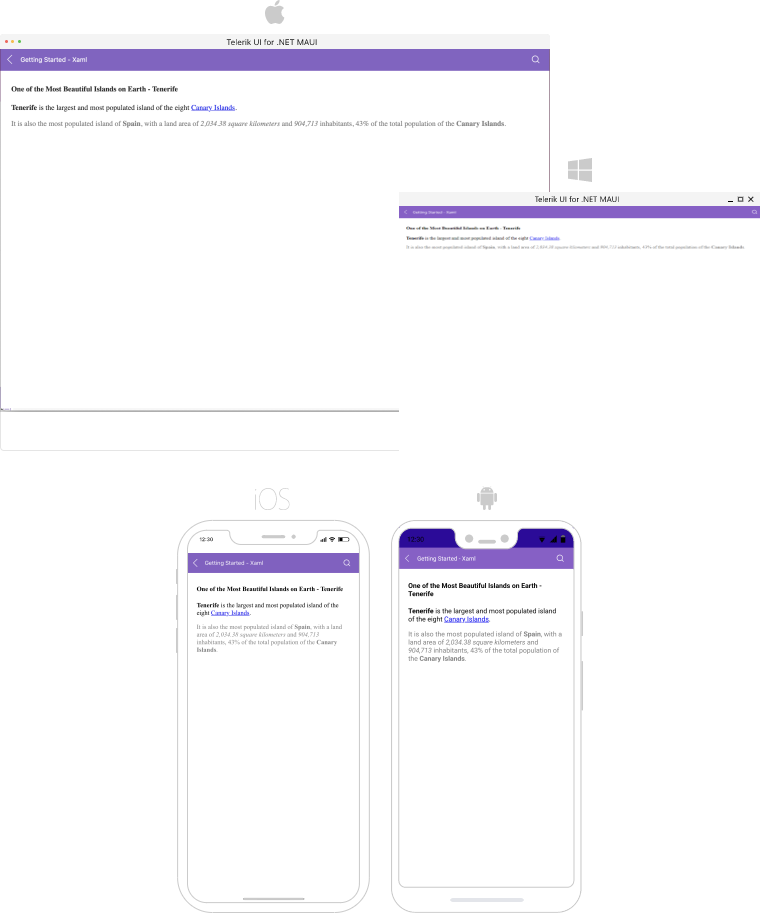
At the end, you will achieve the following result.
## Prerequisites
Before adding the RichTextEditor, you need to:
1. [Set up your .NET MAUI application](https://www.telerik.com/maui-ui/documentation/get-started/quickstart#prerequisites).
2. [Set Up Telerik Development Environment](https://www.telerik.com/maui-ui/documentation/get-started/quickstart#set-up-telerik-development-environment)
## Define the Control
When your .NET MAUI application is set up, you are ready to add a RichTextEditor control to your page. The following example shows a sample RichTextEditor definition.
> `RadRichTextEditor` relies on WebView for the rendering of HTML content. Some of the limitations for placing WebView on the page which are also valid for RichTextEditor:
>
> * Nesting `RadRichTextEditor` inside a ScrollView control is not supported. `RadRichTextEditor` provides its own scrolling mechanism.
>
> * When the `RadRichTextEditor` is placed inside a `StackLayout`, you need to set explicitly its `WidthRequest` and `HeightRequest` properties, otherwise the control will not render. This is because `StackLayout` usually wants to size itself according to its children, but a WebView (since it does scrolling) wants to size itself to its parent. You can learn more about this in the [.NET MAUI WebView documentation](https://learn.microsoft.com/en-us/dotnet/maui/user-interface/controls/webview?pivots=devices-windows).
> You have to either use a Grid as a parent container or explicitly define the size of the RichTextEditor control.
**1.** Set up the `RichTextEditor` instance:
```XAML
```
In addition to this, you need to add the following namespace:
**2.** Add the `telerik` namespaces:
```XAML
xmlns:telerik="http://schemas.telerik.com/2022/xaml/maui"
```
## Loading HTML Content
With RichTextEditor, users can create and edit HTML content. In some cases, you may need to load formatted text in advance—you can achieve this through the `Source` property of the control:
```C#
var htmlSource = @"One of the Most Beautiful Islands on Earth - Tenerife
Tenerife is the largest and most populated island of the eight Canary Islands.
It is also the most populated island of Spain, with a land area of 2,034.38 square kilometers and 904,713 inhabitants, 43% of the total population of the Canary Islands.
";
this.richTextEditor.Source = RichTextSource.FromString(htmlSource);
```
Register the Telerik controls through the `Telerik.Maui.Controls.Compatibility.UseTelerik` extension method called inside the `CreateMauiApp` method of the `MauiProgram.cs` file of your project:
```C#
using Telerik.Maui.Controls.Compatibility;
public static class MauiProgram
{
public static MauiApp CreateMauiApp()
{
var builder = MauiApp.CreateBuilder();
builder
.UseTelerik()
.UseMauiApp()
.ConfigureFonts(fonts =>
{
fonts.AddFont("OpenSans-Regular.ttf", "OpenSansRegular");
});
return builder.Build();
}
}
```
> For a runnable example with the RichTextEditor Getting Started scenario, see the [SDKBrowser Demo Application](https://www.telerik.com/maui-ui/documentation/demos-and-sample-apps/sdkbrowser-app) and go to **RichTextEditor > Getting Started** category.
## Additional Resources
* [Commands](https://www.telerik.com/maui-ui/documentation/controls/richtexteditor/commands)
* [Configure the RichTextEditor](https://www.telerik.com/maui-ui/documentation/controls/richtexteditor/configuration)
* [Events](https://www.telerik.com/maui-ui/documentation/controls/richtexteditor/events)
* [Working with images](https://www.telerik.com/maui-ui/documentation/controls/richtexteditor/working-with-images/overview)
* [Hyperlinks](https://www.telerik.com/maui-ui/documentation/controls/richtexteditor/hyperlink-support)
## See Also
* [.NET MAUI RichTextEditor Product Page](https://www.telerik.com/maui-ui/richtexteditor)
* [.NET MAUI RichTextEditor Forum Page](https://www.telerik.com/forums/maui?tagId=2060)
* [Telerik .NET MAUI Blogs](https://www.telerik.com/blogs/mobile-net-maui)
* [Telerik .NET MAUI Roadmap](https://www.telerik.com/support/whats-new/maui-ui/roadmap)