# Getting Started with the .NET MAUI RefreshView
This guide provides the information you need to start using the Telerik UI for [.NET MAUI RefreshView](https://www.telerik.com/maui-ui/documentation/controls/refreshview/overview) by adding the control to your project and reloading data when the user pulls the content.
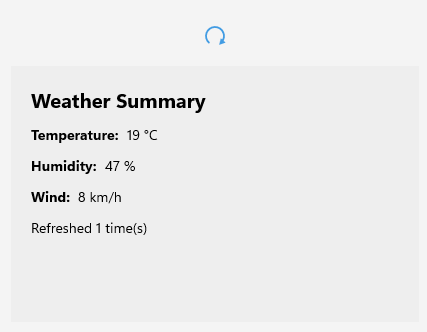
At the end, you will be able to achieve the following result.
## Prerequisites
Before adding the RefreshView, complete the following steps:
1. [Set up your .NET MAUI application](https://www.telerik.com/maui-ui/documentation/get-started/quickstart#prerequisites).
2. [Set Up Telerik Development Environment](https://www.telerik.com/maui-ui/documentation/get-started/quickstart#set-up-telerik-development-environment)
## Define the Control
To display the RefreshView on a page and refresh its content, complete the following steps:
1. Add the RefreshView to your page in and set the content you want to refresh:
```XAML
```
```C#
var temperatureLabel = new Label { Text = "21 °C" };
var humidityLabel = new Label { Text = "45 %" };
var windLabel = new Label { Text = "12 km/h" };
var refreshCountLabel = new Label { Text = "Not refreshed yet" };
int refreshCount = 0;
var refreshView = new RadRefreshView
{
Content = new VerticalStackLayout
{
Padding = 20,
Spacing = 12,
BackgroundColor = Color.FromRgb(238, 238, 238),
Children =
{
new Label { Text = "Weather Summary", FontSize = 20, FontAttributes = FontAttributes.Bold },
new HorizontalStackLayout
{
Spacing = 8,
Children = { new Label { Text = "Temperature:", FontAttributes = FontAttributes.Bold }, temperatureLabel }
},
new HorizontalStackLayout
{
Spacing = 8,
Children = { new Label { Text = "Humidity:", FontAttributes = FontAttributes.Bold }, humidityLabel }
},
new HorizontalStackLayout
{
Spacing = 8,
Children = { new Label { Text = "Wind:", FontAttributes = FontAttributes.Bold }, windLabel }
},
refreshCountLabel
}
}
};
refreshView.Refreshing += async (s, e) =>
{
await Task.Delay(1500);
refreshCount++;
temperatureLabel.Text = $"{18 + refreshCount % 10} °C";
humidityLabel.Text = $"{40 + (refreshCount * 7) % 50} %";
windLabel.Text = $"{5 + (refreshCount * 3) % 25} km/h";
refreshCountLabel.Text = $"Refreshed {refreshCount} time(s)";
refreshView.IsRefreshing = false;
};
```
2. Add the `telerik` namespace:
```XAML
xmlns:telerik="http://schemas.telerik.com/2022/xaml/maui"
```
3. Handle the `Refreshing` event to load the new data. When the data is loaded, set `IsRefreshing` to `false` to end the refresh and hide the indicator:
```C#
private async void OnRefreshing(object sender, EventArgs e)
{
await Task.Delay(1500);
this.refreshCount++;
this.temperatureLabel.Text = $"{18 + this.refreshCount % 10} °C";
this.humidityLabel.Text = $"{40 + (this.refreshCount * 7) % 50} %";
this.windLabel.Text = $"{5 + (this.refreshCount * 3) % 25} km/h";
this.refreshCountLabel.Text = $"Refreshed {this.refreshCount} time(s)";
this.refreshView.IsRefreshing = false;
}
```
4. Register the Telerik controls through the `Telerik.Maui.Controls.Compatibility.UseTelerik` extension method called inside the `CreateMauiApp` method of the `MauiProgram.cs` file of your project:
```C#
using Telerik.Maui.Controls.Compatibility;
public static class MauiProgram
{
public static MauiApp CreateMauiApp()
{
var builder = MauiApp.CreateBuilder();
builder
.UseTelerik()
.UseMauiApp()
.ConfigureFonts(fonts =>
{
fonts.AddFont("OpenSans-Regular.ttf", "OpenSansRegular");
});
return builder.Build();
}
}
```
> important The RefreshView doesn't end a refresh automatically. You must set the `IsRefreshing` property to `false` when the data is loaded. Otherwise, the indicator stays visible.
> tip For a runnable example with the RefreshView Getting Started scenario, see the [SDKBrowser Demo Application](https://www.telerik.com/maui-ui/documentation/demos-and-sample-apps/sdkbrowser-app) and go to the **RefreshView > Getting Started** category.
## Additional Resources
* [.NET MAUI RefreshView Forum Page](https://www.telerik.com/forums/maui)
* [Telerik .NET MAUI Blogs](https://www.telerik.com/blogs/mobile-net-maui)
* [Telerik .NET MAUI Roadmap](https://www.telerik.com/support/whats-new/maui-ui/roadmap)
## See Also
* [Refresh State](https://www.telerik.com/maui-ui/documentation/controls/refreshview/refresh-state)
* [Indicator Type](https://www.telerik.com/maui-ui/documentation/controls/refreshview/indicator-type)
* [RefreshView Events](https://www.telerik.com/maui-ui/documentation/controls/refreshview/events)
* [Styling the RefreshView](https://www.telerik.com/maui-ui/documentation/controls/refreshview/styling)