# .NET MAUI Popup Content

The [Telerik UI for .NET MAUI Popup](https://www.telerik.com/maui-ui/documentation/controls/popup/overview) provides options for setting its content and for defining when it will open and close.

## Opening and Closing

To show the Popup control, set `IsOpen` property to `True`. By default, the Popup stays open until the `IsOpen` property is set to `False` or, in case of a non-modal Popup, until the user clicks outside the control.

## Setting the Content

To host content inside the Popup, either add it directly as a child element or use the `RadPopup`'s `ContentTemplate` property.

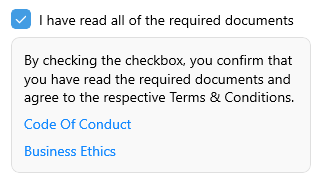
The example below demonstrates how to create a sample `DataTemplate` and set it as the `ContentTemplate` of the Popup.

**1.** Add the needed `DataTemplate` to the page Resources:

```XAML
<ResourceDictionary>
    <DataTemplate x:Key="PopupTemplate">
        <telerik:RadBorder CornerRadius="8"
                           BackgroundColor="#F9F9F9"
                           BorderColor="#DFDFDF"
                           BorderThickness="1"
                           WidthRequest="300"
                           Padding="12">
            <VerticalStackLayout Spacing="8">
                <Label Text="By checking the checkbox, you confirm that you have read the required documents and agree to the respective Terms &amp; Conditions." />
                <Label Text="Code Of Conduct" TextColor="#1188FF" />
                <Label Text="Business Ethics" TextColor="#1188FF" />
            </VerticalStackLayout>
        </telerik:RadBorder>
    </DataTemplate>
</ResourceDictionary>
```

**2.** When you define the Popup either in XAML or as code-behind, apply the `ContentTemplate` property:

```XAML
<HorizontalStackLayout VerticalOptions="Start"
                       Spacing="8">
    <telerik:RadCheckBox x:Name="checkbox"
                         IsCheckedChanged="CheckBoxIsCheckedChanged">
        <telerik:RadPopup.Popup>
            <telerik:RadPopup x:Name="popup"
                              Placement="Bottom"
                              ContentTemplate="{StaticResource PopupTemplate}"
                              VerticalOffset="8" />
        </telerik:RadPopup.Popup>
    </telerik:RadCheckBox>
    <Label Text="I have read all of the required documents"
           telerik:RadCheckBox.ToggleOnTap="{x:Reference checkbox}"
           VerticalOptions="Center" />
</HorizontalStackLayout>
```

**3.** Add the `CheckBoxIsCheckedChanged` event handler as shown below:

```C#
private void CheckBoxIsCheckedChanged(object sender, IsCheckedChangedEventArgs e)
{
    if (e.NewValue == true)
    {
        this.popup.IsOpen = true;
    }
}
```

The following image shows the end result.
![.NET MAUI Popup Content Template](https://www.telerik.com/maui-ui/documentation/assets/5373cdfcf49930e4d8304d18bef53095/popup-contenttemplate.png)

## See Also

* [Placement](https://www.telerik.com/maui-ui/documentation/controls/popup/placement)
* [Modal Popup](https://www.telerik.com/maui-ui/documentation/controls/popup/modal-popup)
