# .NET MAUI Path Styling

The `RadPath` element exposes the following properties you can use to customize the look of the path figures:

* `Fill`: Used for setting up the color within the figures. You have to set an object of type `RadBrush`. This can be a `RadSolidColorBrush` or a `RadSweepGradientBrush`
* `Stroke`: You can use this property to set the stroke color.
* `StrokeThickness`: You can use this property to set the thickness of the stroke.
* `BackgroundColor`: You can use this property to modify the color of the rectangle which contains the specific figure.

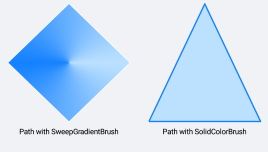
## Styling the Path using the RadSweepGradientBrush

```XAML
<telerik:RadPath x:Name="gradientPath"
                            StrokeThickness="1"
                            Stroke="White"
                            Geometry="{x:Static telerik:RadGeometry.Diamond}">
    <telerik:RadPath.Fill>
        <telerik:RadSweepGradientBrush>
            <x:Arguments>
                <Point>0.5, 0.5</Point>
            </x:Arguments>
            <telerik:RadSweepGradientStop>
                <x:Arguments>
                    <Color>#1481FF</Color>
                    <x:Double>180</x:Double>
                </x:Arguments>
            </telerik:RadSweepGradientStop>
            <telerik:RadSweepGradientStop>
                <x:Arguments>
                    <Color>#BCE1FF</Color>
                    <x:Double>360</x:Double>
                </x:Arguments>
            </telerik:RadSweepGradientStop>
        </telerik:RadSweepGradientBrush>
    </telerik:RadPath.Fill>
</telerik:RadPath>
```

## Styling the Path using the RadSolidColorBrush

```XAML
<telerik:RadPath x:Name="solidPath"
                            Grid.Row="0"
                            StrokeThickness="2"
                            Stroke="#1481FF"
                            Fill="#BCE1FF">
    <telerik:RadPath.Geometry>
        <telerik:RadPathGeometry>
            <telerik:RadPathFigure StartPoint="0, 1">
                <telerik:RadLineSegment Point="1, 1" />
                <telerik:RadLineSegment Point="0.5, 0" />
                <telerik:RadLineSegment Point="0, 1" />
            </telerik:RadPathFigure>
        </telerik:RadPathGeometry>
    </telerik:RadPath.Geometry>
</telerik:RadPath>
```

The following image shows the result:
![.NET MAUI Path Styling](https://www.telerik.com/maui-ui/documentation/assets/7e8358592db2658e1e079dbaa2ffcd41/path_styling.png)

## See Also

* [PathGeometry](https://www.telerik.com/maui-ui/documentation/controls/path/geometry-structure)
