# .NET MAUI Map Shapes Styling
The Map `ShapefileLayer` exposes `ShapeStyle` property which helps you to style the shapes, as well as the selected shapes using the `SelectedShapeStyle` property. A conditional styling is applied using the `ShapeStyleSelector` property.
## Shapes Styles
`ShapeStyle` and `SelectedShapeStyle` properties of type `MapShapeStyle` provide the following styling options for the shapes:
* `StrokeWidth`
* `StrokeColor`
* `FillColor`
The snippet below shows how `ShapeStyle` property can be applied:
```XAML
```
Here is the result:
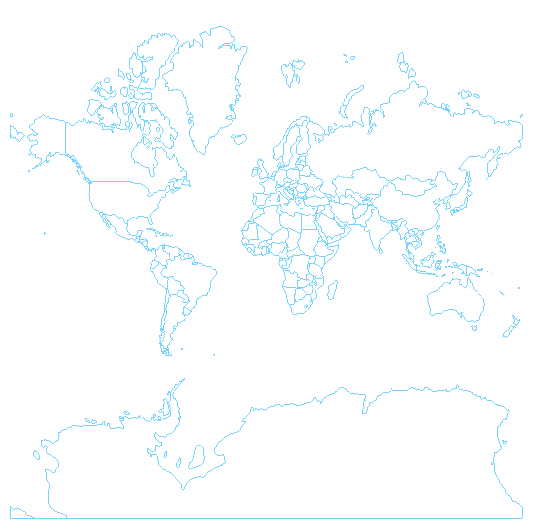
Define the `Source` and the `DataSource` of the `MapShapeReader` to a `.shp` and `.dbf` files, respectively:
```C#
var assembly = this.GetType().Assembly;
var source = MapSource.FromResource("SDKBrowserMaui.Examples.MapControl.world.shp", assembly);
this.reader.Source = source;
```
## Style Selector for Shapes
Using the `ShapeStyleSelector` property of the `MapShapefileLayer` you can implement conditional styling.
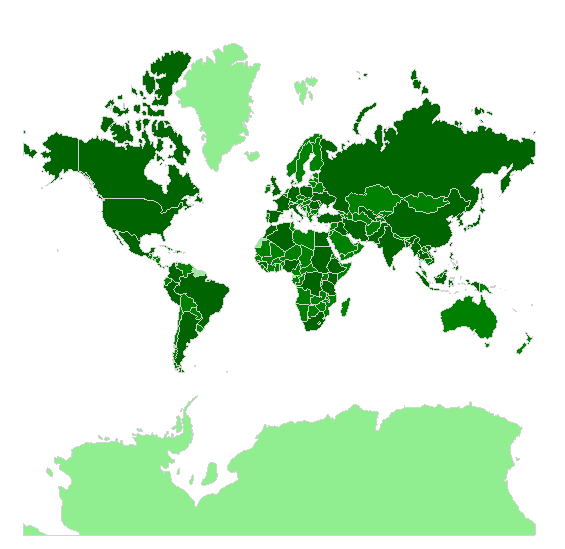
The example below shows how to apply different styles to shapes according to certain property value of each shape.
**1.** First, create the selector class which inherit from `MapShapeStyleSelector`:
```C#
public class PopulationShapeStyleSelector : MapShapeStyleSelector
{
public MapShapeStyle HighPopulationShapeStyle { get; set; }
public MapShapeStyle MediumPopulationShapeStyle { get; set; }
public MapShapeStyle LowPopulationShapeStyle { get; set; }
public override MapShapeStyle SelectStyle(object shape, BindableObject container)
{
var attributesShape = shape as IShape;
if (attributesShape != null)
{
var populationText = attributesShape.GetAttribute("POP_CNTRY").ToString();
int population;
if (int.TryParse(populationText, out population))
{
if (population > 20000000)
{
return this.HighPopulationShapeStyle;
}
else if (population < 1000000)
{
return this.LowPopulationShapeStyle;
}
return this.MediumPopulationShapeStyle;
}
}
return null;
}
}
```
**2.** Define the selector with the Styles as a resource inside a `ResourceDictionary`:
```XAML
```
**3.** Add the definition of the `RadMap` control with the `PopulationShapeStyleSelector` applied;
```XAML
```
**4.** Add the namespace:
```XAML
xmlns:telerik="http://schemas.telerik.com/2022/xaml/maui"
```
Check the result in the screenshot below:
## See Also
* [ShapefileLayer](https://www.telerik.com/maui-ui/documentation/controls/map/layers/shapefilelayer)
* [Labels Styling](https://www.telerik.com/maui-ui/documentation/controls/map/styling/labelstyles)