# .NET MAUI DateTimePicker Modes
The DateTimePicker for .NET MAUI provides a popup and a drop-down picker mode for picking a value from the selector.
## Picker Mode
Use the `PickerMode` (enum of type `Telerik.Maui.Controls.PickerMode`) property to specify which UI to open for selecting a value from the picker selector. The options are:
* `Popup`—Shows the UI for picking a date and time inside a popup. It's the default value for mobile (Android and iOS);
* `DropDown`—Opens the UI for picking a date and time inside a drop-down. It's the default value for Desktop (Windows, macOS);
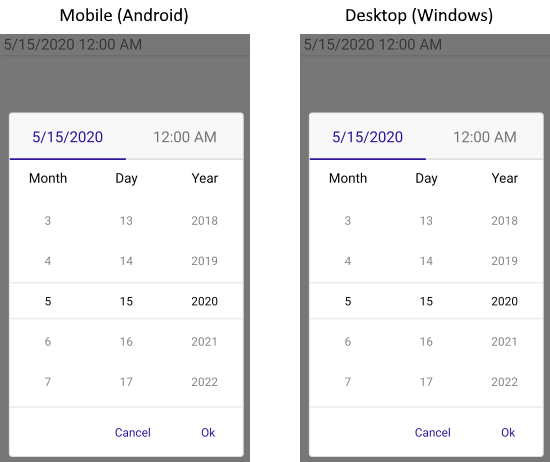
Here is a sample of `PickerMode` set to `Popup`:
```XAML
```
Check below the result on mobile and desktop:
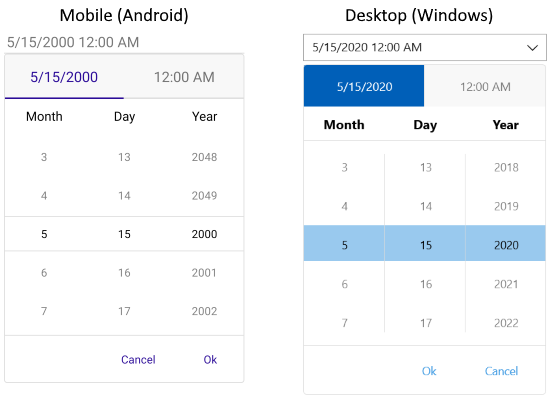
Quick example of `PickerMode` set to `DropDown`:
```XAML
```
Check the result of `DropDown` mode on mobile and desktop:
## Picker Toggle State
You can control whether the picker popup or drop-down is opened or closed by using the `IsOpen` (`bool`) property.
## Arrow Button Picker Mode
In addition, DateTimePicker exposes `IsToggleButtonVisible` property which when set to `True` renders an "arrow" button for opening the UI for picking a date. By default, `IsToggleButtonVisible` is enabled for Desktop and is disabled for mobile platforms. You can explicitly apply it in both cases:
```XAML
```
## See Also
* [Templates](https://www.telerik.com/maui-ui/documentation/controls/datetimepicker/templates)
* [Styling](https://www.telerik.com/maui-ui/documentation/controls/datetimepicker/styling/styling)
* [Commands](https://www.telerik.com/maui-ui/documentation/controls/datetimepicker/commands)
* [Selection](https://www.telerik.com/maui-ui/documentation/controls/datetimepicker/selection)