# .NET MAUI DateTimePicker Formatting
Telerik UI for .NET MAUI DateTimePicker provides formatting options both when the picker dialog is open and when a date value is picked.
## DisplayString Format
The `DisplayStringFormat` property defines the format of the string that will be visualized when the picker dialog is closed.
> note The format set for `DisplayStringFormat` has to be a valid date format.
The following example demonstrates how to set the `DisplayStringFormat` definition.
Define the control and the `DisplayStringFormat`.
```XAML
```
Add the following namespace:
```XAML
xmlns:telerik="http://schemas.telerik.com/2022/xaml/maui"
```
## Spinner Format
The DateTimePicker allows you to use standard or custom date and time format strings through its `SpinnerFormat` property. Depending on what format is set, the picker visualizes spinner controls with prepopulated values that can be picked.
The `SpinnerFormat` property defines the string format for the spinners. The default format is `"g"`.
## Standard Date and Time Format Strings
The available Standard Date and Time Format Strings, which can be set to the `SpinnerFormat` and `DisplayStringFormat` properties, are described in the following table.
| Supported Standard Date Format String | Description |
| ------------------------------------- | ------------------------------------------------------------------ |
| `"d"` | A Short Date Format. The invariant culture format is `MM/dd/yyyy`. |
| `"G"` | A Short Date `"d"` and Long Time `"T"` specifier. |
| `"g"` | A Short Date `"d"` and Short Time `"t"` specifier. |
| `"M"` | A Month Format specifier. |
| `"m"` | A Month Format specifier. |
| `"Y"` | A Year Month Format specifier. |
| `"y"` | A Year Month Format specifier. |
| `"T"` | Long Time Format Specifier |
| `"t"` | Short Time Format Specifier |
> important You can set only short [Standard Date and Time Format Strings](https://docs.microsoft.com/en-us/dotnet/standard/base-types/standard-date-and-time-format-strings) to the DateTime Picker control.
## Custom Date and Time Format Strings
The available Custom Date and Time Format Strings, which can be set to the `SpinnerFormat` and `DisplayStringFormat` properties, are described in the following table.
The Supported Custom Date and Time Format Strings are: `"d"`, `"dd"`, `"M"`, `"MM"`, `"MMM"`, `"MMMM"`, `"y"`, `"yyy"`, `"yyyy"`, `"H"`, `"HH"`, `"h"`, `"hh"`, `"m"`, `"mm"`, `"s"`, `"ss"`, `"t"`, `"tt"`.
> important Currently, the DateTimePicker does not support any standard date formats, which contain a long date inside them. For more information, refer to the official Microsoft documentation on [Standard Date and Time Format Strings](https://docs.microsoft.com/en-us/dotnet/standard/base-types/standard-date-and-time-format-strings).
## Supported Separators
When `SpinnerFormat` is set and the device culture is changed, the separators used for the format string won't be changed:
The Supported Date Format Separators are: `"-"`, `"."`, `","`, `" "`, `":"`,`"/"`.
## Examples
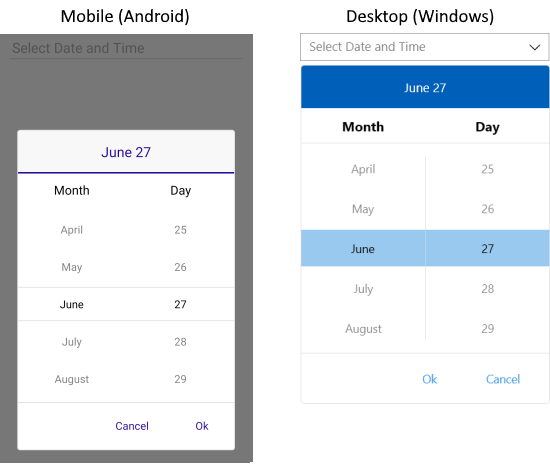
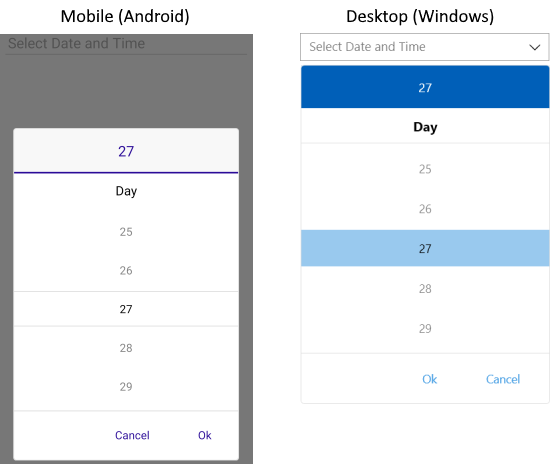
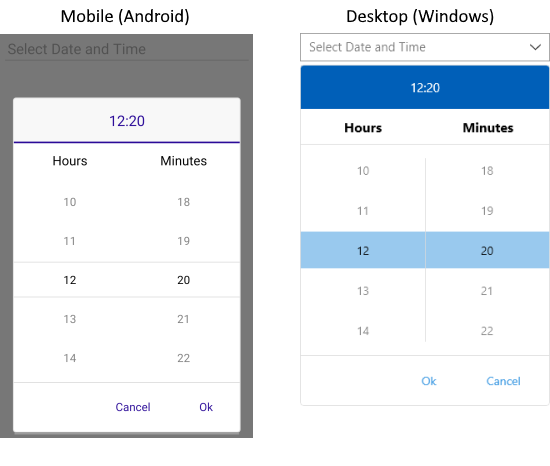
The following examples demonstrate how to set the `SpinnerFormat` property of the DateTimePicker to different formats.
### SpinnerFormat="MMMM dd"
```XAML
```
And the result:
### SpinnerFormat="dd"
```XAML
```
And the result:
### SpinnerFormat="H:mm"
```XAML
```
And the result:
## See Also
* [Templates](https://www.telerik.com/maui-ui/documentation/controls/datetimepicker/templates)
* [Styling](https://www.telerik.com/maui-ui/documentation/controls/datetimepicker/styling/styling)
* [Selection](https://www.telerik.com/maui-ui/documentation/controls/datetimepicker/selection)
* [Commands](https://www.telerik.com/maui-ui/documentation/controls/datetimepicker/commands)