# .NET MAUI DataPager Ellipsis Mode
The ellipsis appears when the pages are more than the rendered numeric buttons. It provides a hint for the end user and indicates that there are undisplayed pages.
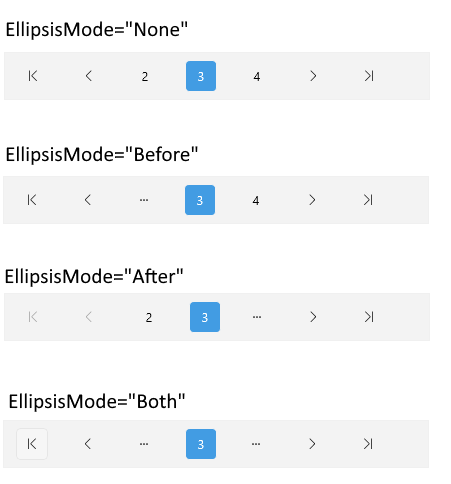
You can specify where the ellipsis is allowed to appear by setting the `EllipsisMode` (`enum` of type `Telerik.Maui.Controls.DataPager.DataPagerEllipsisMode`) property. The `EllipsisMode` controls whether the numeric buttons for the first/last page are replaced with an ellipsis (...) when there are more pages to the left/right.
The available options for `EllipsisMode` are:
* `None`—The ellipsis is disabled.
* `Before`—Display an ellipsis instead of the first numeric button.
* (Default) `After`— Display an ellipsis instead of the last numeric button.
* `Both`—Display an ellipsis on both sides.
The image below shows the ellipsis modes:
## Example
Here is a quick example on how you can define the `EllipsisMode` in the DataPager.
**1.** Define the DataPager in XAML:
```XAML
```
**2.** Add the `telerik` namespace:
```XAML
xmlns:telerik="http://schemas.telerik.com/2022/xaml/maui"
```
**3.** Define the `ViewModel`:
```C#
public class ViewModel
{
public ViewModel()
{
Data = CreateData(200);
}
public List Data { get; set; }
internal static List CreateData(int count)
{
List source = new List();
for (int i = 0; i < count; i++)
{
source.Add(i);
}
return source;
}
}
```
> For the DataPager Ellipsis Mode example, go to the [SDKBrowser Demo Application](https://www.telerik.com/maui-ui/documentation/demos-and-sample-apps/sdkbrowser-app) and navigate to the **DataPager > Features** category.
## Additional Resources
* [.NET MAUI DataPager Product Page](https://www.telerik.com/maui-ui/datagrid)
* [.NET MAUI DataPager Forum Page](https://www.telerik.com/forums/maui?tagId=1801)
* [Telerik .NET MAUI Blogs](https://www.telerik.com/blogs/mobile-net-maui)
* [Telerik .NET MAUI Roadmap](https://www.telerik.com/support/whats-new/maui-ui/roadmap)
## See Also
* [Paged Source](https://www.telerik.com/maui-ui/documentation/controls/datapager/data-binding)
* [Display Modes](https://www.telerik.com/maui-ui/documentation/controls/datapager/display-mode)
* [Page Configuration](https://www.telerik.com/maui-ui/documentation/controls/datapager/page-configuration)
* [Localization](https://www.telerik.com/maui-ui/documentation/controls/datapager/localization)
* [Commands in DataPager](https://www.telerik.com/maui-ui/documentation/controls/datapager/commands)
* [Styling](https://www.telerik.com/maui-ui/documentation/controls/datapager/styling/datapager)
* [Integration with DataGrid](https://www.telerik.com/maui-ui/documentation/controls/datapager/integration/datagrid)