# .NET MAUI DataGrid Columns Cell Templates

This article describes how to extend the functionality of a [.NET MAUI DataGrid](https://www.telerik.com/maui-ui/documentation/controls/datagrid/overview) column and define custom content and edit templates using the `CellContentTemplate` and `CellEditTemplate` properties.

* `CellContentTemplate` (`DataTemplate`)—Defines the appearance of each cell associated with the concrete column. `CellContentTemplate` gives you the opportunity to wrap the text inside each DataGrid column. You can add a Label as a content of the Text, Template Column and wrap its text using the Label's `LineBreakMode` property.
* `CellContentTemplateSelector` (`DataTemplateSelector`)—Defines a `DataTemplateSelector` instance that may be used to retrieve dynamic data templates on a per-cell basis.
* `CellEditTemplate` (`DataTemplate`)—Defines the editor associated with the concrete column. The `CellEditTemplate` is displayed when the cell is in edit mode.

## Cell Content Template Example

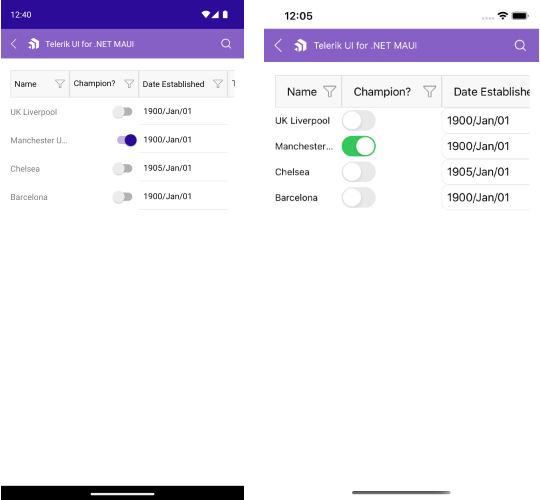
The following example demonstrates how to use the `CellContentTemplate` property to customize your columns. We set a `RadDateTimePicker` as a `CellContentTemplate` for the DataGrid Date Column (Date Established) and a Switch - for the DataGrid Boolean Column (Champion).

**1.** Declare a `RadDataGrid` in XAML:

```XAML
<telerik:RadDataGrid x:Name="dataGrid" 
                     ItemsSource="{Binding Clubs}" 
                     AutoGenerateColumns="False" 
                     UserEditMode="Cell">
    <telerik:RadDataGrid.Columns>
        <telerik:DataGridTextColumn PropertyName="Name" 
                                    Width="130"
                                    SizeMode="Fixed"
                                    HeaderText="Name">
            <telerik:DataGridColumn.CellContentTemplate>
                <DataTemplate>
                    <Label Text="{Binding Name}" 
                           LineBreakMode="TailTruncation"
                           VerticalOptions="Center"
                           Margin="5, 0" />
                </DataTemplate>
            </telerik:DataGridColumn.CellContentTemplate>
        </telerik:DataGridTextColumn>
        <telerik:DataGridBooleanColumn PropertyName="IsChampion" 
                                       HeaderText="Champion?">
            <telerik:DataGridColumn.CellContentTemplate>
                <DataTemplate>
                    <Switch IsToggled="{Binding IsChampion}"
                            VerticalOptions="Center"/>
                </DataTemplate>
            </telerik:DataGridColumn.CellContentTemplate>
        </telerik:DataGridBooleanColumn>
        <telerik:DataGridDateColumn PropertyName="Established" 
                                    HeaderText="Date Established">
            <telerik:DataGridColumn.CellContentTemplate>
                <DataTemplate>
                    <telerik:RadDateTimePicker Date="{Binding Established}" 
                                               DisplayStringFormat="yyyy/MMM/dd"
                                               VerticalOptions="Center"/>
                </DataTemplate>
            </telerik:DataGridColumn.CellContentTemplate>
        </telerik:DataGridDateColumn>
        <telerik:DataGridTemplateColumn HeaderText="Template Column">
            <telerik:DataGridColumn.CellContentTemplate>
                <DataTemplate>
                    <Label Text="{Binding Country}" 
                           Margin="0, 5"
                           HorizontalOptions="Center"
                           VerticalTextAlignment="Center"/>
                </DataTemplate>
            </telerik:DataGridColumn.CellContentTemplate>
        </telerik:DataGridTemplateColumn>
    </telerik:RadDataGrid.Columns>
</telerik:RadDataGrid>
```

**2.** Add the `telerik` namespace:

```XAML
xmlns:telerik="http://schemas.telerik.com/2022/xaml/maui"
```

**3.** Declare the `ViewModel` class:

```C#
public class ViewModel
{
    private ObservableCollection<Club> clubs;

    public ObservableCollection<Club> Clubs => clubs ?? (clubs = CreateClubs());

    private ObservableCollection<Club> CreateClubs()
    {
        return new ObservableCollection<Club>
        {
            new Club("UK Liverpool", new DateTime(1892, 1, 1), 54074, "England", "Liverpool", "Premier League", null),
            new Club("Manchester Utd.", new DateTime(1878, 1, 1), 74310, "England", "Manchester", "Premier League", 594.3) { IsChampion = true },
            new Club("Chelsea", new DateTime(1905, 1, 1), 42055, "England", "London","UEFA Champions League", 481.3),
            new Club("Barcelona", new DateTime(1899, 1, 1), 99354, "Spain", "Barcelona", "La Liga", 540.5)
        };
    }
}
```

**4.** Define the `Club` custom object:

```C#
public class Club : NotifyPropertyChangedBase
{
    private string name;
    private DateTime established;
    private int stadiumCapacity;
    private bool isChampion;
    private string country;
    private string city;
    private string championship;
    private double? revenue;

    public Club(string name, DateTime established, int stadiumCapacity, string country, string city, string championship, double? revenue)
    {
        Name = name;
        Established = established;  
        StadiumCapacity = stadiumCapacity;
        Country = country;
        City = city;
        Championship = championship;
        Revenue = revenue;
    }

    public string Name
    {
        get { return this.name; }
        set { this.UpdateValue(ref this.name, value); }
    }
    public DateTime Established
    {
        get { return this.established; }
        set { this.UpdateValue(ref this.established, value); }
    }

    public int StadiumCapacity
    {
        get { return this.stadiumCapacity; }
        set { this.UpdateValue(ref this.stadiumCapacity, value); }
    }

    public bool IsChampion
    {
        get { return this.isChampion; }
        set { this.UpdateValue(ref this.isChampion, value); }
    }

    public string Country
    {
        get { return this.country; }
        set { this.UpdateValue(ref this.country, value); }
    }

    public string City
    {
        get { return this.city; }
        set { this.UpdateValue(ref this.city, value); }
    }

    public string Championship       
    {
        get { return this.championship; }
        set { this.UpdateValue(ref this.championship, value); }
    }

    public double? Revenue
    {
        get { return this.revenue; }
        set { this.UpdateValue(ref this.revenue, value); }
    }

    public List<string> Championships => new List<string> { "UEFA Champions League", "Premier League", "La Liga" };

    public List<string> Countries => new List<string> { "England", "Spain" };
}
```

The following image shows the end result:
![.NET MAUI DataGrid cell content template example showing custom date and boolean column content](https://www.telerik.com/maui-ui/documentation/assets/b1877ea017b995fa8527146e17f6e214/datagrid-column-cell-content-template.png)

## Cell Edit Template Example

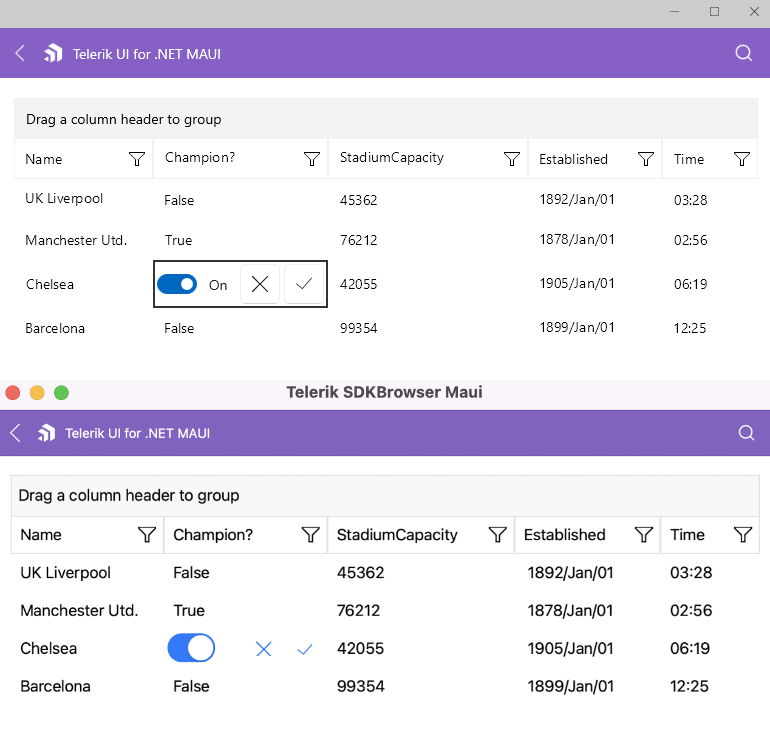
The following example demonstrates how to use the `CellEditTemplate` property to customize your columns. Here, for the DataGrid Boolean Column (Champion) we set a `CellEditTemplate` containing a Switch and two Buttons for confirming or canceling the edit operation. The edit template is visualized when the cell is in edit mode.

**1.** Declare a `RadDataGrid` in XAML:

```XAML
<telerik:RadDataGrid x:Name="dataGrid"
                     ItemsSource="{Binding Clubs}"
                     AutoGenerateColumns="False"
                     SelectionMode="None"
                     UserEditMode="Cell">
    <telerik:RadDataGrid.Columns>
        <telerik:DataGridTextColumn PropertyName="Name"
                                    HeaderText="Name"
                                    SizeMode="Fixed"
                                    Width="175">
            <telerik:DataGridColumn.CellEditTemplate>
                <DataTemplate>
                    <VerticalStackLayout Spacing="8"
                                         Margin="4">
                        <telerik:RadEntry Text="{Binding Item.Name, Mode=TwoWay}"
                                          ReserveSpaceForErrorView="False">
                            <VisualElement.Behaviors>
                                <telerik:RadEventToCommandBehavior EventName="Completed"
                                                                   Command="{Binding CommitEditCommand}" />
                            </VisualElement.Behaviors>
                        </telerik:RadEntry>
                        <telerik:RadButton Text="Cancel"
                                           Command="{Binding CancelEditCommand}" />
                    </VerticalStackLayout>
                </DataTemplate>
            </telerik:DataGridColumn.CellEditTemplate>
        </telerik:DataGridTextColumn>
        <telerik:DataGridBooleanColumn PropertyName="IsChampion"
                                       HeaderText="Champion?"
                                       SizeMode="Fixed"
                                       Width="200">
            <telerik:DataGridColumn.CellEditTemplate>
                <DataTemplate>
                    <Grid Margin="4"
                          ColumnDefinitions="*, Auto, Auto"
                          ColumnSpacing="8">
                        <Switch IsToggled="{Binding Item.IsChampion, Mode=TwoWay}"
                                HorizontalOptions="Start"
                                MinimumWidthRequest="0" />
                        <telerik:RadButton Grid.Column="1"
                                           FontSize="16"
                                           FontFamily="{x:Static telerik:TelerikFont.Name}"
                                           Text="{x:Static telerik:TelerikFont.IconCancel}"
                                           Command="{Binding CancelEditCommand}" />
                        <telerik:RadButton Grid.Column="2"
                                           FontSize="16"
                                           FontFamily="{x:Static telerik:TelerikFont.Name}"
                                           Text="{x:Static telerik:TelerikFont.IconOk}"
                                           Command="{Binding CommitEditCommand}" />
                    </Grid>
                </DataTemplate>
            </telerik:DataGridColumn.CellEditTemplate>
        </telerik:DataGridBooleanColumn>
        <telerik:DataGridNumericalColumn PropertyName="StadiumCapacity"
                                         SizeMode="Fixed"
                                         Width="200">
            <telerik:DataGridColumn.CellEditTemplate>
                <DataTemplate>
                    <Grid Margin="4"
                          ColumnDefinitions="*, Auto, Auto"
                          ColumnSpacing="8">
                        <telerik:RadNumericMaskedEntry Value="{Binding Item.StadiumCapacity, Mode=TwoWay}"
                                                       ClearButtonVisibility="Never" />
                        <telerik:RadButton Grid.Column="1"
                                           FontSize="16"
                                           FontFamily="{x:Static telerik:TelerikFont.Name}"
                                           Text="{x:Static telerik:TelerikFont.IconCancel}"
                                           Command="{Binding CancelEditCommand}" />
                        <telerik:RadButton Grid.Column="2"
                                           FontSize="16"
                                           FontFamily="{x:Static telerik:TelerikFont.Name}"
                                           Text="{x:Static telerik:TelerikFont.IconOk}"
                                           Command="{Binding CommitEditCommand}" />
                    </Grid>
                </DataTemplate>
            </telerik:DataGridColumn.CellEditTemplate>
        </telerik:DataGridNumericalColumn>
        <telerik:DataGridDateColumn PropertyName="Established"
                                    CellContentFormat="{}{0: yyyy/MMM/dd}">
            <telerik:DataGridColumn.CellEditTemplate>
                <DataTemplate>
                    <telerik:RadDatePicker Date="{Binding Item.Established, Mode=TwoWay}"
                                           SpinnerFormat="yyyy/MMM/dd"
                                           Margin="2" />
                </DataTemplate>
            </telerik:DataGridColumn.CellEditTemplate>
        </telerik:DataGridDateColumn>
    </telerik:RadDataGrid.Columns>
</telerik:RadDataGrid>
```

**2.** Add the `telerik` namespace:

```XAML
xmlns:telerik="http://schemas.telerik.com/2022/xaml/maui"
```

**3.** Declare the `ViewModel` class:

```C#
public class ViewModel
{
    private ObservableCollection<Club> clubs;

    public ObservableCollection<Club> Clubs => clubs ?? (clubs = CreateClubs());

    private ObservableCollection<Club> CreateClubs()
    {
        return new ObservableCollection<Club>
        {
            new Club("UK Liverpool", new DateTime(1892, 1, 1), 54074, "England", "Liverpool", "Premier League", null),
            new Club("Manchester Utd.", new DateTime(1878, 1, 1), 74310, "England", "Manchester", "Premier League", 594.3) { IsChampion = true },
            new Club("Chelsea", new DateTime(1905, 1, 1), 42055, "England", "London","UEFA Champions League", 481.3),
            new Club("Barcelona", new DateTime(1899, 1, 1), 99354, "Spain", "Barcelona", "La Liga", 540.5)
        };
    }
}
```

**4.** Define the `Club` custom object:

```C#
public class Club : NotifyPropertyChangedBase
{
    private string name;
    private DateTime established;
    private int stadiumCapacity;
    private bool isChampion;
    private string country;
    private string city;
    private string championship;
    private double? revenue;

    public Club(string name, DateTime established, int stadiumCapacity, string country, string city, string championship, double? revenue)
    {
        Name = name;
        Established = established;  
        StadiumCapacity = stadiumCapacity;
        Country = country;
        City = city;
        Championship = championship;
        Revenue = revenue;
    }

    public string Name
    {
        get { return this.name; }
        set { this.UpdateValue(ref this.name, value); }
    }
    public DateTime Established
    {
        get { return this.established; }
        set { this.UpdateValue(ref this.established, value); }
    }

    public int StadiumCapacity
    {
        get { return this.stadiumCapacity; }
        set { this.UpdateValue(ref this.stadiumCapacity, value); }
    }

    public bool IsChampion
    {
        get { return this.isChampion; }
        set { this.UpdateValue(ref this.isChampion, value); }
    }

    public string Country
    {
        get { return this.country; }
        set { this.UpdateValue(ref this.country, value); }
    }

    public string City
    {
        get { return this.city; }
        set { this.UpdateValue(ref this.city, value); }
    }

    public string Championship       
    {
        get { return this.championship; }
        set { this.UpdateValue(ref this.championship, value); }
    }

    public double? Revenue
    {
        get { return this.revenue; }
        set { this.UpdateValue(ref this.revenue, value); }
    }

    public List<string> Championships => new List<string> { "UEFA Champions League", "Premier League", "La Liga" };

    public List<string> Countries => new List<string> { "England", "Spain" };
}
```

The following image shows the end result:
![.NET MAUI DataGrid cell edit template example showing custom boolean column editing controls](https://www.telerik.com/maui-ui/documentation/assets/2579d4a61ff07ac2ed76db4e54ba7962/datagrid-column-cell-edit-template.png)

## See Also

* [ComboBox Column](https://www.telerik.com/maui-ui/documentation/controls/datagrid/columns/column-types/combobox-column)
* [Template Column](https://www.telerik.com/maui-ui/documentation/controls/datagrid/columns/column-types/template-column)
* [Text Column](https://www.telerik.com/maui-ui/documentation/controls/datagrid/columns/column-types/text-column)
